Integrate Federated Directory with Your AI Solution
We just published a new video showing exactly how to connect Federated Directory to your AI assistant, copilot, or agent workflow. If you have been wondering how to give your AI tools structured access to your company directory — without building custom connectors or exposing your identity provider directly — this walkthrough is for you.
In this article
- What the AI integration does
- How it works — the MCP endpoint
- What your AI can do with it
- Why AI agents need a dedicated directory layer
- Which AI platforms are supported
- Getting started
What the AI integration does
Federated Directory already gives your employees a unified, searchable address book that spans multiple organisations. The AI integration extends that same directory layer to your AI tools — so your copilots, chatbots, and agentic workflows can look up people, resolve reporting lines, and enrich their responses with live, structured contact data.
The key point is that there is one source of truth for both humans and machines. Your team accesses it through the web app, Outlook, and Microsoft Teams. Your AI agents access it through the MCP endpoint. Both get the same normalised, up-to-date directory data from a single place — no duplicate integrations, no fragmented exports.
How it works — the MCP endpoint
The integration is built on the Model Context Protocol (MCP), an open standard for connecting AI tools to external data sources in a secure, structured way. Rather than giving your AI assistant direct access to your identity solution — which opens a large attack surface — Federated Directory acts as a dedicated, read-only directory layer between your core systems and your AI agents.
The setup is straightforward: you point your MCP-compatible AI platform at the Federated Directory MCP endpoint. From that point on, whenever your AI needs to answer a question about people or organisations, it sends a structured directory query to the endpoint and receives clean, normalised data back. No custom connectors, no bespoke integration code.
Full technical setup instructions are available in the Federated Directory MCP documentation.
What your AI can do with it
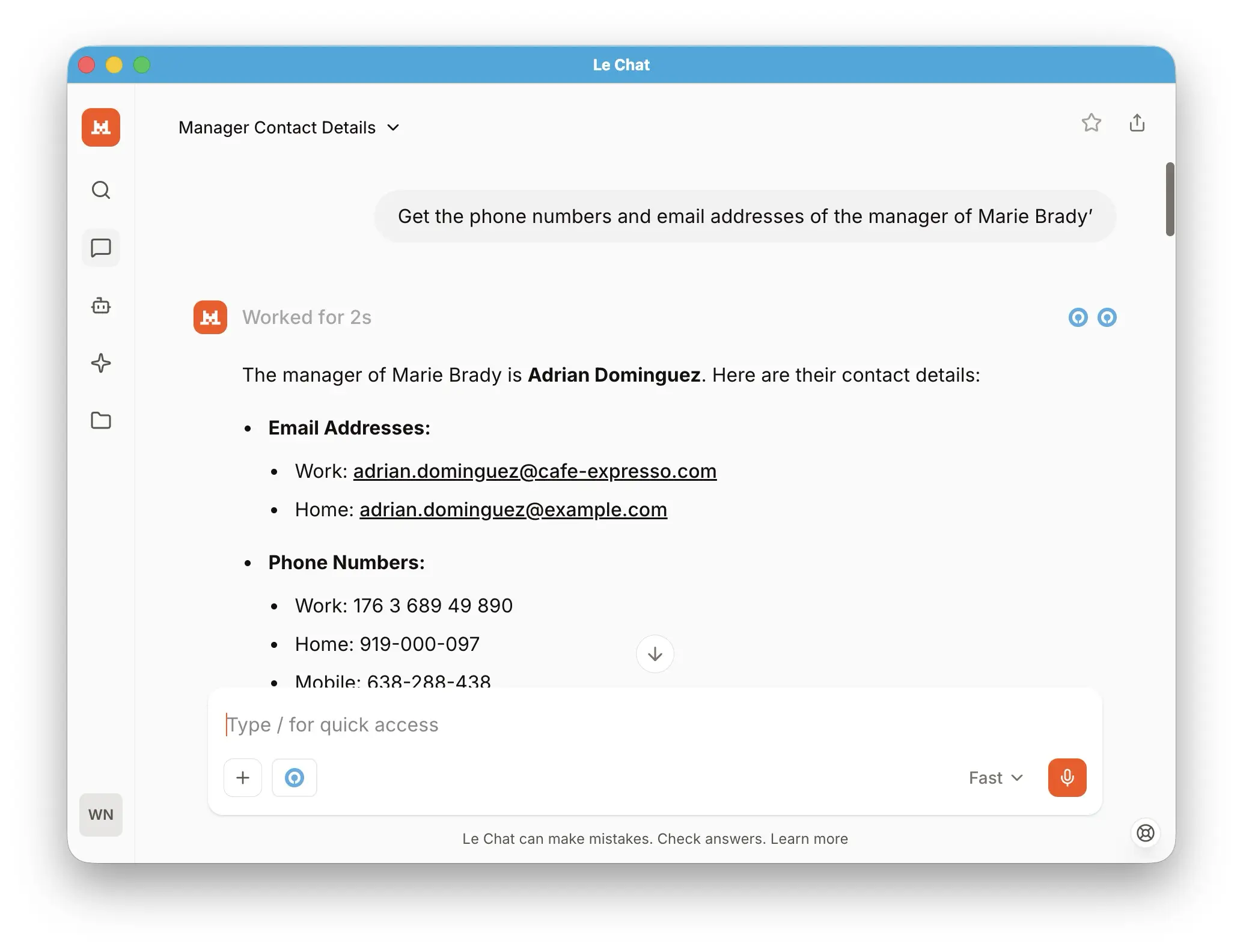
Once connected, your AI assistant gains the ability to answer directory questions directly in conversation — without you needing to copy-paste contact details or switch to a separate app. Here are some of the things it can handle:
- Search for a contact by name, job title, department, or company
- Answer questions like "Who is the procurement lead at our partner organisation?" or "List all HR managers across our federated companies"
- Resolve reporting lines and team structures in real time
- Draft and address an email without the user leaving the chat interface
- Enrich agent workflows with trusted contact data as part of a multi-step automated process
- Power internal employee support agents that need to route queries to the right person
Because Federated Directory normalises data across all connected organisations, the AI always works with a consistent schema — even when your partner companies use different field names or directory structures internally.
Why AI agents need a dedicated directory layer
Connecting an AI agent directly to your identity solution might seem like the obvious shortcut, but it carries significant risks and complexity. Federated Directory sits between your core systems and your AI — giving agents exactly what they need and nothing more.
One endpoint, not a maze
If your organisation spans multiple identity solutions or directories, connecting each one separately means different APIs, different authentication flows, and different data schemas. Federated Directory collapses all of that into a single, consistent MCP endpoint. One connection gives your AI access to your entire federated directory network.
Structured, normalised data
AI queries are only as reliable as the data behind them. When Company A stores job titles in a field called JobTitle and Company B uses Position_Level_4, queries become fragile and unpredictable. Federated Directory normalises all sources into one clean schema before the AI ever sees the data.
Security by design
Giving an AI agent direct access to your identity solution exposes a large attack surface. If the agent is compromised via prompt injection, the damage can extend far beyond contact lookups. Federated Directory acts as a security buffer — the agent can only access the contact data it is permitted to see, and nothing else. The endpoint is read-only by design: your AI can never write, modify, or delete directory data.
Your AI stays on your side
Federated Directory never sees your prompts, your conversation history, or the reasoning behind a query. It only receives structured directory lookup requests. You keep full control over your AI model, your provider, and your agent logic — we provide the data endpoint and stay out of everything else.
Which AI platforms are supported
Any platform that supports the Model Context Protocol can connect to Federated Directory without additional work. This includes:
- Microsoft Copilot
- Claude (Anthropic)
- ChatGPT (OpenAI)
- Gemini (Google)
- Mistral
- Self-hosted and on-premises models running inside your own infrastructure
Because MCP is an open standard, any new AI platform that adopts it in the future will automatically be compatible — you will not need to reconfigure the Federated Directory side of the integration.
Getting started
The video above walks through the full connection process end to end. If you prefer to go straight to the documentation, the MCP setup guide covers everything from endpoint configuration to query examples.
If you do not yet have a Federated Directory account, you can sign up for free — the free tier supports up to 20 users with full feature access, including the MCP endpoint. No credit card required.
For a broader overview of how Federated Directory fits into your AI stack, visit our AI integrations page.
Ready to give your AI assistant access to your company directory? Connect Federated Directory to your AI tools in minutes via our MCP endpoint — no custom connectors required.
Read the MCP setup guide