
Microsoft Entra ID vs Okta (vs Federated Directory): Which Identity Solution Actually Fits Your Needs in 2026?

Choosing between Microsoft Entra ID and Okta for your identity and access management often comes down to these five critical questions:
- Are you deeply embedded in the Microsoft ecosystem, or do you need a vendor-neutral solution that works across multiple platforms?
- Do you prioritize seamless integration with existing infrastructure over best-of-breed identity features?
- Is your primary concern securing workforce identities, customer identities, or collaboration between different organizations?
- How important is having a single source of truth for identities across your entire technology stack?
- Do you need employees to find and collaborate with contacts in partner companies without complex federation setups?
In short, here's what we recommend:
👉 Microsoft Entra ID excels as the identity backbone for organizations deeply invested in the Microsoft ecosystem. With native integration across Microsoft 365, Azure, and Dynamics 365, it provides seamless single sign-on, multi-factor authentication, and Conditional Access policies. Its AI-powered threat intelligence processes trillions of signals daily to detect identity-based risks. However, integration with non-Microsoft applications may require additional configuration, the licensing structure can be confusing, and choosing this platform means building your identity infrastructure around Microsoft.
👉 Okta serves as the vendor-neutral champion for organizations with diverse, multi-cloud environments. With over 7,000 pre-built integrations in the Okta Integration Network and a user-friendly interface, it makes securing access across heterogeneous IT landscapes straightforward. Okta's strength lies in its flexibility and its ability to work with virtually any application or identity provider. While powerful, Okta's premium pricing can be significant, and several security incidents in recent years have raised concerns about platform security.
Both platforms are enterprise-grade identity solutions focused on securing access to applications and resources. However, they primarily solve the problem of authenticating users to applications within a single organization. But what if you need employees from different companies to find and collaborate with each other? That's a different challenge entirely.
👉 Federated Directory approaches identity from a unique angle, creating a cross-company contact directory that connects corporate address books across trusted organizations. Instead of focusing solely on authentication and access control, it solves the problem of employees finding the right person to contact in partner companies. With native integrations for Microsoft and Google Workspace, plus SCIM 2.0 support for other identity providers, Federated Directory bridges the gap between disparate corporate directories. For organizations implementing AI workflows, its MCP (Model Context Protocol) endpoint provides a secure way for AI agents to query contact data without exposing sensitive identity information. As a European company with EU-based data storage, it offers a straightforward path to cross-company collaboration without forcing you into any single vendor's ecosystem.
If connecting your corporate address book with trusted partners sounds like the missing piece of your collaboration strategy, see how Federated Directory works.
Table of Contents
- Microsoft Entra ID vs Okta vs Federated Directory at a glance
- The fundamental difference: Application access vs cross-company collaboration
- Microsoft Entra ID dominates the Microsoft ecosystem
- Okta leads in vendor-neutral flexibility
- Federated Directory solves the inter-company contact problem
- Pricing models reveal different target markets
- Security and compliance approaches differ significantly
- Integration capabilities determine real-world value
- Microsoft Entra ID vs Okta vs Federated Directory: Which should you choose?
Microsoft Entra ID vs Okta vs Federated Directory at a glance
Here's the fundamental difference: While Microsoft Entra ID and Okta both focus on securing access to applications within your organization, Federated Directory focuses on enabling collaboration between organizations by connecting corporate address books.
- Microsoft Entra ID is typically recommended for organizations standardized on Microsoft technologies needing unified identity and access management.
- Okta works well for organizations with diverse, multi-cloud environments requiring vendor-neutral identity management.
- Federated Directory is best suited for organizations that need employees to find contacts in partner companies across different directory systems, particularly holding companies, franchise networks, or organizations managing M&A transitions.
| Microsoft Entra ID | Okta | Federated Directory | |
|---|---|---|---|
| Primary function | Identity and access management | Identity and access management | Cross-company contact directory |
| Best for | Microsoft-centric organizations | Multi-cloud environments | Inter-company collaboration |
| Pricing model | Per-user/month with complex tiers | Per-user/month with suite bundles | Volume-based, free for up to 20 users |
| Starting price | Free tier available; P1 from $6/user/month | From $6/user/month (Starter suite) | Free for 20 users; tiered pricing beyond |
| SSO and MFA | Included | Included | Not primary function (supports SSO for directory access) |
| Pre-built integrations | Deep Microsoft integration; thousands of apps | 7,000+ in Okta Integration Network | Microsoft, Google Workspace native; SCIM for others |
| Vendor neutrality | Microsoft-centric | Vendor-neutral | Vendor-neutral |
| Cross-company sharing | Complex B2B setup required | Requires separate configuration | Core functionality |
| AI integration | Via Microsoft Graph API (broad permissions required) | Via Okta APIs | MCP endpoint (contact-only access) |
| GDPR compliance | European data centers available | Various data center options | European company, EU data center |
| Learning curve | Moderate to steep | Moderate | Low |
The fundamental difference: Application access vs cross-company collaboration
Before diving into the comparison, it's crucial to understand that these three solutions solve fundamentally different problems, despite all being related to identity.
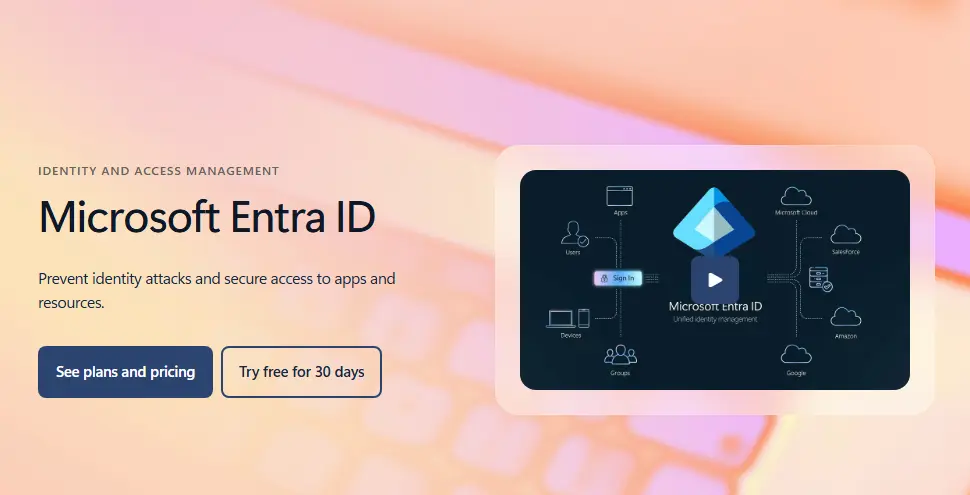
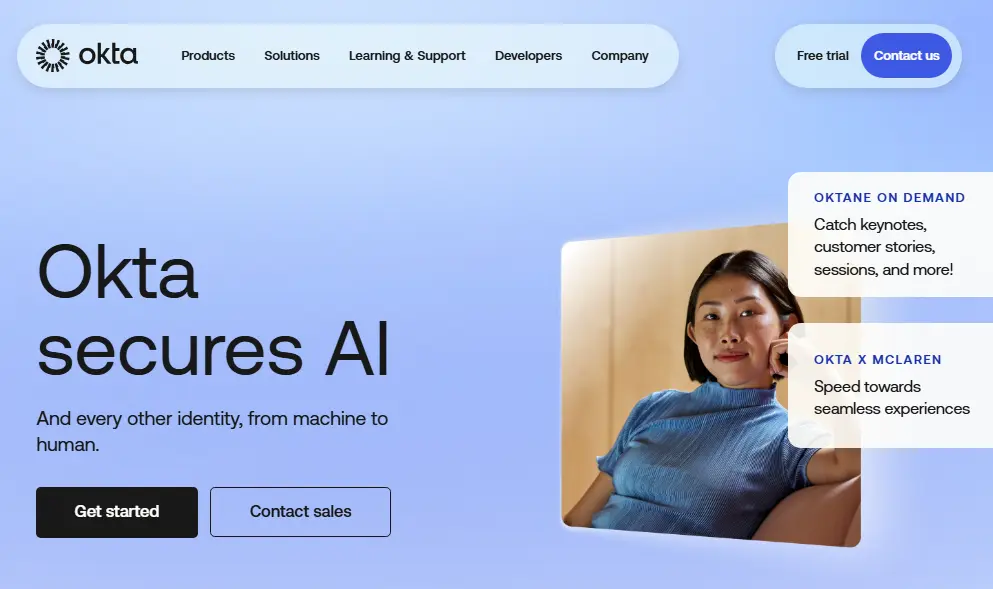
Microsoft Entra ID and Okta are both identity and access management (IAM) platforms. Their core mission is to answer the question: "Is this person who they claim to be, and should they have access to this application?" They excel at single sign-on, multi-factor authentication, conditional access policies, and lifecycle management for users within an organization.
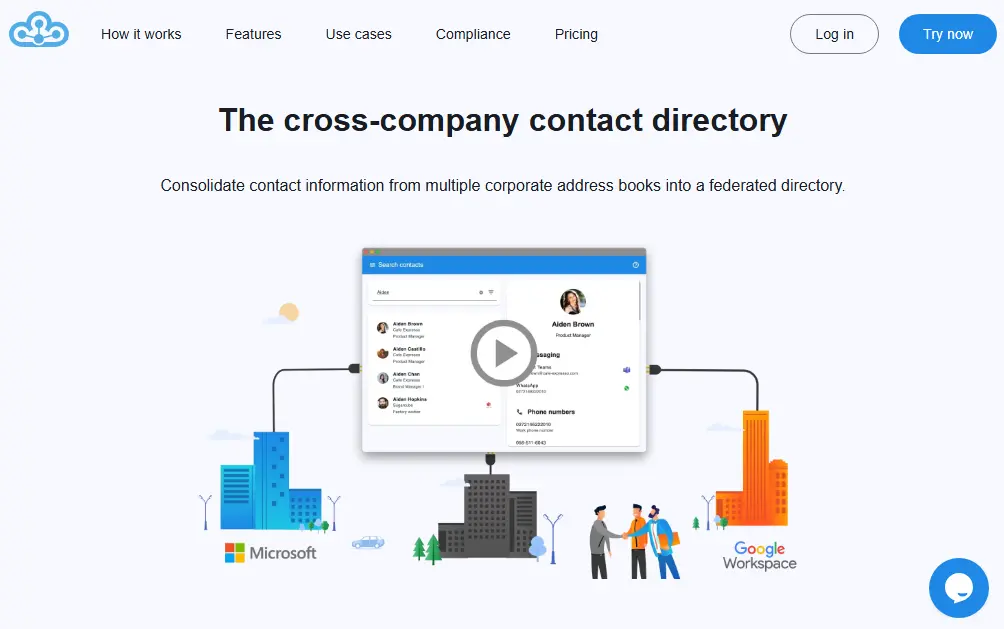
Federated Directory solves a different problem entirely: "How can employees in my company easily find and contact the right person in a partner organization?"
While Microsoft Entra ID and Okta can enable external collaboration through B2B or guest user features, these capabilities require additional configuration and are designed primarily for granting application access, not for simple contact discovery. Federated Directory makes cross-company directory sharing its primary purpose.
This distinction matters because many organizations struggle with a problem that neither traditional IAM platform directly addresses. You might have perfect single sign-on to all your applications, but when your sales team needs to find the right contact at a partner company, they're still sending emails asking for spreadsheets of contacts.
When comparing Federated Directory to Entra ID B2B specifically for cross-company contact sharing, several key differences emerge:
- Simpler setup: Federated Directory requires no guest user management or complex cross-tenant configurations. IT teams can enable cross-company contact sharing without the overhead of managing external identities in their core directory.
- Separation of concerns: With Entra ID B2B, external partners become guest user objects in your identity system, potentially with access to resources. Federated Directory keeps contact data entirely separate from identity and permissions data, eliminating this security consideration.
- Cross-platform compatibility: Federated Directory works across Microsoft and Google Workspace environments. Entra ID's deeper cross-tenant collaboration features require both parties to be on Entra ID, which creates vendor lock-in and removes flexibility for organizations with diverse partner ecosystems.
- AI-safe architecture: For organizations implementing agentic AI workflows, giving AI agents access to your core identity directory (via Microsoft Graph API) exposes sensitive permissions data. Federated Directory provides a dedicated contact-only API, following the principle of least privilege.
- Linear scaling: In a mesh sync topology, adding a tenth organization requires nine new sync configurations. Federated Directory requires exactly one connection per organization, regardless of how many partners you already have.
Consider the typical scenario: A holding company with five subsidiaries, each running their own IT stack, some on Microsoft 365, others on Google Workspace. Employees in one subsidiary need to find contacts in sister companies regularly. Without a cross-company directory solution, they're stuck maintaining manual contact lists, searching LinkedIn, or sending emails asking "who should I talk to about X?"
Microsoft Entra ID dominates the Microsoft ecosystem
If your organization runs on Microsoft 365, Azure, and Dynamics 365, Microsoft Entra ID is the natural choice for identity and access management. The integration is seamless because it's all one ecosystem.
Microsoft Entra ID (formerly Azure Active Directory) provides a comprehensive set of identity capabilities. Single sign-on works natively across all Microsoft services and extends to thousands of third-party applications.
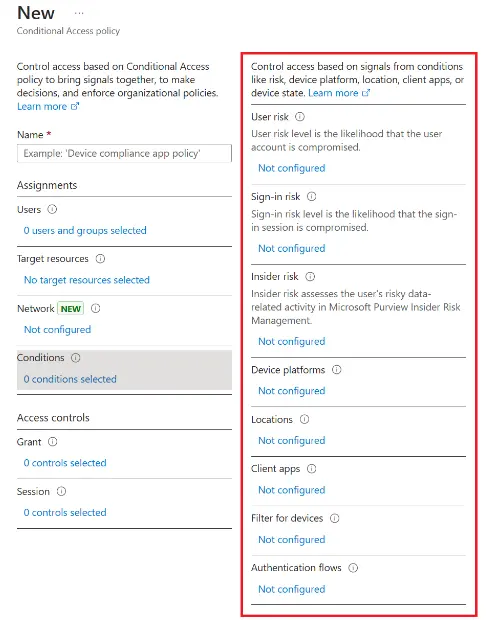
Multi-factor authentication options range from the Microsoft Authenticator app to FIDO2 security keys and Windows Hello for Business. Conditional Access policies can evaluate user, device, location, and risk signals to make real-time access decisions.
The AI-powered security features are particularly impressive. Microsoft Entra ID Protection leverages threat intelligence from trillions of signals across Microsoft's global infrastructure to detect risky sign-ins, compromised credentials, and impossible travel patterns. This scale of threat intelligence is difficult for smaller vendors to match.
For hybrid environments, Microsoft Entra Connect synchronizes on-premises Active Directory with the cloud, providing a consistent identity experience across both. Self-Service Password Reset reduces helpdesk calls, and the device management capabilities integrate with Microsoft Intune for comprehensive endpoint control.
However, the complexity of the licensing structure is a common frustration.
The free tier covers basic needs, but features like Conditional Access require P1 licensing at $6 per user per month. Identity Protection and Privileged Identity Management require P2 at $9 per user per month. The Identity Governance add-on adds another $7 per user per month. Understanding which license covers which feature requires careful study.
Integration with non-Microsoft applications, while supported, may require more configuration effort than comparable integrations in vendor-neutral platforms. And choosing Microsoft Entra ID means building your identity infrastructure around Microsoft, which may not suit organizations with a strategic commitment to multi-vendor approaches.
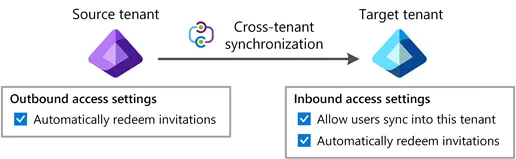
For organizations that need cross-tenant synchronization, Microsoft provides robust capabilities, but complexity scales with the number of tenants. Each tenant relationship requires a separate synchronization configuration, and bidirectional sync requires setup in both tenants. For organizations managing many partner relationships, this can become administratively challenging.
Okta leads in vendor-neutral flexibility
Okta built its reputation on being the independent identity layer that works with everything. With over 7,000 pre-built integrations in the Okta Integration Network, it's designed for organizations with heterogeneous IT environments.
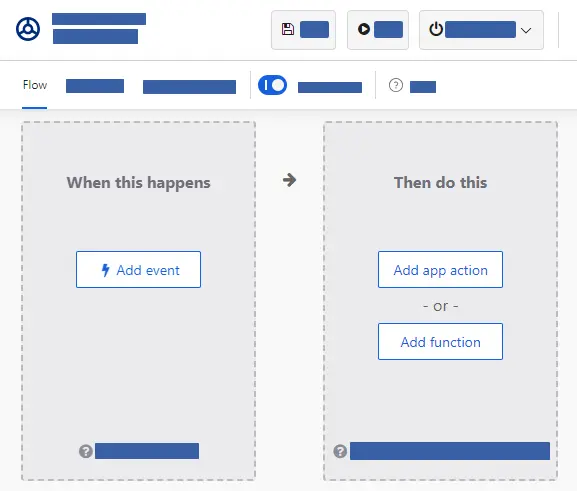
The platform emphasizes user experience, with an interface designed to be intuitive for both administrators and end-users. The customizable dashboard makes accessing applications simple. The drag-and-drop workflow builder (Okta Workflows) allows IT teams to automate complex identity processes without writing code.
Okta's Adaptive Multi-Factor Authentication goes beyond static MFA policies. It evaluates contextual signals including user behavior, device posture, location, and network information to determine the appropriate level of authentication. The integration with Okta ThreatInsight provides proactive protection by blocking malicious IP addresses identified across Okta's entire customer network.
For organizations managing both workforce and customer identities, Okta offers comprehensive solutions for both. The acquisition of Auth0 significantly strengthened its customer identity and access management (CIAM) capabilities, providing developer-friendly tools for embedding authentication into customer-facing applications.
Universal Directory serves as a centralized repository that can aggregate user information from multiple sources including Active Directory, LDAP, HR systems, and cloud applications. This makes Okta particularly valuable for organizations that need to consolidate identity across diverse systems.
However, Universal Directory is designed to consolidate identity within a single organization, not to serve as a cross-company contact directory.
Using it for cross-company contact sharing would require creating user accounts for external partners in your identity system, which introduces unnecessary security complexity. Identity platforms manage authentication and access permissions; treating them as contact directories conflates two distinct concerns and exposes your identity infrastructure to external data you may not fully control.
Also, Okta's premium positioning comes with premium pricing.
The Essentials suite at $17 per user per month is the most popular tier, and organizations needing advanced features can see costs climb significantly. Several high-profile security incidents in recent years have also raised questions about platform security, though Okta has committed to substantial security investments through its Secure Identity Commitment.
The platform is primarily designed for authenticating users to applications. If your challenge is enabling collaboration between separate organizations, you'll need to configure B2B features that require additional setup.
Federated Directory solves the inter-company contact problem
Federated Directory approaches identity from a different angle. Instead of focusing on authentication and access control, it creates a unified, cross-company contact directory that enables employees from different organizations to find and collaborate with each other.
The core concept is simple but powerful. Each company maintains control over its own corporate address book while granting read-only access to trusted partners. This creates a searchable directory spanning multiple organizations, eliminating the need to manually exchange and update contact lists.
This approach is particularly valuable for specific organizational structures: holding companies with multiple subsidiaries running different IT stacks, franchise networks where headquarters and franchisees need to collaborate, and organizations navigating mergers and acquisitions where full IT integration takes time but collaboration needs to happen immediately.
What makes Federated Directory particularly valuable is its vendor-neutral integration approach.
It offers native integrations with Microsoft Entra ID and Google Workspace, allowing it to bridge different corporate directory systems. For organizations using other identity providers like Okta or OneLogin, the platform supports SCIM 2.0 provisioning, the same open standard used across the identity industry.
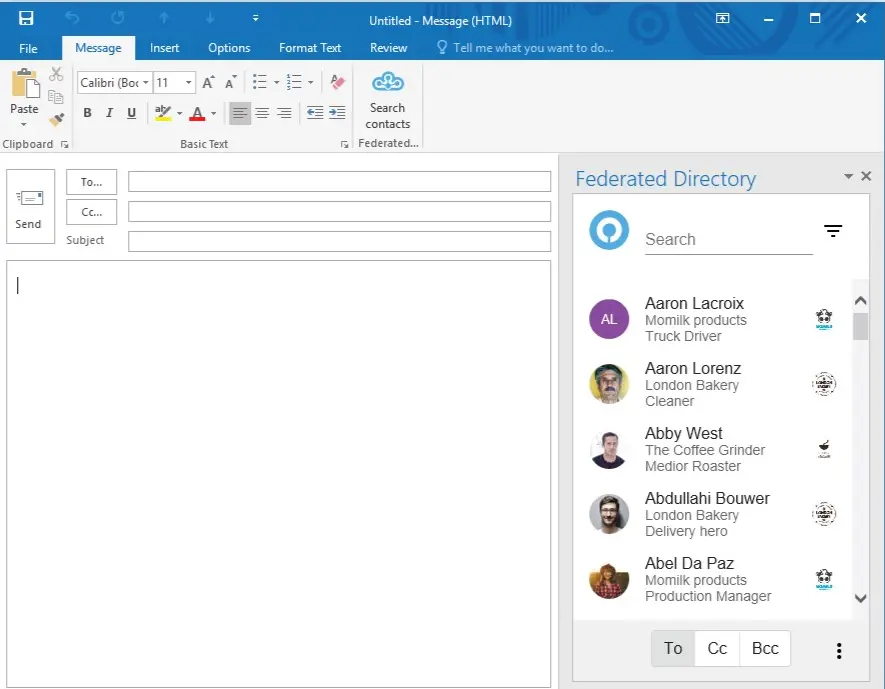
The platform provides access through a web application, Microsoft Outlook Add-in, and Microsoft Teams integration, meeting users where they already work. Users don't need to learn a new tool or change their habits — they simply see an additional button in Outlook or Teams to search connected partner directories. The trust-based sharing model uses groups and invitations rather than complex federation setups, making it accessible to administrators without deep identity expertise.
For organizations implementing AI and agentic workflows, Federated Directory offers an MCP (Model Context Protocol) endpoint that allows AI assistants to query contact data by name or email.
This provides a secure data layer for AI integration: rather than connecting AI agents directly to identity management systems (which would expose sensitive permissions and access data), Federated Directory provides contact information only. This follows the principle of least privilege that Microsoft itself recommends for AI agent permissions.
As a European company headquartered in the Netherlands, Federated Directory stores data in European data centers. For organizations concerned about European data sovereignty, particularly as some enterprises and government bodies evaluate alternatives to US-based cloud providers, this can be a significant advantage.
The pricing model is notably accessible. The first 20 users are free with full feature access, and beyond that, pricing scales with volume at a level where technical teams can often add it to their stack without extensive budget approvals. This makes it feasible to start small and expand as collaboration needs grow.
However, Federated Directory doesn't replace Microsoft Entra ID or Okta for core identity and access management functions.
While it supports single sign-on for accessing the Federated Directory platform itself (via Microsoft, Google, or other identity providers), it's not designed to provide SSO to your other applications or handle multi-factor authentication for your broader infrastructure.
It's specifically designed to solve the problem of cross-company contact sharing, which means organizations will likely need it alongside their primary IAM platform rather than instead of it.
Pricing models reveal different target markets
Microsoft Entra ID offers a free tier that covers basic authentication for Microsoft 365 users, making it effectively "included" for many organizations.
But the valuable security features require paid tiers: P1 at $6 per user per month adds Conditional Access and self-service features, P2 at $9 per user per month adds Identity Protection and Privileged Identity Management, and the Governance add-on adds another $7 per user per month.
For a fully-featured deployment, costs can reach $16 per user per month or more (though bundles like the Entra Suite at $12 per user per month may reduce this), not including the underlying Microsoft 365 or Azure subscriptions.
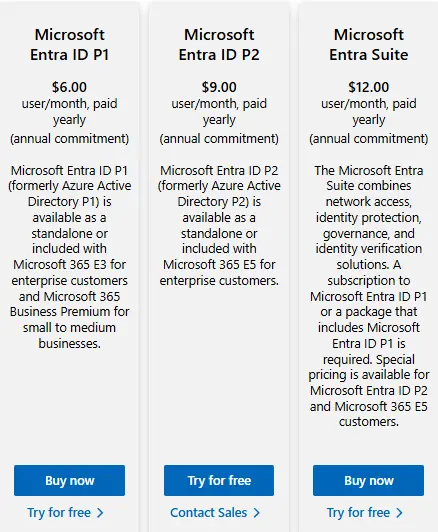
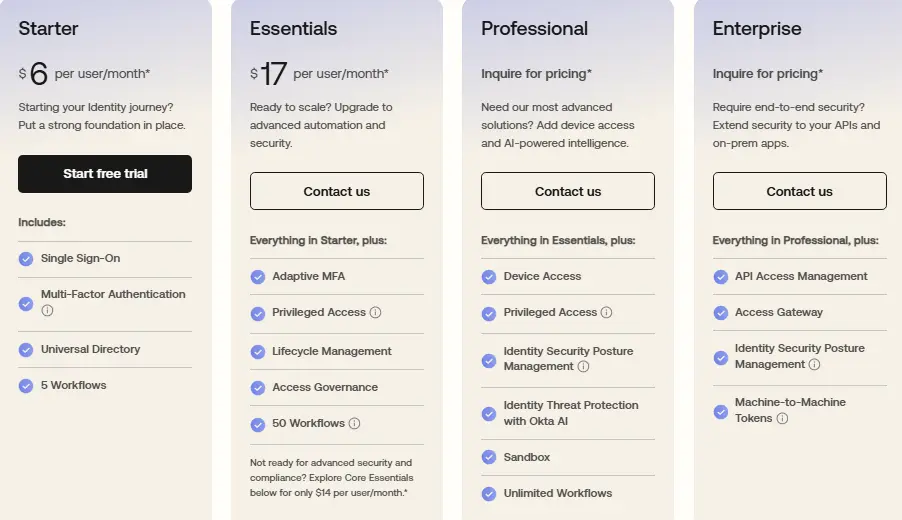
Okta's pricing starts at $6 per user per month for the Starter suite (SSO, MFA, Universal Directory), rises to $17 per user per month for the popular Essentials suite (adding Adaptive MFA, Lifecycle Management, and basic Privileged Access), and goes up from there for Professional and Enterprise tiers.
There's a $1,500 minimum annual contract, and many advanced features require additional add-ons. The pricing model assumes you're a serious enterprise buyer.
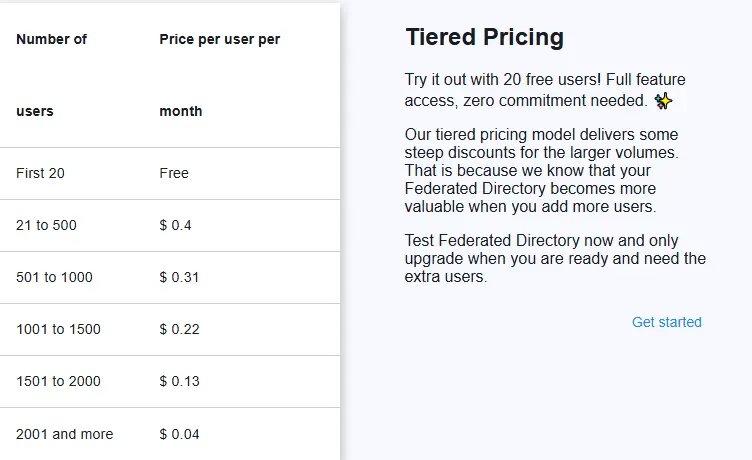
Federated Directory's pricing is dramatically different.
The first 20 users are completely free with full feature access. Beyond that, pricing scales inversely with volume, designed to be accessible enough that a developer or technical decision-maker can adopt it without requiring large budget approvals.
This pricing reflects its focus on solving a specific collaboration problem rather than serving as a comprehensive identity platform.
For organizations evaluating these solutions, the pricing comparison needs to account for what each platform actually does. Microsoft Entra ID and Okta are comprehensive IAM platforms with significant capabilities.
Federated Directory solves a specific collaboration problem. Many organizations will find value in combining Federated Directory with their existing IAM solution rather than choosing between them.
Security and compliance approaches differ significantly
Each platform takes a distinct approach to security and compliance, reflecting their different origins and target markets.
Microsoft Entra ID benefits from Microsoft's massive scale.
The AI-powered threat detection processes trillions of signals from across Microsoft's global infrastructure, including consumer accounts and enterprise services. This creates threat intelligence that smaller vendors struggle to match.
Conditional Access policies can evaluate multiple risk signals in real-time, and integration with Microsoft Defender provides additional protection layers. Microsoft maintains extensive compliance certifications including ISO 27001, SOC 2 Type II, FedRAMP, and industry-specific certifications for healthcare and financial services.
Oktaemphasizes its independence as a security advantage, arguing that a neutral identity layer provides better security than being tied to any single vendor.
Adaptive MFA evaluates contextual signals to step up authentication when risk is detected. Okta ThreatInsight blocks malicious IP addresses identified across its customer network, creating a collective defense.
However, several security incidents in recent years (including compromises of its customer support system and source code theft) have raised concerns. Okta has responded with a Secure Identity Commitment and increased security investments. The platform maintains SOC 2 Type II, ISO 27001, FedRAMP, and various industry certifications.
Federated Directory operates with a controlled sharing approach befitting its European origins.
As a company based in the Netherlands, GDPR considerations are foundational. Data is stored in European data centers. The platform operates on a principle of controlled sharing, where each company maintains control over its own data and explicitly grants access to trusted partners — a "clean room" approach where organizations don't have to trust the data quality of an external organization's entire Active Directory. They only ingest what the partner explicitly shares.
For organizations implementing AI workflows, Federated Directory's architecture provides an additional security benefit.
Microsoft's own documentation notes that AI agents with access to Microsoft Graph API could pose security risks, which is why Microsoft explicitly blocks high-risk permissions for agents.
Federated Directory creates a security boundary: AI agents query only contact data through a limited, purpose-built API, following the principle of least privilege. This reduces the attack surface compared to granting AI direct access to identity management systems.
For organizations subject to data sovereignty requirements, the location of data processing matters significantly. Microsoft Entra ID and Okta offer various regional options but are fundamentally US companies. Federated Directory's European data storage may simplify certain compliance requirements.
Integration capabilities determine real-world value
The practical value of any identity solution depends heavily on how well it integrates with your existing technology stack.
Microsoft Entra ID provides deep integration within the Microsoft ecosystem.
Single sign-on to Microsoft 365, Azure, Dynamics 365, and Power Platform is native and seamless. Beyond Microsoft's own services, there are thousands of pre-integrated SaaS applications in the gallery, and SAML/OIDC support enables integration with custom applications.
Microsoft Entra Application Proxy provides secure remote access to on-premises web applications. However, integration complexity may increase when moving outside the Microsoft ecosystem, and connecting legacy or non-standard applications may require additional effort.
Okta's Okta Integration Network (OIN) contains over 7,000 pre-built integrations, covering virtually every significant SaaS application.
The platform's vendor-neutral positioning means it's designed from the ground up to work with heterogeneous environments. Deep integrations often support not just SSO but also automated user provisioning and deprovisioning.
For on-premises applications, Okta Access Gateway provides similar capabilities to Microsoft's Application Proxy. The developer ecosystem includes SDKs for major programming languages and frameworks, making custom integration straightforward.
Federated Directory takes a different integration approach focused on directory systems rather than applications.
Native integrations exist for Microsoft Entra ID and Google Workspace, with support for Okta and OneLogin as well. For other systems, a SCIM-compliant API enables custom integration. The platform also integrates with productivity tools including Microsoft Outlook and Microsoft Teams, ensuring that the federated directory is accessible where users already work.
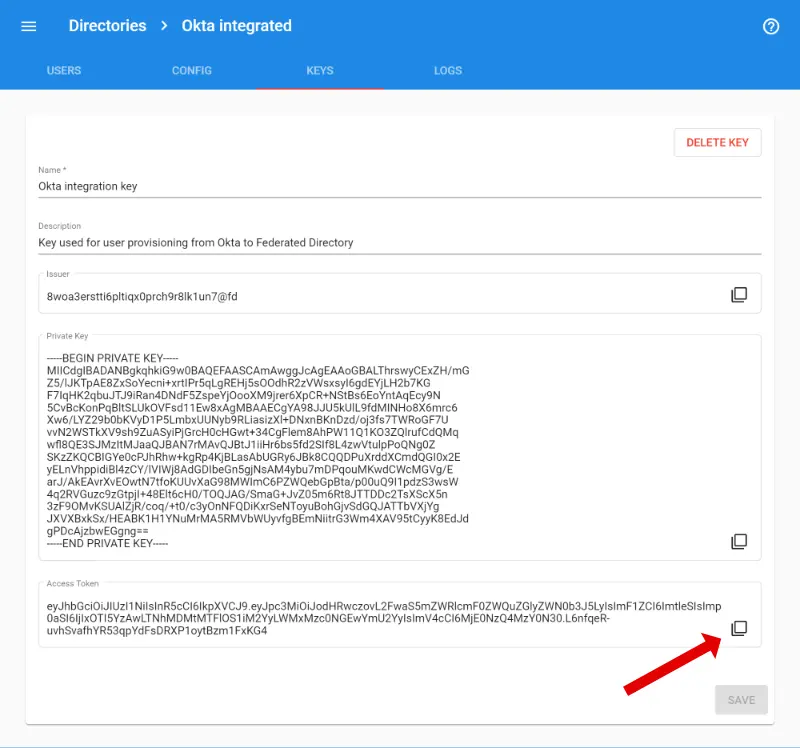
For organizations that are a group of multiple companies with different identity tenants — say, five subsidiaries with five different Entra ID instances — building integrations becomes complex.
A developer trying to help an employee find an expert in a sister company would need to connect to multiple different APIs, handle multiple authentication methods, and merge multiple data formats. Federated Directory provides a single, clean endpoint for applications and AI agents to query contact data across all connected organizations without requiring broad permissions to each organization's core identity provider.
This focused integration scope means simpler configuration but also means it solves a narrower problem than full-featured IAM platforms. The question isn't just "how many integrations exist" but "does it integrate with what we actually use, and does it solve the problem we're trying to solve?"
Microsoft Entra ID vs Okta vs Federated Directory: Which should you choose?
The right choice depends on what problem you're actually trying to solve.
Choose Microsoft Entra ID if:
- Your organization is standardized on Microsoft 365, Azure, and related Microsoft technologies
- You want the deepest possible integration with your existing Microsoft infrastructure
- Your security strategy benefits from Microsoft's massive threat intelligence scale
- You need comprehensive identity governance alongside access management
- You're comfortable with Microsoft's licensing complexity in exchange for ecosystem benefits
Explore Microsoft Entra ID to unify identity across your Microsoft environment.
Choose Okta if:
- You operate a multi-cloud or heterogeneous IT environment
- Vendor neutrality is strategically important to your organization
- You need to integrate with a wide variety of SaaS applications and custom systems
- You value an intuitive user experience for both administrators and end-users
- You're managing both workforce and customer identities
Discover how Okta can secure your diverse application landscape.
Choose Federated Directory if:
- Your employees need to find and contact people in partner organizations
- You're a holding company, franchise network, or multi-subsidiary organization where different entities run different IT stacks
- You're navigating an M&A transition and need immediate collaboration while IT integration happens in the background
- Your partners use different identity systems (Microsoft, Google, Okta, etc.) and you need a single place to search across all of them
- You're implementing AI workflows and need a secure, contact-only data layer that doesn't expose sensitive identity permissions
- European data residency is a priority
See how Federated Directory can connect your corporate address book with trusted partners.
The strategic perspective
For most organizations, this isn't an either/or choice between all three platforms. Microsoft Entra ID and Okta are alternatives to each other as your primary identity and access management solution. Federated Directory solves a different problem that neither of them directly addresses.
If you're a Microsoft shop, Microsoft Entra ID is likely your foundation for identity. If you're multi-cloud or vendor-neutral, Okta may be the better choice. Either way, if you have significant collaboration needs with external partners, or if you're managing a group of companies with decentralized IT, Federated Directory can complement your primary IAM platform by solving the cross-company directory problem.
The organizations that get identity right recognize that different tools solve different problems. The best identity strategy might combine a robust IAM platform for securing application access with a purpose-built solution for enabling the cross-company collaboration that increasingly drives business value.
Ready to solve the cross-company contact challenge? Get started with Federated Directory for free with up to 20 users.
Get started free