Okta vs OneLogin (vs Federated Directory): Which Identity Solution Fits Your Needs in 2026?
If you're comparing Okta vs OneLogin, you're likely evaluating enterprise identity and access management platforms to secure your organization's applications and user access. Both are established players with comprehensive feature sets, great security credentials, and thousands of integrations.
But here's what most comparison articles miss: while Okta and OneLogin excel at managing identities within your organization, neither is specifically designed for sharing corporate address books between organizations. When your employees need to find contacts at partner companies, clients, or subsidiaries using different directory systems, these platforms leave you with manual workarounds and scattered address books.
The real questions you should be asking are:
- Do you need to secure access to applications within your organization, or do you also need seamless collaboration with external partners?
- Are you willing to be locked into a single vendor's ecosystem, or do you need flexibility across different directory platforms?
- Is your primary challenge user authentication and lifecycle management, or connecting disparate corporate directories?
- How important is it that your employees can easily find and contact people in partner organizations?
- Do you need enterprise-grade identity governance, or would a simpler, more focused solution better fit your needs?
- Are you building AI or agentic workflows that need access to contact data across organizations?
In short, here's what we recommend:
Okta is one of the leading providers in enterprise identity and access management, offering a comprehensive platform that includes Single Sign-On, Multi-Factor Authentication, Universal Directory, and Lifecycle Management. With over 7,000 pre-built integrations and a good focus on security innovation, Okta is ideal for large enterprises with complex identity requirements. However, its premium pricing (starting at $6 per user per month for basic workforce identity) and the complexity of its feature set can be an issue for organizations with simpler needs or tighter budgets.
OneLogin provides a cost-effective alternative with similar core functionality, including SSO, MFA, and automated user provisioning. Its SmartFactor Authentication uses AI to adapt security requirements based on risk, and its user-friendly interface makes it accessible to organizations without dedicated identity specialists. Starting at $3 per user per month for the Basic plan (with pack pricing), OneLogin offers value, though some user reviews mention occasional performance issues and a complex initial setup process.
Both platforms are good solutions for internal identity management. However, they are identity solutions, not contact directory solutions. They focus on securing access within your organization and don't include built-in cross-company address book sharing.
Federated Directory takes a different approach as a dedicated contact directory service, not an identity provider. Instead of replacing your existing directory, Federated Directory connects with platforms like Microsoft 365, Google Workspace, Okta, and OneLogin to create a unified, searchable address book across multiple organizations. It also provides a SCIM-compliant API and Model Context Protocol (MCP) endpoint, making contact data accessible to AI and agentic workflows without exposing sensitive identity information. With 20 free users permanently (all features included) and affordable scaling beyond that, it provides a simple, cost-effective way to break down contact silos between companies. As a European company headquartered in the Netherlands, Federated Directory stores customer data in European data centers.
If cross-company collaboration, unified corporate directories, or AI-ready contact data matter to your organization, see how Federated Directory works.
Table of Contents
- Okta vs OneLogin vs Federated Directory at a glance
- Understanding why these solutions get compared
- Okta excels at enterprise identity management
- OneLogin offers cost-effective identity security
- Federated Directory connects what others can't
- Pricing models reveal different priorities
- Integration capabilities vary by purpose
- Which solution delivers on your actual needs?
- Okta vs OneLogin vs Federated Directory: Which should you choose?
Okta vs OneLogin vs Federated Directory at a glance
| Okta | OneLogin | Federated Directory | |
|---|---|---|---|
| Primary function | Enterprise identity & access management | Unified access management | Cross-company directory integration |
| Solution category | Identity provider (IAM) | Identity provider (IAM) | Contact directory service |
| Starting price | $6/user/month (Starter) | $3/user/month (Basic, pack pricing) | Free for first 20 users |
| Free trial | 30 days | Developer Free Trial available | 20 users free permanently |
| Pre-built integrations | 7,000+ in Okta Integration Network | 6,000+ applications | Microsoft 365, Google Workspace, Okta, OneLogin |
| SSO capability | ⭐⭐⭐⭐⭐ Industry-leading | ⭐⭐⭐⭐⭐ Comprehensive | N/A (not an SSO solution) |
| MFA capability | ⭐⭐⭐⭐⭐ Extensive options | ⭐⭐⭐⭐⭐ AI-powered SmartFactor | N/A (not an MFA solution) |
| Cross-company collaboration | ⭐⭐ Limited | ⭐⭐ Limited | ⭐⭐⭐⭐⭐ Purpose-built |
| AI/API access to contact data | Via Graph API (exposes identity data) | Via API (exposes identity data) | ⭐⭐⭐⭐⭐ SCIM API + MCP endpoint (contact-only) |
| Ease of setup | ⭐⭐⭐ Complex for full deployment | ⭐⭐⭐ Moderate learning curve | ⭐⭐⭐⭐⭐ Simple configuration |
| Data residency | Global data centers | Global data centers | European data centers |
| Best for | Large enterprises with complex identity needs | Mid-market organizations seeking value | Organizations collaborating across company boundaries |
Understanding why these solutions get compared
Okta and OneLogin are identity providers: full-featured platforms designed to secure user authentication and manage the user lifecycle across applications. They answer the question "who is this user and what can they access?"
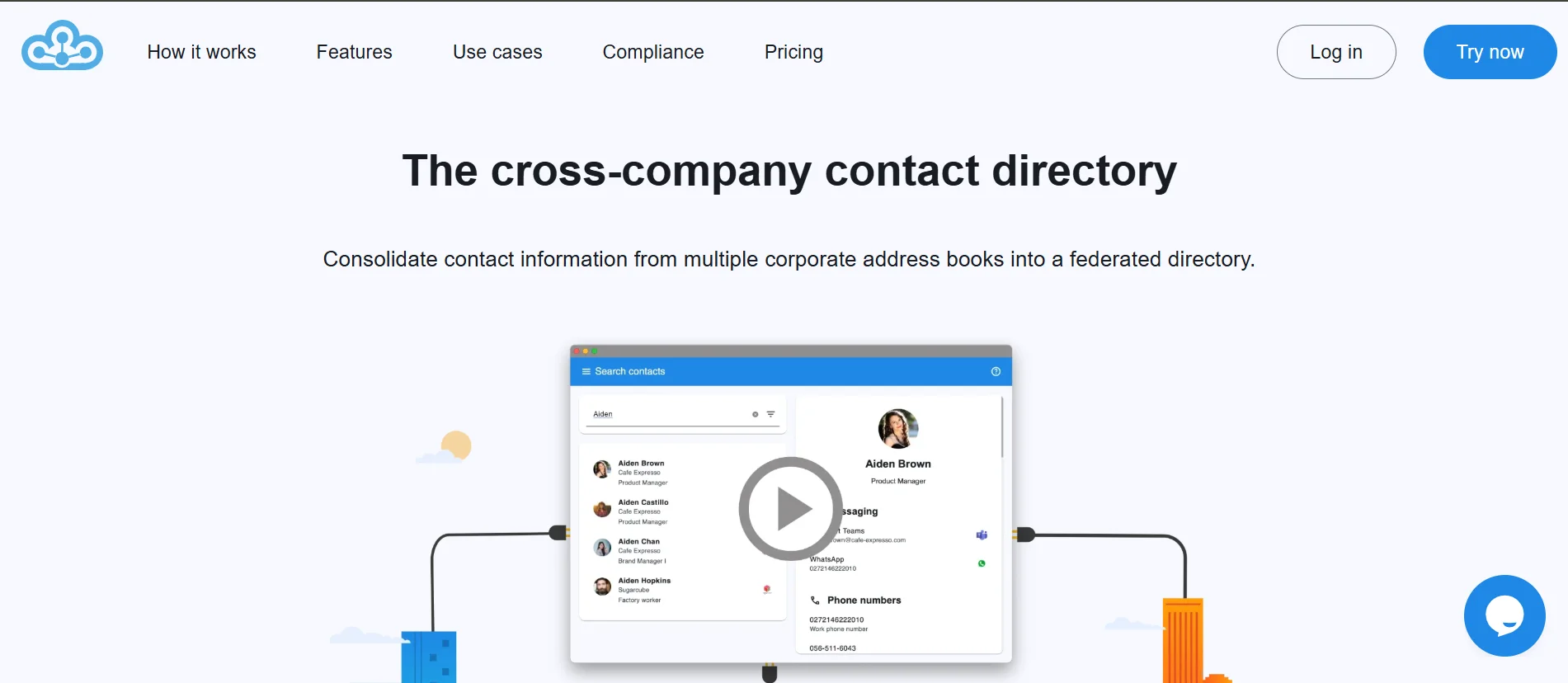
Federated Directory is a contact directory service: a specialized platform for connecting corporate address books across organizations. It answers the question "how do I find and contact the right person at a partner company?"
But there's a reason you might be evaluating all three together: modern businesses don't just need to manage internal identities. They need to collaborate effectively with partners, clients, subsidiaries, and vendors — often across different technology ecosystems.
Consider a common scenario: your company uses Microsoft 365, but your key partner runs on Google Workspace. Your employees need to frequently contact people at that partner organization, but the contact information lives in separate, disconnected directories. Okta and OneLogin can secure access to your applications, but neither offers a purpose-built cross-company shared address book for this use case. Creating guest accounts in an identity solution just to access contact data introduces unnecessary complexity.
This is the gap that Federated Directory addresses.
It doesn't replace Okta or OneLogin — it complements them by connecting the corporate directories that these platforms help manage. In fact, Federated Directory integrates directly with Okta, OneLogin, Microsoft 365, and Google Workspace.
For organizations evaluating their identity and collaboration needs, understanding this distinction is crucial:
- If your primary challenge is securing application access within your organization, Okta or OneLogin is likely the right choice.
- If you also need to break down contact silos between your company and its partners, Federated Directory fills that gap.
- If you're doing both, you should consider using these solutions together.
Okta excels at enterprise identity management
Okta has established itself as one of the market leaders in enterprise identity and access management. The company, founded in 2009 by former Salesforce executives Todd McKinnon and Frederic Kerrest, was built from the ground up as a cloud-native platform to address the challenges of managing user access in an increasingly cloud-based IT landscape.
The platform's Single Sign-On capability is its foundation, allowing users to access multiple applications with a single set of credentials. The Okta Integration Network, with over 7,000 pre-built integrations, makes connecting to virtually any application straightforward. Whether you're using popular SaaS applications like Salesforce, or legacy on-premises systems, Okta likely has a connector ready to go.
Okta's Multi-Factor Authentication goes beyond basic second-factor verification. The platform supports a wide range of authentication methods, from its proprietary Okta Verify app to biometric authentication via WebAuthn, hardware security keys, and traditional SMS codes. Adaptive MFA analyzes contextual signals like user location, device, and network to adjust authentication requirements based on risk.
The Universal Directory serves as a centralized repository for all user identities, consolidating information from multiple sources including Active Directory, LDAP, HR systems, and cloud directories. Profile Mastering allows organizations to designate authoritative sources for different user attributes, ensuring data consistency across the organization.
Lifecycle Management automates the processes of onboarding and offboarding users. When an employee joins, changes roles, or leaves the organization, their access to applications can be automatically adjusted based on predefined policies. This automation reduces IT workload and eliminates the security risks associated with manual provisioning.
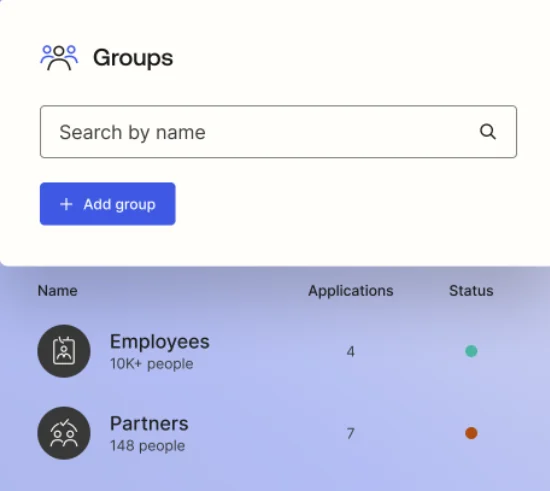
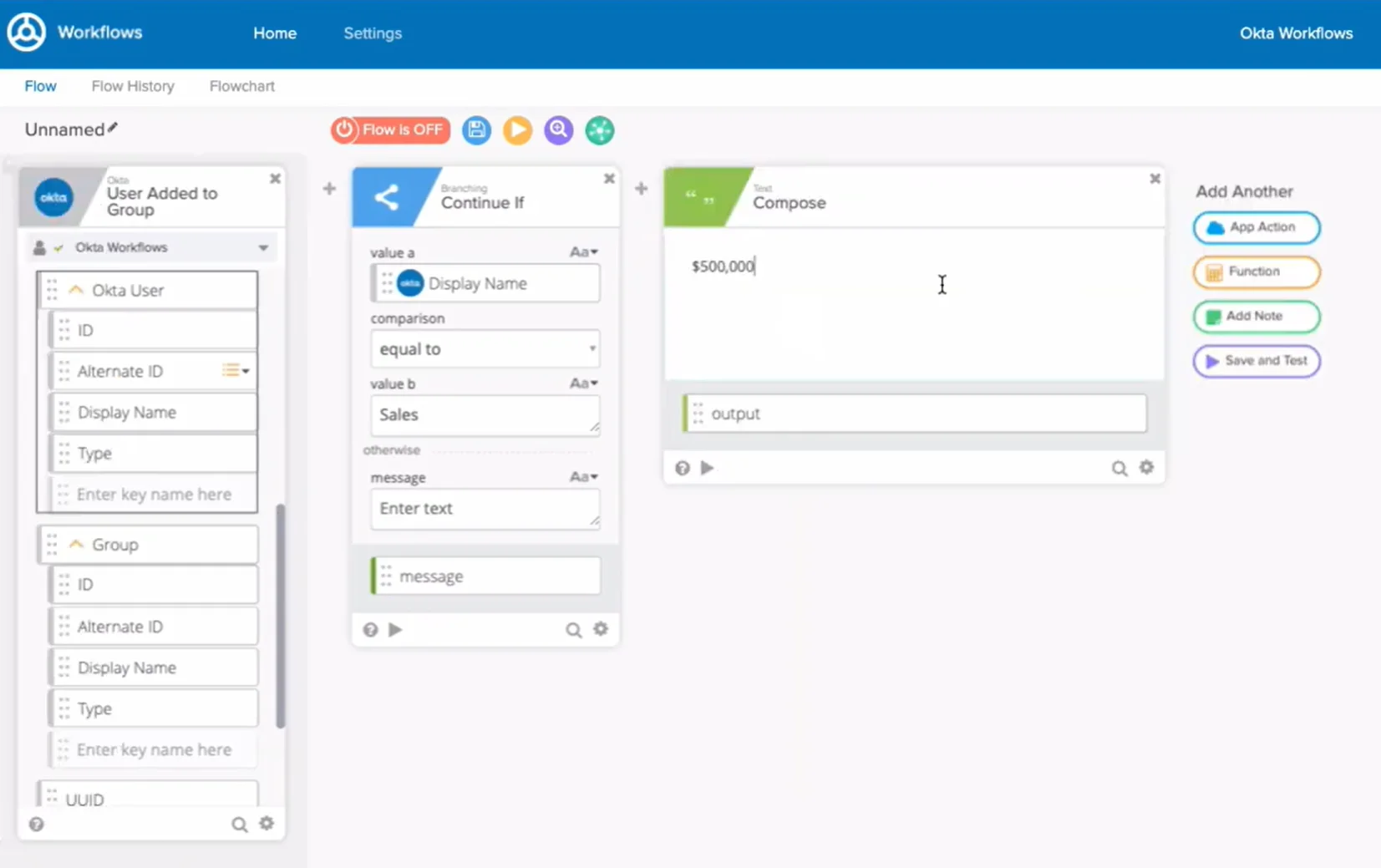
For organizations with stringent security requirements, Okta offers Identity Governance capabilities including access certifications and reporting, API Access Management for securing APIs, and the Okta Workflows platform for no-code identity automation.
Pricing note: Okta's pricing starts at $6 per user per month for the Starter plan, scaling up significantly for more advanced features. A minimum annual contract of $1,500 is required. For organizations with complex requirements, the full cost of Okta can be substantial, and the platform's extensive feature set creates a steeper learning curve for administrators.
Okta pros and cons
| Pros | Cons |
|---|---|
| 7,000+ pre-built integrations | Premium pricing starts at $6/user/month |
| Industry-leading SSO and Adaptive MFA | Minimum annual contract of $1,500 |
| Comprehensive Identity Governance | Complex setup for full deployment |
| No-code Okta Workflows automation | Advanced features require higher-tier plans |
| Strong ecosystem and market leader status | No cross-company address book sharing |
OneLogin offers cost-effective identity security
OneLogin, founded in 2009 by brothers Thomas and Christian Pedersen, was inspired by experiences at Zendesk, where Thomas Pedersen had worked, observing the challenges companies faced managing access to cloud applications. The company was acquired by One Identity in 2021, becoming part of a broader Unified Identity Security Platform.
The platform's approach to access management mirrors Okta's core capabilities, typically at a lower price point. Single Sign-On provides users with a unified portal for accessing all their applications, while the Advanced Directory integrates with Active Directory, LDAP, Google Workspace, and HR systems to create a centralized view of user identities.
Where OneLogin differentiates itself is with SmartFactor Authentication, powered by its Vigilance AI threat engine. This adaptive authentication system uses machine learning to analyze contextual factors including user behavior, device information, location, and network data to calculate a risk score for each login attempt. Low-risk logins can proceed without additional verification, while elevated-risk attempts trigger step-up authentication or are blocked entirely.
OneLogin's Identity Lifecycle Management automates user provisioning and deprovisioning. The HR-Driven Identity capability integrates with HR systems like Workday, BambooHR, and UKG to use the HR system as the source of truth for employee identity. When a new employee is added to the HR system, their accounts can be automatically created across all necessary applications. When they leave, access is revoked immediately.
OneLogin Desktop extends the platform's authentication capabilities to the desktop level, allowing users to log into their Windows or Mac computers using their OneLogin credentials. Combined with certificate-based authentication, this creates a passwordless experience for accessing both the desktop and all SSO-enabled applications.
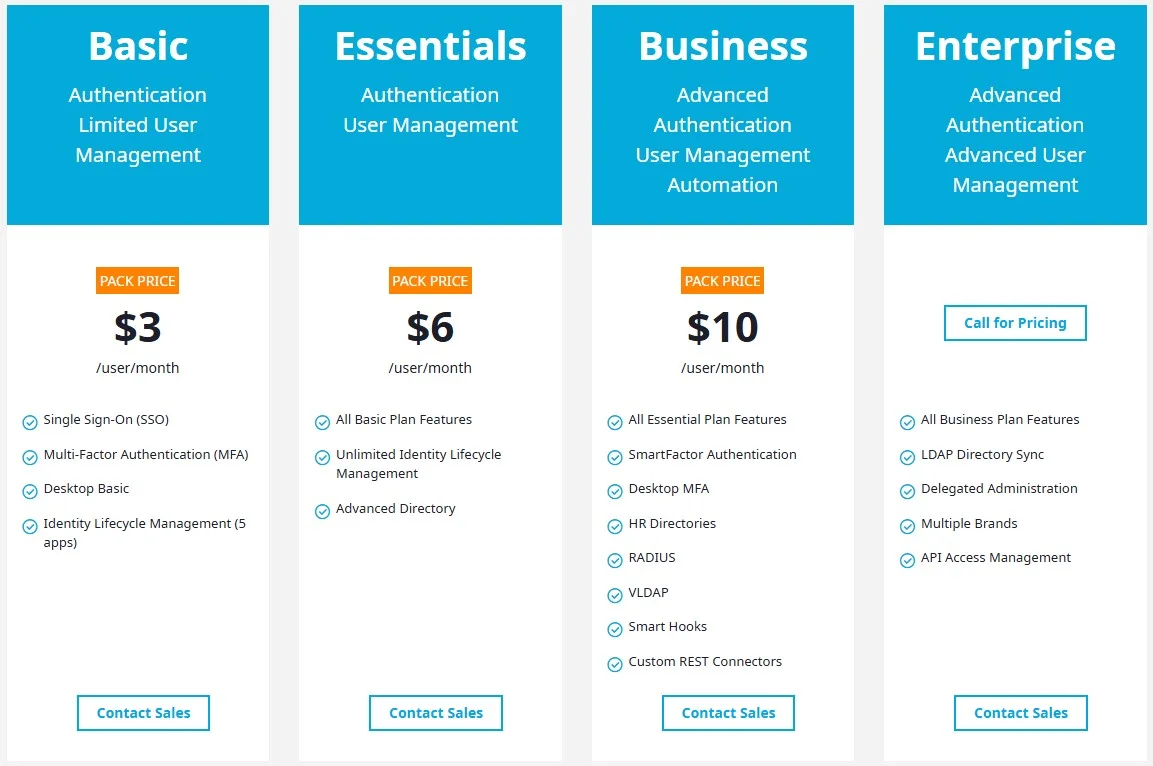
Pricing note: OneLogin's Basic plan starts at $3/user/month (pack pricing), with the Essentials plan at $6/user/month adding unlimited Lifecycle Management and HR-Driven Identity. The Business plan at $10/user/month includes SmartFactor Authentication and Desktop MFA. A Developer Free Trial is available for evaluation.
Some user reviews on platforms like Capterra and G2 mention occasional performance inconsistencies with OneLogin, including browser extension issues and slow loading times. The initial setup can also be complex for organizations with extensive application portfolios. However, for mid-market organizations seeking advanced identity security without enterprise-level pricing, OneLogin offers great value.
OneLogin pros and cons
| Pros | Cons |
|---|---|
| More accessible pricing than Okta | Occasional performance inconsistencies reported |
| AI-powered SmartFactor Authentication | Complex initial setup for large application portfolios |
| HR-Driven Identity integration | No cross-company address book sharing |
| Desktop-level authentication | Smaller ecosystem than Okta (6,000 vs 7,000+ integrations) |
| Strong value for mid-market organizations | Advanced features require Business plan ($10/user) |
Federated Directory connects what others can't
While Okta and OneLogin excel at managing identities within an organization, they are identity solutions, not contact directory solutions. They don't offer features specifically designed for connecting corporate address books across organizational boundaries to create shared, searchable directories between companies.
Federated Directory, developed by Fed Blokes (a Netherlands-based company), takes a different approach. Rather than replacing existing identity infrastructure, it connects disparate corporate address books to create a unified, searchable directory that spans multiple companies.
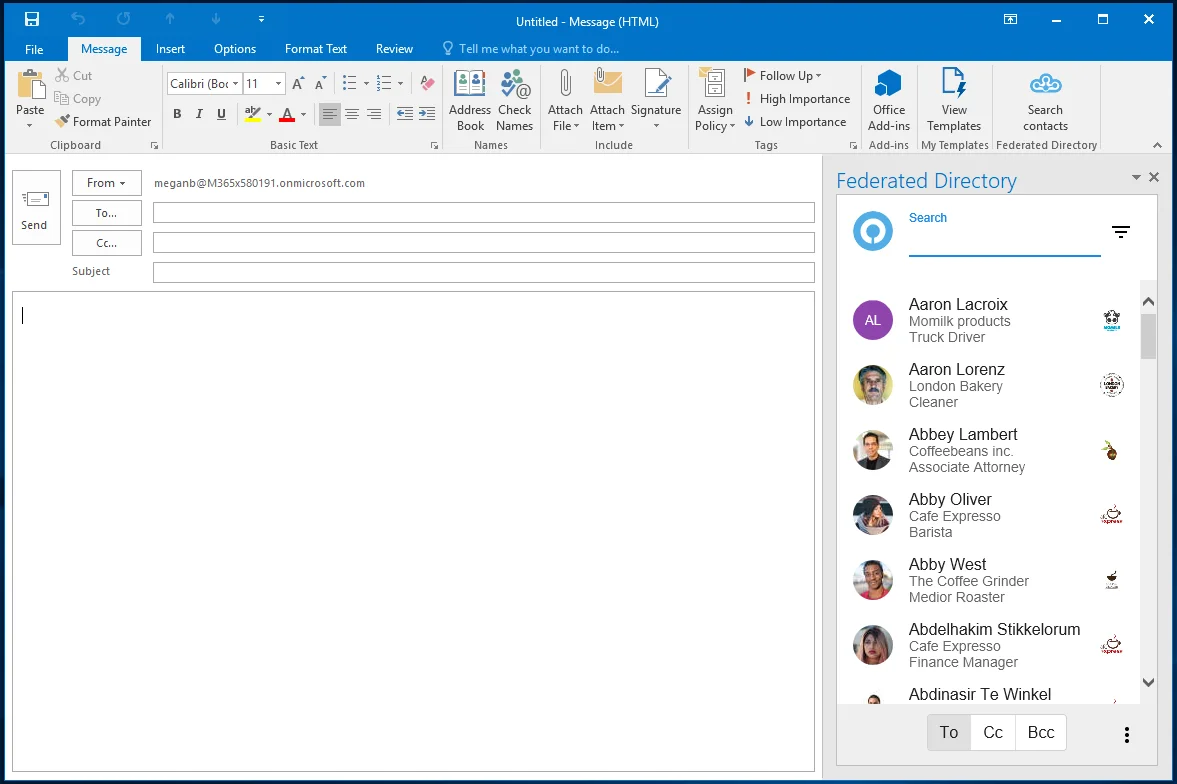
The platform integrates with Microsoft 365, Google Workspace, Okta, and OneLogin. This means organizations can continue using their existing identity providers while gaining the ability to share contact information securely with trusted partners. The integration works through standard protocols including SCIM and native directory synchronization, ensuring that contact data stays up-to-date automatically.
The core value proposition centers on eliminating contact silos. When your company collaborates closely with partners who use different directory systems, finding the right contact can require manual workarounds: requesting contact lists, maintaining spreadsheets, or simply not being able to find the person you need to reach. Federated Directory creates a single, searchable address book that includes users from all connected organizations.
Purpose-built for multi-organization environments
For holding companies, franchises, and multi-subsidiary organizations, this problem is particularly critical. When a parent company has dozens of subsidiaries — some on Microsoft 365, others on Google Workspace, each with their own IT infrastructure — finding an expert in a sister company becomes a maze.
Without a central directory solution, IT teams either build complex mesh synchronization architectures (where complexity scales exponentially with each new organization) or employees simply can't find contacts across the group. Federated Directory provides a single connection point for each organization, eliminating the need for N-to-N sync configurations.
For mergers and acquisitions, Federated Directory provides an immediate collaboration solution. When a company acquires another, full IT integration can take months or years. In the meantime, employees need to work together across company boundaries. Federated Directory enables this collaboration immediately, without waiting for complex identity system migrations.
AI-ready contact data
AI and agentic workflows represent an emerging use case where Federated Directory provides value. As organizations implement AI assistants and automated workflows, they increasingly need contact data accessible to LLMs. However, connecting AI systems directly to identity management platforms like Okta, OneLogin, or Microsoft Entra ID exposes sensitive permissions, access data, and identity metadata — creating security risks if the AI is compromised via prompt injection or other attacks.
Federated Directory provides a safer approach: a SCIM-compliant API and Model Context Protocol (MCP) endpoint that gives AI agents access to contact information only — not permissions, group memberships, or other sensitive identity data. This follows the principle of least privilege and creates a security boundary between AI systems and core identity infrastructure. It also decouples AI integrations from the underlying identity provider, meaning organizations can change from Microsoft to Google or Okta to OneLogin without rebuilding their AI workflows.
As a European company, Federated Directory emphasizes data protection and sovereignty. Customer data is stored in European data centers, which matters for organizations concerned about data residency — particularly European companies and government organizations navigating increasingly strict data sovereignty requirements.
Pricing models reveal different priorities
Okta pricing
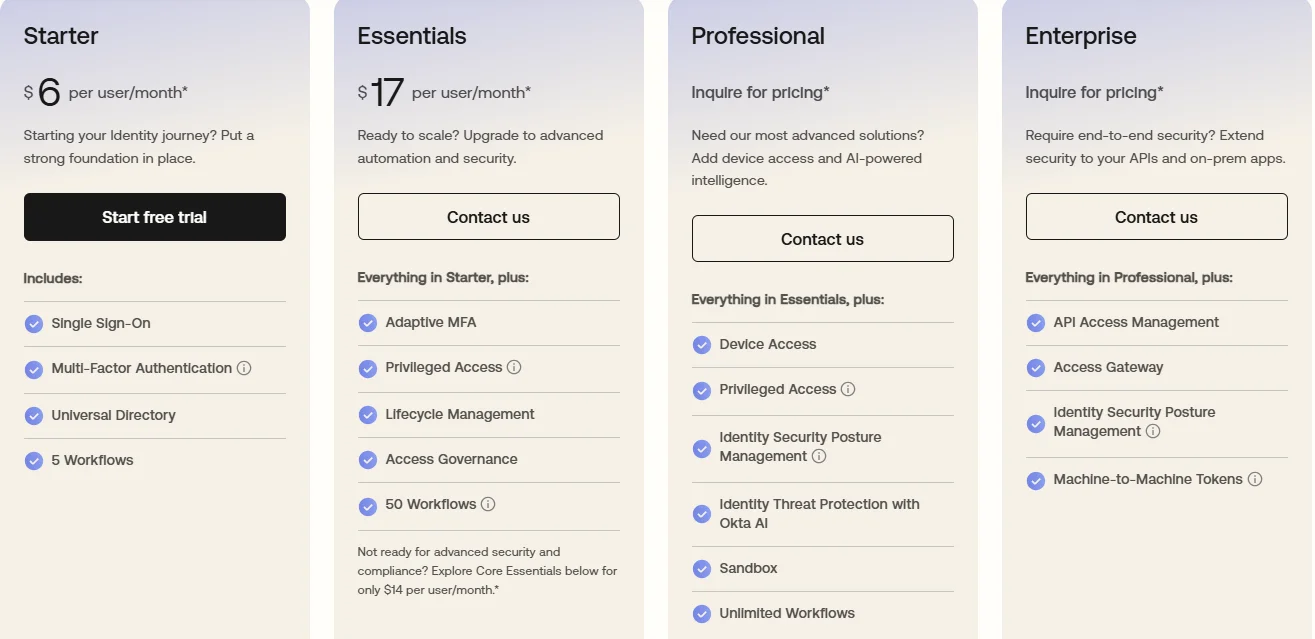
Okta positions itself at the premium end of the market. Workforce Identity pricing starts at $6 per user per month for the Starter plan, which includes SSO, basic MFA, Universal Directory, and limited Workflows. The Essentials plan at $17 per user per month adds Adaptive MFA, Lifecycle Management, and Privileged Access. Higher tiers (Professional and Enterprise) require custom pricing discussions.
Customer Identity pricing for external user authentication starts at $3,000 per month as a base platform fee, with additional products available as add-ons. All Okta plans are billed annually with a minimum contract of $1,500. Okta offers a 30-day free trial for Workforce Identity to explore capabilities.
OneLogin pricing
OneLogin offers more accessible pricing while maintaining comprehensive functionality. The Basic plan at $3 per user per month (bundle pricing) includes SSO, the basic desktop app, and MFA. The Essentials plan at $6 per user per month adds Identity Lifecycle Management, Advanced Directory, and HR-Driven Identity. The Business plan at $10 per user per month includes SmartFactor Authentication, OneLogin Desktop MFA, and additional administrative capabilities.
Individual add-on modules are also available for organizations that don't need full bundle pricing. A Developer Free Trial is available for evaluation.
Federated Directory pricing
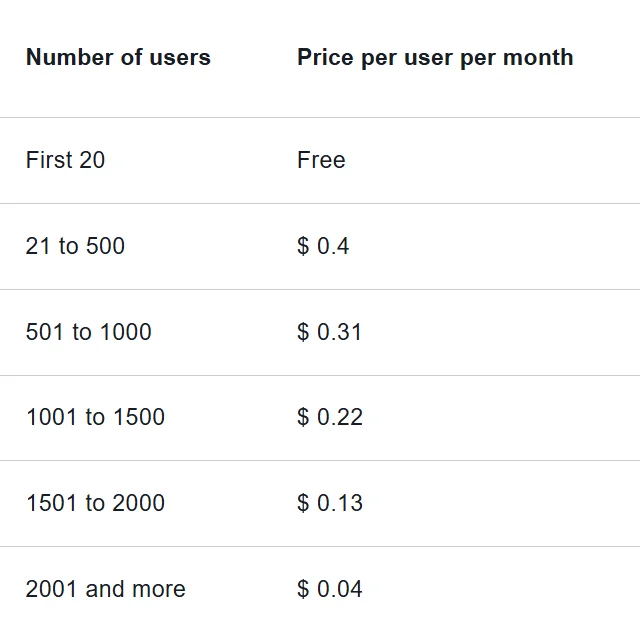
Federated Directory takes a volume-based approach designed for accessibility. The first 20 users are free permanently, with all features included. This pricing model allows developers and technical decision-makers to evaluate and adopt the platform without requiring large budget approvals. For pricing beyond the free tier, contact Federated Directory directly for current rates.
This pricing reflects Federated Directory's recognition that the service becomes more valuable as more users and organizations are connected.
| Platform | Starting price | Free option | Billing |
|---|---|---|---|
| Okta | $6/user/month (Starter) | 30-day free trial | Annual, min. $1,500 |
| OneLogin | $3/user/month (Basic, pack) | Developer Free Trial | Annual |
| Federated Directory | Free for 20 users | 20 users free permanently | Volume-based |
Integration capabilities vary by purpose
Okta integrations
Okta prioritizes depth and breadth of application integrations. The Okta Integration Network contains over 7,000 pre-built integrations covering cloud applications, on-premises systems, and custom applications. These integrations support not just SSO but also automated user provisioning via SCIM, meaning user accounts can be created, updated, and deactivated automatically across connected applications.
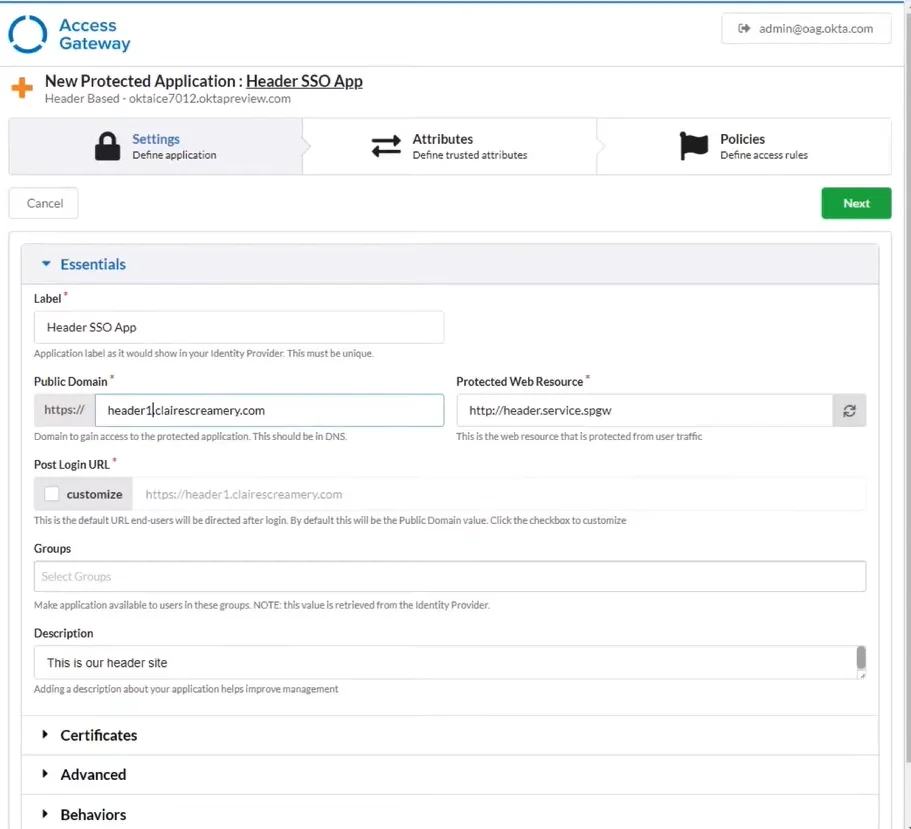
For on-premises applications, Okta provides the Access Gateway for extending SSO and MFA capabilities to applications behind the corporate firewall. The platform's APIs allow developers to embed identity functionality into custom applications. Okta Workflows provides no-code automation for identity-centric processes, connecting identity events to actions across the technology stack.
OneLogin integrations
OneLogin similarly emphasizes application integrations, with a catalog of over 6,000 pre-integrated applications. The platform supports SAML, OIDC, and form-based authentication for applications that don't support modern standards. OneLogin's Universal Connector enables integration with a broader range of directory sources and target applications. The platform also offers RADIUS authentication for network devices and VPNs.
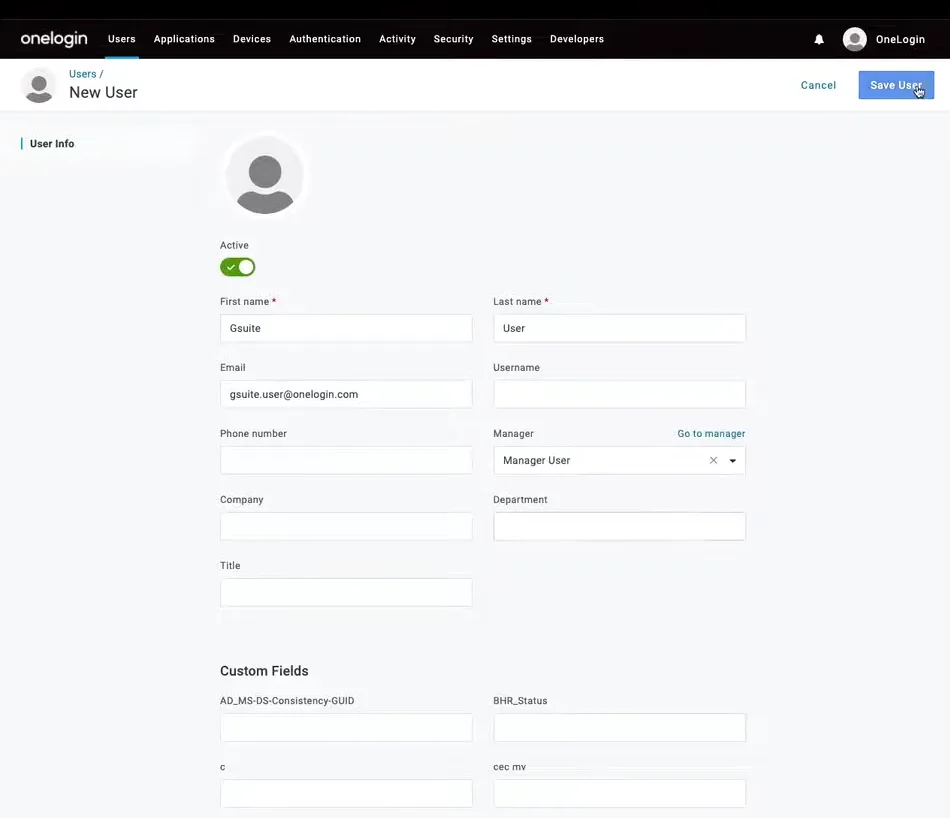
Federated Directory integrations
Federated Directory takes a different approach, focusing specifically on directory integrations and contact data access. The platform natively synchronizes with Microsoft 365 and Azure AD, Google Workspace, Okta, and OneLogin. This means organizations using these platforms can connect their directories to Federated Directory without manual data management.
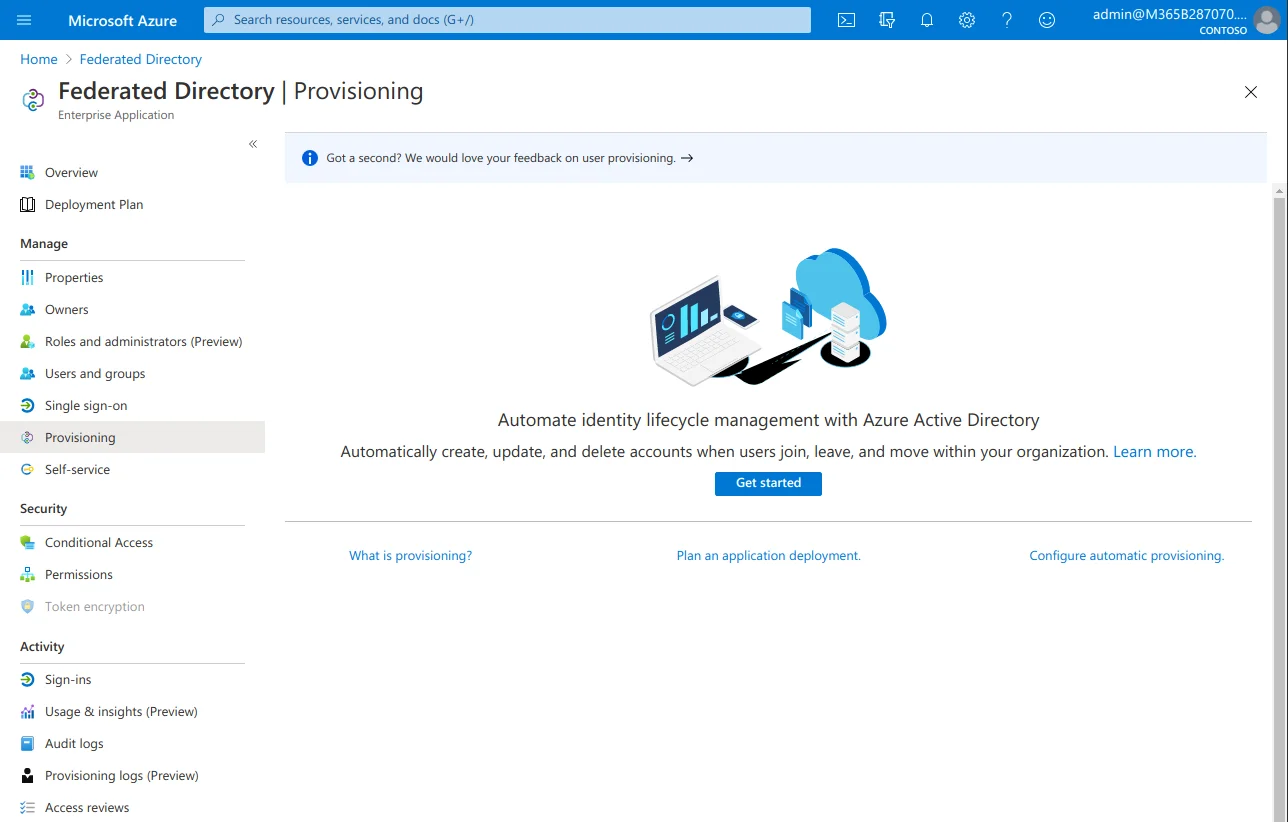
For organizations that don't use one of these supported platforms, Federated Directory offers manual user import via CSV files and a SCIM-compliant API for custom integrations.
For AI and application integrations, the platforms differ significantly. Okta and OneLogin provide APIs that can return user data, but these APIs are designed for identity management — they expose permissions, group memberships, access policies, and other sensitive identity information alongside contact data. For applications that only need contact information, this represents unnecessary data exposure and potential security risk.
Federated Directory's API is purpose-built for contact data access. It provides only the information needed to find and contact people — names, titles, departments, phone numbers, email addresses — without exposing sensitive identity or access management data. For organizations building AI assistants or agentic workflows that need to query "who is the right person to contact about X?", this separation of concerns provides both better security and simpler integration.
Which solution delivers on your actual needs?
If your primary challenge is securing application access within your organization, Okta and OneLogin are purpose-built for this task. Both provide comprehensive SSO, MFA, directory integration, and lifecycle management capabilities. Your choice between them likely comes down to budget (OneLogin is typically more cost-effective), specific feature requirements, and organizational complexity.
If you need enterprise-grade identity governance with extensive compliance and audit capabilities, advanced API access management, or the ability to handle complex identity scenarios across thousands of applications, Okta's comprehensive platform is the better choice despite the higher cost.
If you're seeking better identity security at a reasonable price, with AI-powered adaptive authentication and a more accessible entry point, OneLogin delivers excellent value — particularly for mid-market organizations.
If your challenge is connecting corporate directories across organizational boundaries so employees can find contacts at partner companies, clients, or subsidiaries, neither Okta nor OneLogin offers a solution for this specific use case. This is where Federated Directory provides value.
If you're building AI or agentic workflows that need access to contact data, consider where that data should come from. Connecting AI directly to identity providers exposes sensitive information and creates security risks. Federated Directory provides a contact-only data layer that follows the principle of least privilege. AI agents can query contact information without gaining access to permissions, access policies, or other sensitive identity data. It also provides a single endpoint for contact data across multiple organizations, avoiding the complexity of connecting to multiple identity providers with different APIs and authentication methods.
If you need to insulate applications from identity provider changes, Federated Directory provides a separation of concerns. When your organization changes identity providers — moving from Microsoft to Google, or from Okta to OneLogin — applications and AI workflows that connect to Federated Directory continue working without modification. The contact directory becomes an abstraction layer that shields downstream integrations from identity infrastructure changes.
Important: these aren't mutually exclusive choices. Organizations can use Okta or OneLogin for internal identity management while adding Federated Directory to enable cross-company collaboration and provide safe contact data access for AI. Federated Directory integrates directly with both platforms, meaning you can leverage your existing identity infrastructure while gaining these additional capabilities.
Okta vs OneLogin vs Federated Directory: Which should you choose?
The answer depends on your specific requirements and the problems you're trying to solve.
Choose Okta if:
- You're a large enterprise with complex identity and access management requirements
- You need extensive application integrations (7,000+ available)
- Identity governance and compliance are critical priorities
- You require advanced API access management
- Budget is less of a constraint than comprehensive capability
- You want one of the market leaders with an extensive ecosystem
Explore Okta's capabilities with a 30-day free trial.
Choose OneLogin if:
- You want advanced identity security at a more accessible price point
- AI-powered adaptive authentication appeals to your security strategy
- You're a mid-market organization without dedicated identity specialists
- HR-driven identity management is a priority
- You value a balance of capability and cost-effectiveness
- Desktop-level authentication integration matters for your use case
Evaluate OneLogin with their Developer Free Trial.
Choose Federated Directory if:
- You collaborate frequently with external partners, clients, or vendors
- Your employees struggle to find contacts at partner organizations
- You're a holding company, franchise, or multi-subsidiary organization with decentralized IT
- You use different directory systems than your partners (Microsoft vs. Google, for example)
- You're building AI or agentic workflows that need access to contact data across organizations
- You want to avoid vendor lock-in and maintain flexibility across identity platforms
- You need to enable collaboration quickly during mergers or acquisitions
- Data storage in European data centers matters to your organization
- You want to complement (not replace) your existing identity platform
The optimal approach for many organizations
For organizations with both internal security requirements and cross-company collaboration needs, the most effective approach is using these solutions together:
- Implement Okta or OneLogin to secure internal application access and manage the user lifecycle
- Add Federated Directory to connect your corporate directory with those of your partners, provide a unified address book for employees, and offer safe contact data access for AI workflows
These are complementary solution categories — identity management and contact directory services — that work better together than either does alone. Okta and OneLogin secure who can access what within your organization. Federated Directory connects your people with people in partner organizations and makes that contact data accessible to the applications and AI systems that need it.
The identity and access management market has matured significantly, with solutions available for securing internal access. But the challenge of collaboration across organizational boundaries — and the emerging need for AI-ready contact data — remains underserved by traditional IAM platforms. Federated Directory exists precisely to fill this gap, providing a simple and affordable way to break down the contact silos that form when companies using different directory systems need to work together.
Ready to connect your corporate directory with your partners? Start with Federated Directory's 20 free users — all features included, no credit card required.
Get started free