7 OneLogin Alternatives: Specialized Identity Tools for Growing Businesses (2026)
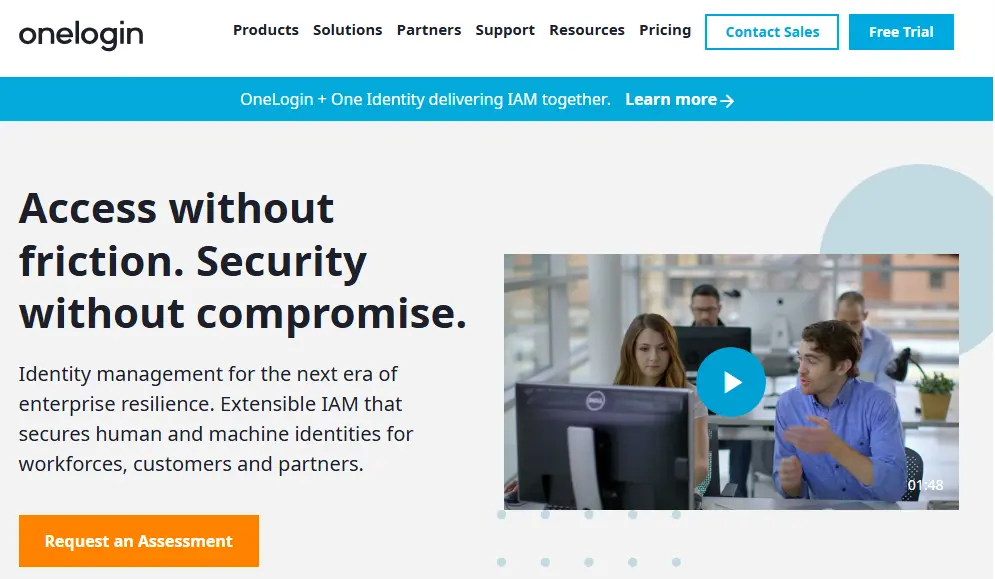
OneLogin is an established player in the Identity and Access Management space, offering a comprehensive all-in-one solution for managing workforce identities. It combines Single Sign-On, Multi-Factor Authentication, user lifecycle management, and directory services in a single cloud-based platform that now operates under One Identity following its 2021 acquisition.
But as your organization grows and evolves, you might find that a general-purpose IAM solution cannot provide the specialized depth you need in certain areas. Perhaps you need more advanced device management than OneLogin offers. Maybe your developers require deeper customization capabilities for customer-facing applications. Or you might need to collaborate seamlessly with external partners and find that internal directory tools do not bridge the gap between companies.
That is where this guide comes in. We will explore dedicated OneLogin alternatives that excel where you need them most, whether you are looking to:
- Connect and share contact directories across multiple organizations for seamless collaboration
- Consolidate identity and device management in a single platform
- Build custom authentication experiences with developer-first tools
- Deploy identity infrastructure in hybrid or on-premises environments
- Implement zero-trust MFA with deep device security verification
- Eliminate per-user licensing costs with open-source solutions
- Scale enterprise identity management with extensive integration coverage
This is not about finding a "better" platform. It is about finding the right fit for your specific needs. Some readers may use these tools alongside OneLogin, while others may find a complete replacement. In fact, the first tool on our list is not an IAM replacement at all, but a complementary solution that adds cross-company collaboration capabilities to your existing identity infrastructure. Let us dive into the alternatives that can give you the specialized capabilities you are looking for.
OneLogin Alternatives Summary

Federated Directory
Best for Cross-Company Contact Collaboration (Complementary to OneLogin)
Federated Directory creates a unified contact directory spanning multiple organizations, allowing employees to find and connect with people at partner companies. It integrates directly with OneLogin to complement your existing IAM infrastructure with inter-company collaboration capabilities.

Okta
Best Alternative for Enterprise-Grade Identity Management
Okta offers an extensive vendor-neutral integration network with 7,000+ pre-built connectors, advanced threat intelligence through ThreatInsight, and comprehensive identity governance for regulated enterprises.

JumpCloud
Best Alternative for All-in-One Identity and Device Management
JumpCloud combines identity management with comprehensive device management across Windows, macOS, and Linux, eliminating the need for separate MDM tools while replacing traditional Active Directory infrastructure.

Auth0
Best Alternative for Developer-First Custom Authentication
Auth0 provides extensive customization through serverless Actions, deep Universal Login branding, and purpose-built B2B multi-tenancy for development teams building custom identity experiences into their applications.

Ping Identity
Best Alternative for Hybrid Deployment Flexibility
Ping Identity supports true hybrid and multi-cloud deployments with FedRAMP High authorization, no-code identity orchestration through DaVinci, and fine-grained attribute-based access control for regulated enterprises.

Duo Security
Best Alternative for Zero-Trust MFA and Device Security
Duo Security specializes in phishing-resistant MFA with Verified Push and native device trust verification, backed by Cisco's security ecosystem for organizations prioritizing authentication security over full lifecycle management.

Keycloak
Best Alternative for Zero Licensing Costs and Data Sovereignty
Keycloak is an open-source IAM solution with no per-user fees, complete infrastructure control, and deep customization through Service Provider Interfaces for organizations with strong in-house technical expertise.
What is OneLogin?
OneLogin is a cloud-based Identity and Access Management platform that provides a comprehensive suite of solutions for securing and managing user access to applications and data. It is designed to streamline and secure user identities for an organization's workforce, including employees, contractors, and partners.
At its core, OneLogin offers Single Sign-On (SSO), which enables users to access all their authorized applications with a single set of credentials. To enhance security, the platform provides robust Multi-Factor Authentication (MFA) that adds an extra layer of protection during login. Key features include:
- Single Sign-On (SSO): One-click access to over 6,000 pre-integrated cloud and on-premises applications via SAML, OpenID Connect, and form-based authentication
- Multi-Factor Authentication:SmartFactor Authentication uses machine learning through the Vigilance AI Threat Engine to assess login risk and dynamically adjust security requirements
- User Lifecycle Management: Automated provisioning and deprovisioning that syncs with HR systems like Workday, UKG, and BambooHR
- Unified Directory: Consolidates user identities from Active Directory, LDAP, Google Workspace, and cloud directories into a single meta-directory
- Virtual LDAP (VLDAP):Brings cloud-based authentication to legacy applications that require LDAP
- OneLogin Desktop:Enables users to log into their computers using OneLogin Cloud Directory credentials for seamless SSO access
Following its acquisition by One Identity in October 2021, OneLogin has become part of a broader Unified Identity Security Platform that integrates with Privileged Access Management (PAM), Identity Governance and Administration (IGA), and Active Directory Management.
OneLogin excels at centralizing identity management for workforce applications. But as your business scales and your collaboration needs extend beyond your organization's boundaries, or as you require deeper capabilities in specific areas like device management, custom authentication, or hybrid deployment, you might find that specialized tools provide the focused functionality you need.
How We Curated Our List of OneLogin Alternatives
After testing OneLogin and researching the market, we found that organizations often need more specialized capabilities than what a general-purpose IAM platform provides. While OneLogin delivers solid authentication and access management, businesses frequently require deeper functionality in specific areas:
- Cross-company collaboration: Sharing contact directories with partner organizations, not just managing internal identities
- Unified device management: Managing endpoints alongside identities without purchasing separate MDM tools
- Developer customization: Building custom authentication flows with extensive code-level extensibility beyond what configuration and built-in hooks provide
- Deployment flexibility: Running identity infrastructure on-premises or in hybrid environments for regulatory compliance
- Deep security focus: Implementing zero-trust MFA with native device posture verification
- Cost optimization: Eliminating per-user licensing fees through open-source solutions
- Extensive integration coverage: Accessing a broad application catalog for complex enterprise environments
Each tool on this list is a leader in one of these specific areas.
⚠️ DISCLAIMER: We are not covering every single tool. Our focus is on highlighting the best alternatives that address some of OneLogin's limitations for various use cases.
1. Federated Directory — Best for Cross-Company Contact Collaboration (Complementary to OneLogin)
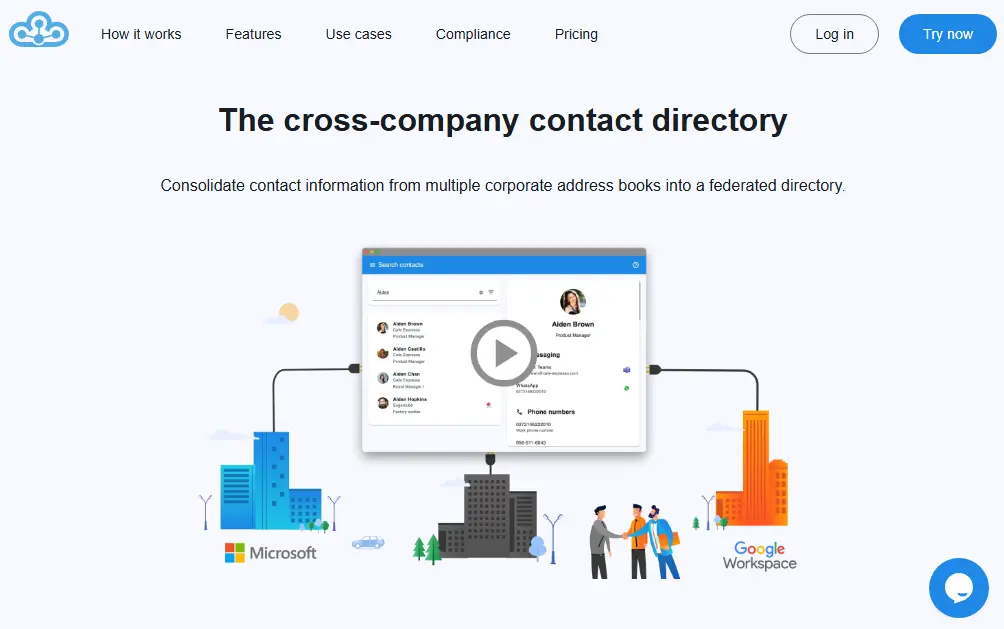
Federated Directory is a cloud-based cross-company contact directory service that enables organizations to connect and share their corporate address books with trusted partner companies.
Unlike the other tools on this list, Federated Directory is not an IAM replacement. It is a complementary solution that works alongside your existing identity infrastructure, including OneLogin, to solve a specific problem that IAM platforms were not designed to address: finding and connecting with people at external organizations.
This distinction matters. Identity platforms like OneLogin manage authentication (who can log in) and authorization (what they can access). Federated Directory manages contact discovery (who works where and how to reach them). These are different problems requiring different solutions.
Key capabilities include:
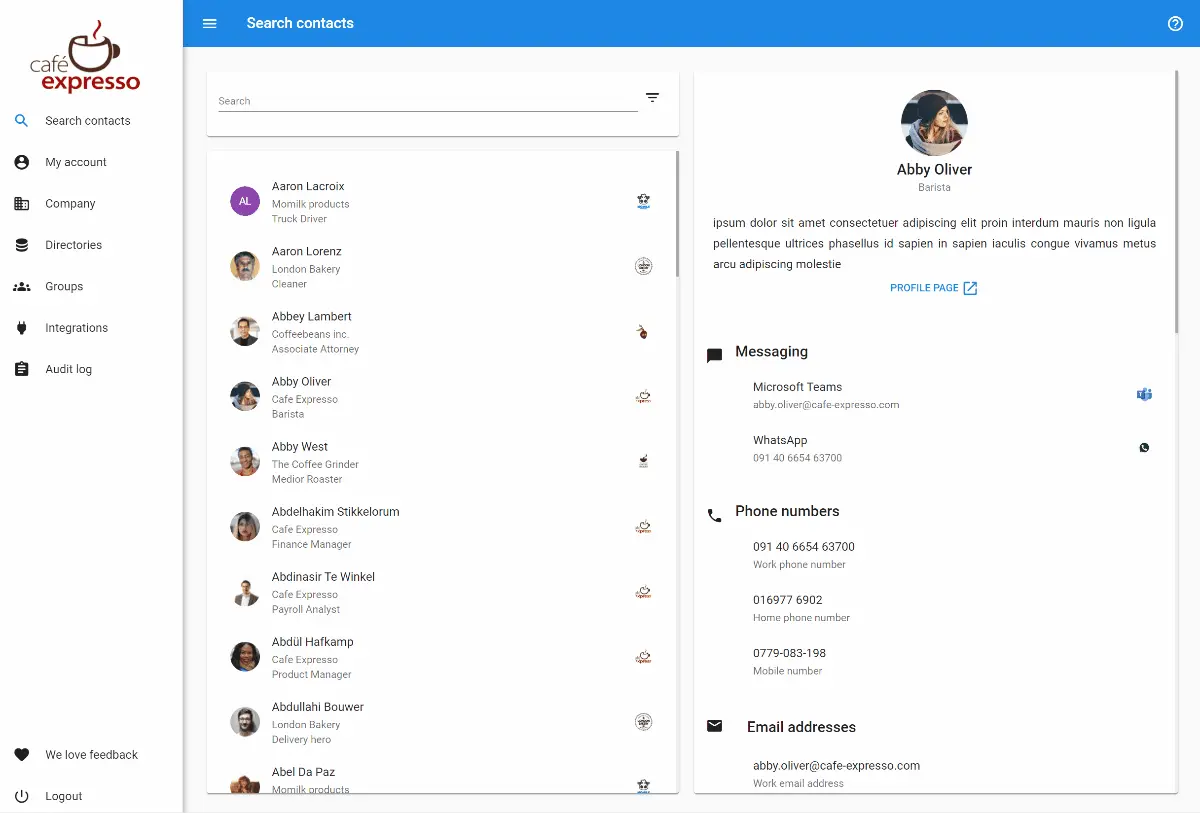
- Cross-Company Directory Federation: Creates a unified, searchable contact directory spanning multiple organizations, allowing employees to find and connect with people at partner companies without manual contact list exchanges
- SCIM 2.0 Compliant API: A fully standards-compliant REST API for developers to integrate contact data into custom applications and workflows, with detailed documentation and Postman collections for rapid integration
- Native OneLogin Integration:Syncs directly with OneLogin (alongside Okta, Microsoft 365, and Google Workspace), helping keep contact information current across systems
- Vendor-Agnostic Architecture: Works across multiple identity providers, enabling collaboration between companies using different IAM ecosystems, whether partners use Microsoft, Google, Okta, or OneLogin
- European Data Residency with GDPR Compliance: All data stored exclusively in European data centers with encryption in transit
- Microsoft Ecosystem Integration: Provides add-ins for Microsoft Outlook and Microsoft Teams for direct directory access from existing productivity tools
Importantly, Federated Directory is not a sync tool. It does not synchronize calendars, files, or application data between organizations. It solves a specific problem: cross-company contact discovery and providing a unified API for B2B collaboration.
Why Choose Federated Directory Alongside OneLogin for Cross-Company Collaboration
Federated Directory occupies a unique position in the identity landscape: rather than replacing OneLogin, it complements existing IAM infrastructure by solving the specific problem of cross-company contact sharing that SSO and access management platforms typically do not address. Here is why organizations add it to their existing stack:
1. Purpose-Built for Inter-Company Contact Sharing
OneLogin's Unified Directory is designed to consolidate user identities from various sources within an organization for authentication and application access.
While OneLogin can integrate with multiple directories like Active Directory, LDAP, and Google Workspace, its primary function is enabling Single Sign-On and enforcing access policies, not facilitating contact discovery between separate companies.
Federated Directory was purpose-built from the ground up to solve the specific problem of cross-company contact silos. When employees need to find the right person at a partner organization, whether that is a supplier, client, franchise location, or subsidiary, they can search a unified directory rather than requesting, receiving, and manually updating contact spreadsheets.
2. Separation of Concerns: Contact Data vs. Identity Permissions
When applications or AI systems need to use contact data, organizations should integrate with a dedicated contact directory, not directly with their identity solution.
With traditional approaches like Microsoft Entra ID B2B, external partners become guest users in your directory. By default, these guest users are hidden from your Global Address List, but the guest user model means partners become objects in your identity system with potential access to resources, rather than remaining in a separate contact-only layer.
Federated Directory maintains clear separation: contact information stays in a purpose-built contact layer, while identity and permissions remain in your IAM platform. This separation means that when your organization changes identity providers (switching from OneLogin to Okta, or from Microsoft to Google), existing application integrations that consume contact data are not affected.
3. Single Endpoint for Multi-Company Environments
For organizations that operate as a group of multiple companies with different identity tenants, common in holding companies, franchise networks, and post-acquisition scenarios, building integrations across all partner directories is complex.
Each company may use a different identity provider, requiring connections to multiple APIs with multiple authentication methods and data formats.
Federated Directory provides a single, clean API endpoint to query contact data across all connected organizations. Instead of building and maintaining integrations with five different Entra ID tenants or a mix of Google Workspace and Microsoft 365 environments, developers connect once to Federated Directory's SCIM-compliant API.
4. Vendor Independence Across Heterogeneous IT Environments
When two companies collaborate, differences in their chosen identity providers can create friction, particularly if one uses OneLogin while another uses Okta, Microsoft Entra ID, or Google Workspace.
Federated Directoryintegrates with OneLogin, Okta, Microsoft 365, and Google Workspace, serving as a bridge between companies regardless of their respective IAM investments.
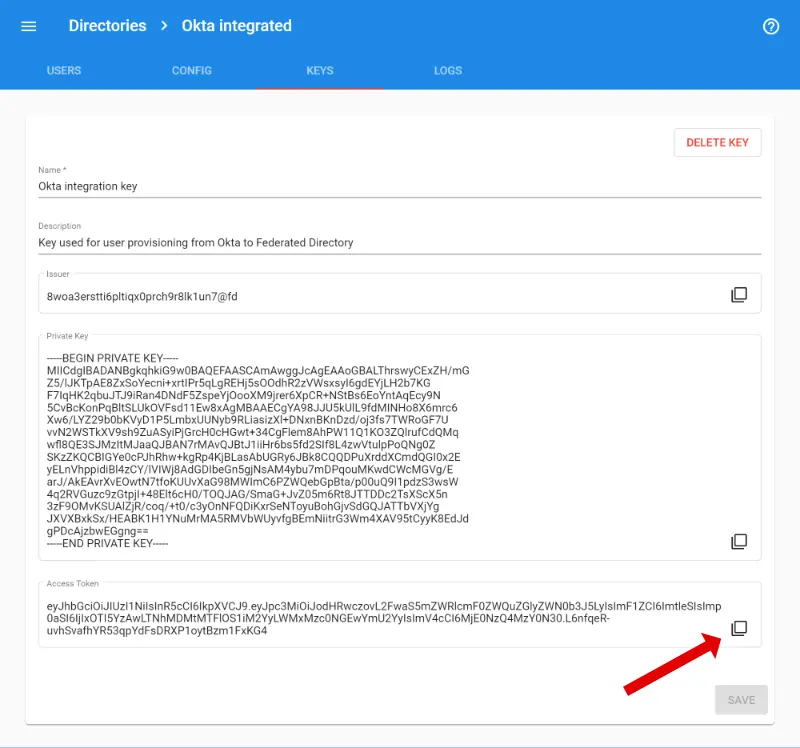
A company using OneLogin can share contacts with a partner using Microsoft Entra ID without either party needing to change their existing infrastructure. For organizations that collaborate across supply chains, franchise networks, or multi-vendor ecosystems, this platform-agnostic approach removes a significant barrier to effective communication.
5. Frictionless User Adoption in Existing Workflows
A common concern with any new tool is whether employees will actually use it.
Federated Directory addresses this by integrating directly into the tools employees already use: Outlook and Microsoft Teams. Users do not need to learn a new application or change their habits. They simply see an additional search option in their existing email or collaboration workflow. This makes adoption seamless and reduces the IT burden of training and change management.
🎯 NOTE: Federated Directory is a complementary tool that integrates directly with OneLogin rather than replacing it. If your primary need is cross-company contact collaboration, Federated Directory adds this capability to your existing OneLogin infrastructure. If you need a full IAM replacement, consider the other alternatives on this list.
Federated Directory Pricing
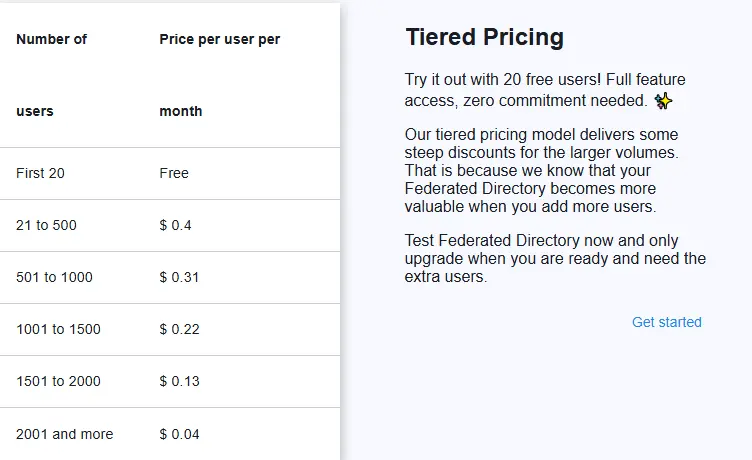
Federated Directory uses a volume-based pricing model with a generous free tier:
Free Tier
- Up to 20 users at no cost
- Full feature access including API with no limitations beyond user count
Paid Tiers
Pricing is tiered with cost savings as you add more licenses. The pricing is intentionally accessible for developers and technical decision-makers, at a level where a developer can reasonably add the subscription without extensive budget approval processes. Contact Federated Directory for specific pricing details for your organization size.
Who Should Use Federated Directory?
Add Federated Directory to your stack if:
- Your organization collaborates closely with external partners, suppliers, or clients and employees frequently need to find contact information for people at those companies. Manual exchange of contact spreadsheets creates data accuracy problems and administrative overhead that Federated Directory eliminates through automated synchronization.
- You are part of a holding company, franchise network, or recently merged organization where different business units operate separate IT systems but need to communicate as one organization. Federated Directory can bridge multiple directory systems into a unified contact experience. For M&A scenarios specifically, Federated Directory provides an immediate collaboration layer while full IT integration happens in the background, which can take months or years.
- Your subsidiary companies have decentralized IT and are free to choose their own tech stack (some on Microsoft, others on Google), but the parent organization still needs seamless collaboration. Federated Directory works across these heterogeneous environments without requiring standardization.
- You use OneLogin alongside other identity providers and need a vendor-neutral solution for contact sharing. Because Federated Directory integrates with OneLogin, Okta, Microsoft 365, and Google Workspace, it does not require partners to standardize on any particular platform.
- Data residency and GDPR compliance are priorities for your organization. As a European company storing all data in European data centers, Federated Directory may satisfy compliance requirements for organizations moving toward European sovereign cloud solutions.
- You are building integrations or custom applications that need to consume contact data from multiple partner organizations. The SCIM-compliant API provides a standardized way to access this data without direct integration to each partner's identity system.
2. Okta — Best Alternative for Enterprise-Grade Identity Management
Okta is an independent, cloud-native identity and access management platform that serves organizations requiring a vendor-neutral identity provider with an extensive pre-built integration network. Founded in 2009 by former Salesforce executives, Okta has grown to serve over 19,300 customers and processes millions of authentications daily.
Its key capabilities include:
- Okta Integration Network (OIN): A catalog of over 7,000 pre-built integrations with cloud and on-premises applications, significantly reducing time to onboard new applications
- Universal Directory: A centralized meta-directory that consolidates identity information from multiple sources including Active Directory, LDAP, and HR systems
- ThreatInsight Security Intelligence:AI-powered threat detection that analyzes authentication data across Okta's entire customer network to identify and block suspicious login attempts
- Identity Governance:Built-in access certification campaigns, compliance reporting, and streamlined access request workflows
- Adaptive Multi-Factor Authentication: Context-aware authentication that dynamically adjusts security requirements based on user behavior, device posture, location, and network information
Okta positions itself as the enterprise-grade, vendor-neutral alternative for organizations that need a purpose-built identity platform without being tied to a specific technology ecosystem.
Why Choose Okta Over OneLogin for Enterprise-Grade Identity Management
Okta stands out compared with OneLogin in several ways that matter particularly to enterprise organizations:
1. Extensive Vendor-Neutral Integration Network
While OneLogin offers over 6,000 pre-integrated applications, Okta's Integration Network exceeds 7,000 integrations and is regularly updated with new applications. Many of Okta's integrations provide full SAML, OIDC, and SCIM provisioning support out of the box, though coverage varies by application.
For enterprises managing diverse application portfolios spanning legacy on-premises systems, modern SaaS applications, and custom internal tools, this integration breadth translates directly into reduced implementation time and lower total cost of ownership.
2. Advanced Threat Intelligence Through Network Effect
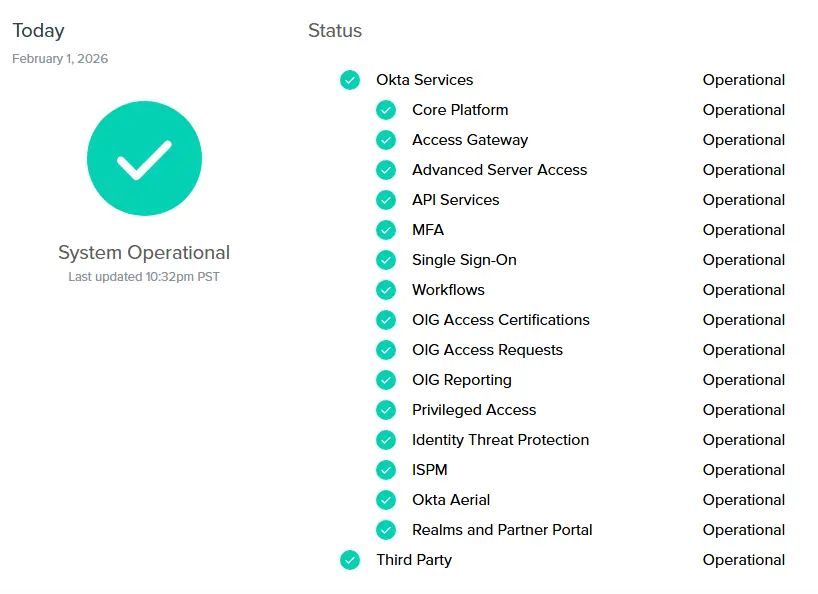
Okta's ThreatInsight leverages threat data gathered from millions of daily authentications across its entire customer base of 19,300+ organizations. This collective intelligence allows Okta to identify and preemptively block authentication attempts from IP addresses known to be involved in credential stuffing, password spraying, and other large-scale attacks.
OneLogin's Vigilance AI engine operates with a smaller data set given OneLogin's smaller market presence. For enterprises where security is paramount, Okta's network effect provides a meaningful security advantage.
3. Comprehensive Identity Governance Integration
OneLogin's identity governance capabilities require combining multiple products within the One Identity portfolio.
Okta's Identity Governance is natively integrated into the same platform as its access management capabilities, providing a unified experience for access certification campaigns, automated access reviews, and access requests. This integration matters for enterprises facing regulatory compliance requirements like SOX, HIPAA, and GDPR.
🎯 NOTE: We also evaluated Microsoft Entra ID and Ping Identity as enterprise-grade alternatives. While Microsoft Entra ID excels for organizations deeply invested in the Microsoft ecosystem, and Ping Identity offers strong hybrid deployment flexibility, Okta offers a comprehensive vendor-neutral solution for enterprises requiring broad integration coverage.
Okta Pricing
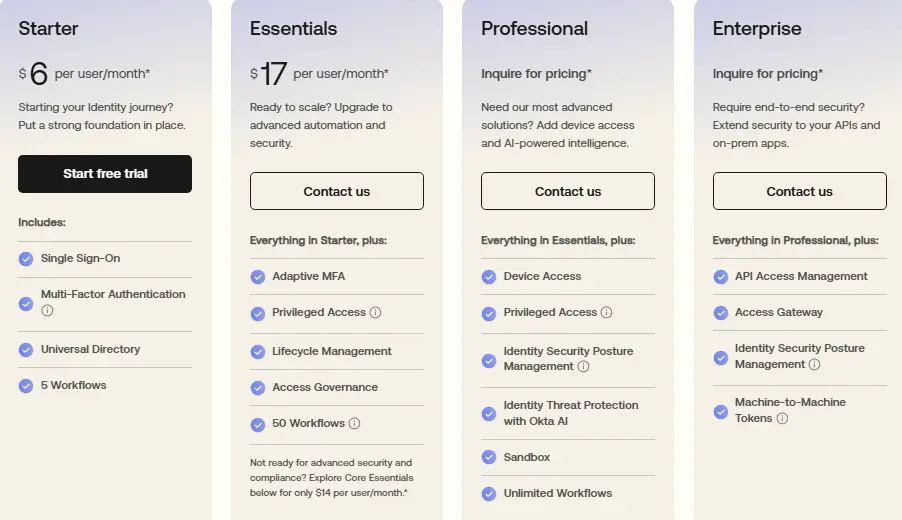
Okta uses a tiered, per-user, per-month model billed annually with a minimum annual contract of $1,500.
- Starter Suite: $6 per user/month (includes SSO, MFA, Universal Directory)
- Essentials Suite: $17 per user/month (adds Adaptive MFA, Lifecycle Management, Access Governance)
- Professional Suite: Contact for pricing (adds Device Access, Identity Threat Protection with Okta AI)
- Enterprise Suite: Contact for pricing (adds API Access Management, expanded Identity Security Posture Management)
Who Should Use Okta?
Choose Okta if:
- Your organization manages a large number of users across a diverse application portfolio where the integration network's breadth becomes increasingly valuable as application count grows.
- You require vendor-neutral identity management without ecosystem lock-in and use a mix of Microsoft, Google, AWS, and specialized industry applications.
- Security and compliance are primary drivers and you benefit from ThreatInsight's network effect, comprehensive audit trails, and native identity governance capabilities.
3. JumpCloud — Best Alternative for All-in-One Identity and Device Management
JumpCloud is a cloud-native open directory platform that centralizes identity, access, and device management into a single unified console, addressing a fundamental gap that OneLogin leaves unfilled.
While OneLogin focuses primarily on identity and access management, JumpCloud extends its capabilities to include comprehensive device management across Windows, macOS, Linux, iOS, and Android.
Its key capabilities include:
- Unified Endpoint Management (UEM):Manage Windows, macOS, Linux, iOS, and Android from a single console with policy enforcement and patch management (software deployment features vary by platform)
- Cloud-Based Directory Service:Replaces traditional on-premises Active Directory infrastructure entirely in the cloud
- Single Sign-On (SSO): Support for over 800 pre-integrated applications via SAML 2.0 and OIDC
- Cloud LDAP and Cloud RADIUS: Authenticate legacy applications and secure network access without on-premises servers
- Zero-Touch Device Enrollment:Apple Business Manager integration for Mac device deployment
JumpCloud is well-suited for small to medium-sized businesses with mixed operating systems that want to consolidate multiple point solutions into a single platform.
Why Choose JumpCloud Over OneLogin for All-in-One Identity and Device Management
1. Native Device Management Eliminates Separate MDM Tools
OneLogin provides limited endpoint features through OneLogin Desktop (device trust certificates and workstation login), but it does not offer full device management capabilities. Organizations using OneLogin typically purchase and maintain a separate MDM/UEM solution.
JumpCloud includes comprehensive device management as part of its core platform. Administrators can enforce security policies like full-disk encryption, manage OS patches, and execute remote commands across their entire device fleet from the same console where they manage user identities.
2. Cloud Directory Service Replaces On-Premises Active Directory
While OneLogin can integrate with existing directories like Active Directory and LDAP, it requires organizations to maintain that underlying directory infrastructure.
JumpCloud's Cloud Directory acts as a complete replacement for traditional on-premises Active Directory. For cloud-first SMBs that do not want to maintain physical domain controllers, JumpCloud provides a single source of truth for user identities that is entirely cloud-based.
3. Cross-Platform Support for Heterogeneous Environments
JumpCloud was designed to address the limitations of Windows-centric Active Directory in a world where macOS and Linux devices are prevalent in businesses. The platform provides strong cross-platform support for Windows, macOS, and Linux device management, though some features (such as patch management for specific Linux distributions) may vary.
🎯 NOTE: We also evaluated LastPass and Duo Security. While LastPass excels at password management and Duo Security is strong for MFA, JumpCloud offers a comprehensive platform for SMBs needing to consolidate identity management with device management.
JumpCloud Pricing
JumpCloud pricing is structured as follows:
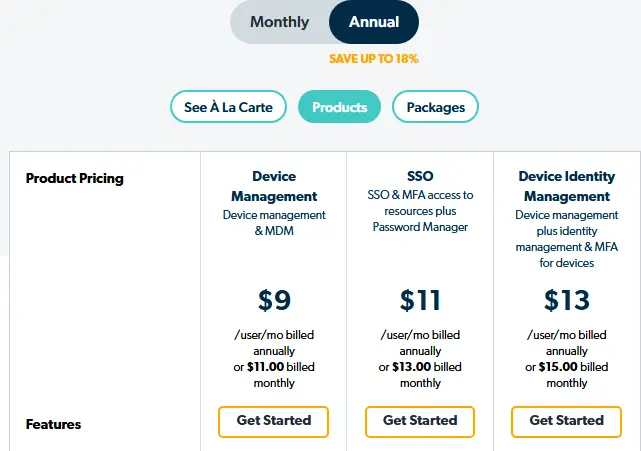
- Device Management Package: $9/user/month (billed annually)
- SSO Package: $11/user/month (billed annually)
- Device Identity Management Package: $13/user/month (billed annually)
- Platform Essentials, Platform, Platform Prime: Contact Sales
JumpCloud offers a 30-day free trial with no restrictions and special pricing for educational institutions and nonprofits.
Who Should Use JumpCloud?
Choose JumpCloud if:
- Your organization manages a mix of Windows, macOS, and Linux devices and you want a single platform for both user identities and endpoint security.
- You are a cloud-first SMB without on-premises Active Directory and want a modern cloud directory that eliminates the need for physical domain controllers.
- Your IT team is small and cannot afford the complexity of managing separate IAM and MDM tools.
4. Auth0 — Best Alternative for Developer-First Custom Authentication
Auth0 is an identity-as-a-service platform acquired by Okta in 2021 that provides developers with comprehensive building blocks to secure applications without requiring deep security expertise. It positions itself as an alternative for teams that require extensive customization capabilities and serverless extensibility through code.
Its key capabilities include:
- Universal Login with Deep Customization:Server-side rendered authentication that can be extensively branded using no-code editors, low-code page templates, or custom HTML/CSS/JavaScript
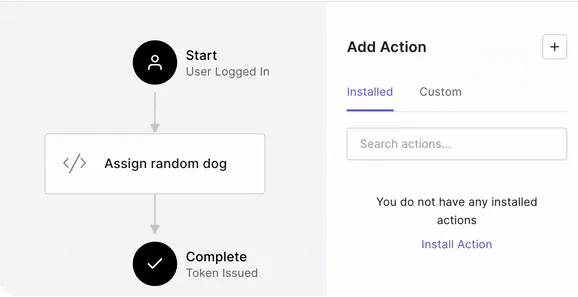
- Actions (Serverless Extensibility):Custom Node.js functions that execute at specific trigger points within authentication flows, allowing developers to inject complex business logic
- Comprehensive Authentication Methods: Passwordless authentication, 30+ social login providers, enterprise federation via SAML and OpenID Connect, and FIDO2-compliant security keys
- Breached Password Detection:Checking against databases of known compromised credentials (detection timing varies; faster detection available with Credential Guard add-on)
- Organizations (Multi-Tenant B2B Architecture):Purpose-built for SaaS companies managing multiple business customers with isolated users and authentication policies
Auth0 targets engineering teams building customer-facing applications who need granular control over authentication flows.
Why Choose Auth0 Over OneLogin for Developer-First Custom Authentication
1. Extensibility Through Code with Auth0 Actions
Auth0's Actions feature enables developers to write actual Node.js functions that execute during the authentication pipeline at specific trigger points.
These serverless functions can perform complex operations: enriching tokens with data from external APIs, implementing conditional MFA based on custom risk calculations, or integrating with CRMs. While OneLogin also offers code-level extensibility through Smart Hooks, Auth0's Actions ecosystem provides a broader range of trigger points and an extensive library of pre-built integrations.
2. Universal Login Customization Depth
Auth0's Universal Login provides extensive branding and customization options.
Page templates using Liquid templating enable significant control over HTML and CSS around the login widget. Custom domains ensure users never see an "auth0.com" URL. For organizations building consumer-facing applications where brand consistency is paramount, Auth0's customization depth is a substantial advantage.
3. Purpose-Built B2B Multi-Tenancy with Organizations
Auth0's Organizations feature is designed specifically for B2B SaaS companies managing multiple business customers.
Each organization can have its own users, custom branding, enabled authentication connections, and role-based access control policies. While some branding elements (such as custom domains) are shared at the tenant level, organizations provide meaningful isolation for multi-tenant applications.
🎯 NOTE: We also evaluated Ping Identity and CyberArk for this developer-focused archetype. Auth0 offers an extensive SDK library and developer-centric customization capabilities for teams building custom identity experiences.
Auth0 Pricing
Auth0 pricing is structured as follows:
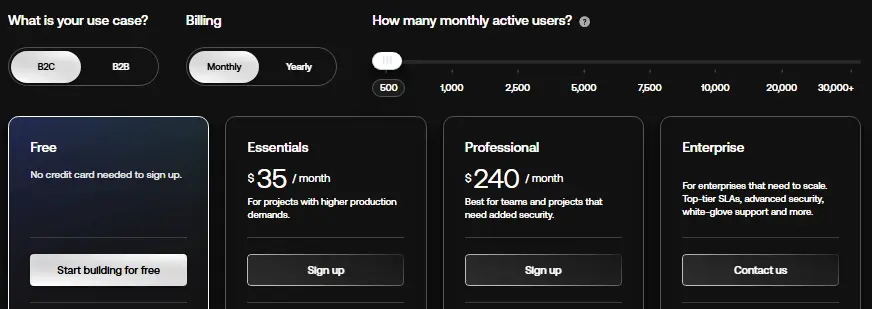
- Free Plan: $0 for up to 25,000 monthly active users (limited features)
- Essentials Plan: $35/month for up to 500 MAUs
- Professional Plan: $240/month for up to 500 MAUs
- Enterprise Plan: Custom pricing with 99.99% SLA
Who Should Use Auth0?
Choose Auth0 if:
- Your development team needs to implement custom authentication logic through code that cannot be met through policy configuration alone.
- You are building a B2B SaaS application requiring per-customer identity isolation with organization-specific branding and authentication.
- Extensive branding customization of the login experience is a requirement where authentication screens must closely match the rest of your application.
5. Ping Identity — Best Alternative for Hybrid Deployment Flexibility
Ping Identity is an enterprise-focused Identity and Access Management platform that serves organizations requiring deployment flexibility spanning cloud-native, dedicated tenant, self-managed, and on-premises environments. Acquired by Thoma Bravo in October 2022 for $2.8 billion, Ping Identity targets large enterprises in regulated industries.
Its key capabilities include:
- PingFederate:Enterprise-grade federation and SSO supporting SAML, OAuth, OpenID Connect, WS-Federation, and SCIM
- PingOne DaVinci:No-code identity orchestration for designing complex authentication journeys without developer resources
- PingAuthorize:Dynamic, attribute-based access control extending beyond traditional role-based models
- PingIntelligence for APIs:AI-powered threat detection with automated blocking of API-based attacks
- FedRAMP High Authorization:Certification for government and defense-related applications
Ping Identity supports true hybrid and multi-cloud deployments, including complete on-premises installations.
Why Choose Ping Identity Over OneLogin for Hybrid Deployment Flexibility
1. Unmatched Deployment Flexibility
Where OneLogin operates primarily as a cloud-based platform, Ping Identity was designed to support true hybrid and multi-cloud deployments.
Organizations can choose between cloud-native services, dedicated tenant deployments, fully self-managed installations, or complete on-premises deployments. PingFederate's heritage as an on-premises federation server makes it well-suited for integrating with legacy systems.
2. No-Code Identity Orchestration Through DaVinci
Ping Identity'sDaVinci orchestration engine provides drag-and-drop workflow building for designing complex authentication journeys without requiring developer resources. Organizations can visually design intricate identity flows that incorporate risk signals, step-up authentication, and custom business logic.
3. FedRAMP High Authorization for Government Compliance
Ping Identity has achieved FedRAMP High authorization, followed by Department of Defense IL5 authorization. Organizations in the federal sector or serving government clients have fewer options when it comes to identity providers meeting these compliance thresholds.
🎯 NOTE: We also evaluated CyberArk for this archetype. Ping Identity offers comprehensive deployment flexibility for organizations scaling from mid-market to enterprise with changing compliance requirements.
Ping Identity Pricing
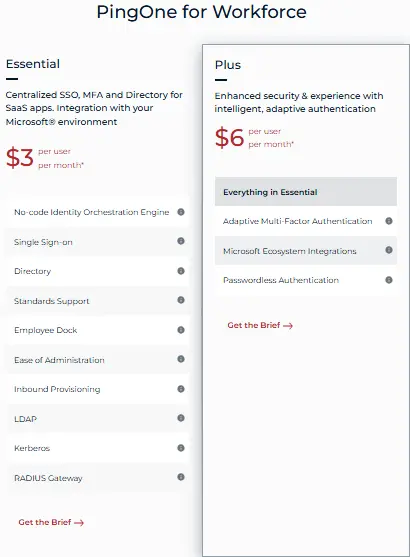
Ping Identity pricing is structured as follows:
- PingOne for Workforce Essential Plan: $3/user/month (5,000 user minimum)
- PingOne for Workforce Plus Plan: $6/user/month (5,000 user minimum)
- PingOne for Customers Essential Plan: Starting at $35,000 annually
- PingOne for Customers Plus Plan: Starting at $50,000 annually
A free 30-day trial is available.
Who Should Use Ping Identity?
Choose Ping Identity if:
- Your organization requires true hybrid or on-premises deployment due to regulatory compliance or data sovereignty requirements.
- You need fine-grained, attribute-based authorization that extends beyond "who can access which application" to control what users can see and do within applications.
- FedRAMP High or government compliance is mandatory for your procurement eligibility.
6. Duo Security (Cisco) — Best Alternative for Zero-Trust MFA and Device Security
 Best Alternative for.webp)
Duo Security, acquired by Cisco for $2.35 billion in 2018, is a cloud-based identity security platform specializing in multi-factor authentication and zero-trust access controls. While Duo has expanded its capabilities to include SSO and directory features, its core strength remains verifying user identities and assessing device security posture before granting access.
Its key capabilities include:
- Device Trust Verification:Assesses security posture of every endpoint including OS version, firewall status, disk encryption, and endpoint protection
- Verified Duo Push:Push notifications requiring code entry to resist MFA fatigue attacks and credential phishing
- Duo Passport:Reduces authentication friction by remembering trusted device and user combinations
- Identity Threat Detection and Response (ITDR):Real-time monitoring with AI-driven analytics through Cisco Identity Intelligence
- VPN-less Remote Access:Duo Network Gateway provides secure per-application access without broad VPN connectivity
Duo Security positions itself as "security-first IAM" for organizations whose primary concern is securing the authentication process.
Why Choose Duo Security Over OneLogin for Zero-Trust MFA and Device Security
1. Native Device Trust and Health Verification
OneLogin can integrate with MDM solutions, but Duo builds device trust verification directly into its authentication workflow as a foundational capability. Before any user gains access, Duo assesses whether the device meets security standards: Is the OS current? Is the firewall enabled? Is disk encryption active? These checks happen in real-time at authentication.
2. Verified Duo Push and MFA Fatigue Resistance
Duo's Verified Push displays a unique multi-digit code on the login screen that users must enter into the Duo Mobile app, ensuring active engagement with the legitimate login attempt. This helps protect against "MFA fatigue" attacks where malicious actors repeatedly send prompts hoping users will accidentally approve.
3. Specialized Security Depth Backed by Cisco's Ecosystem
As part of Cisco's security portfolio, Duo benefits from integration with network security, endpoint security, and threat intelligence. The Duo Advantage and Premier tiers include Cisco Identity Intelligence with cross-identity visibility and Identity Threat Detection and Response capabilities.
🎯 NOTE: We also evaluated RSA SecurID and Yubico. Duo Security offers an accessible balance of zero-trust security depth with straightforward deployment.
Duo Security Pricing
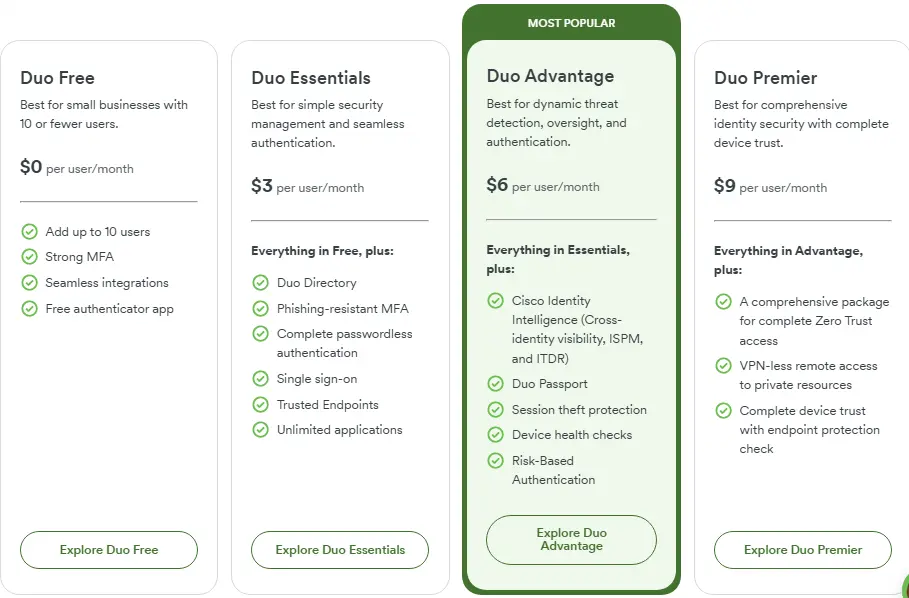
Duo Security pricing is structured as follows:
- Duo Free: $0/user/month (limited to 10 users)
- Duo Essentials: $3/user/month
- Duo Advantage: $6/user/month (includes Cisco Identity Intelligence, ITDR)
- Duo Premier: $9/user/month (includes VPN-less remote access)
A 30-day free trial is available.
Who Should Use Duo Security?
Choose Duo Security if:
- Your organization prioritizes authentication security over full identity lifecycle management and needs deeper MFA and device trust verification than broader IAM platforms provide.
- You need device posture verification without deploying a full MDM solution with agentless visibility and user self-remediation flows.
- You already have a directory service and need a security layer to add zero-trust controls without replacing existing identity infrastructure.
7. Keycloak — Best Alternative for Zero Licensing Costs and Data Sovereignty
Keycloak is an open-source Identity and Access Management solution developed under Red Hat's stewardship and now an incubating project within the Cloud Native Computing Foundation (CNCF). It provides a comprehensive, self-hosted platform for securing applications with modern authentication and authorization capabilities.
Its key capabilities include:
- Completely Free and Open Source:Licensed under Apache 2.0 with no per-user fees
- Full Protocol Support: Native implementation of OpenID Connect 1.0, OAuth 2.0, and SAML 2.0
- Identity Brokering and Social Login: Connect to external identity providers without application code changes
- Built-in LDAP and Active Directory Integration: Direct connection with synchronization (bidirectional sync available when configured in WRITABLE edit mode)
- Fine-Grained Authorization Services:Advanced authorization extending beyond RBAC to support ABAC
- Cloud Native and Scalable: Kubernetes-native deployment with horizontal scalability
Keycloak is recommended for organizations with strong in-house technical expertise who require deep customization, complete data sovereignty, and want to avoid vendor lock-in.
Why Choose Keycloak Over OneLogin for Zero Licensing Costs and Data Sovereignty
Keycloak stands out compared with OneLogin in several fundamental ways:
1. Complete Elimination of Per-User Licensing Fees
OneLogin's pricing ranges from $4 to $10 per user per month. For organizations with large user counts, these per-user fees add up significantly.
Keycloak has absolutely no per-user fees. While organizations must account for infrastructure costs and personnel for maintenance, total cost of ownership can be dramatically lower for organizations with existing DevOps capabilities and the technical expertise to manage the platform.
2. Complete Data Sovereignty and Infrastructure Control
OneLogin operates as a cloud-based platform where user identity data resides in OneLogin's infrastructure.
Keycloak can be deployed entirely on-premises, in a private cloud, or in any public cloud environment. This provides complete control over where user data is stored and processed, which is critical for organizations subject to strict data sovereignty regulations like GDPR, HIPAA, or industry-specific requirements.
3. Unparalleled Customization Through Service Provider Interfaces
Keycloak's modular architecture, built on Service Provider Interfaces (SPIs), enables organizations to customize or replace nearly every aspect of functionality.
Organizations can implement custom authentication flows, create custom User Federation providers, develop custom token mappers, and build custom event listeners. While some SaaS solutions offer extensibility through hooks and rules, Keycloak's SPI architecture provides deeper customization for organizations with Java development expertise.
🎯 NOTE: We also evaluated Authentik and Authelia for this open-source archetype. Keycloak is a mature and enterprise-ready open-source IAM solution with a large community and comprehensive feature set.
Keycloak Pricing
- Open-Source Version: $0 licensing cost, completely free under Apache 2.0 license
- Red Hat Build of Keycloak:Subscription-based through Red Hat Runtimes, priced by processor cores (not per-user)
Organizations bear infrastructure costs (which vary based on deployment size, cloud provider, and high-availability requirements) and personnel costs for deployment and maintenance.
Who Should Use Keycloak?
Choose Keycloak if:
- Your organization has strong in-house technical expertise in DevOps, SRE, or Java development for deployment, configuration, and ongoing maintenance.
- You require complete data sovereignty and infrastructure control where regulatory requirements dictate that identity data must remain entirely within your control.
- You need deep customization that SaaS platforms cannot provide including custom authentication flows and integration with proprietary user stores.
- You want to avoid vendor lock-in and per-user cost escalation with predictable costs tied to infrastructure rather than user count.
The Final Verdict
While OneLogin serves well as a comprehensive cloud-based IAM solution, growing businesses often need specialized tools that provide deeper capabilities in specific areas. Based on our research, here are the best alternatives:
- Federated Directory for adding cross-company contact collaboration to your existing OneLogin infrastructure (complementary, not a replacement)
- Okta for enterprise-grade identity management with broad integration coverage and threat intelligence
- JumpCloud for unified identity and device management without separate MDM tools
- Auth0 for developer-first custom authentication with code-level extensibility
- Ping Identity for hybrid deployment flexibility and fine-grained authorization in regulated industries
- Duo Security for zero-trust MFA with native device posture verification
- Keycloak for zero licensing costs with complete data sovereignty and self-hosted deployment
Remember, you do not have to choose between OneLogin and these alternatives exclusively.
Many organizations successfully use OneLogin alongside complementary tools to create their ideal identity stack. Federated Directory, for example, integrates directly with OneLogin to add cross-company collaboration capabilities that identity platforms were not designed to provide. Consider your specific needs, security requirements, and growth plans when deciding which solution works best for you.
Need to collaborate seamlessly with partner organizations? Federated Directory connects your corporate address book with trusted external companies, letting employees find the right contacts instantly — without replacing your existing OneLogin infrastructure.
Start Free — Up to 20 Users at No Cost