OneLogin Review 2026: Is This Identity Platform Right for You?
OneLogin has established itself as a significant player in the Identity and Access Management space, serving organizations that need to secure and streamline user access to their applications. With features spanning Single Sign-On, Multi-Factor Authentication, and automated user lifecycle management, it provides the infrastructure many businesses need to manage their workforce identities effectively.
To create this OneLogin review, I've analyzed the platform extensively. I believe it's the ideal choice if:
- You need a unified platform for Single Sign-On and Multi-Factor Authentication
- You want to automate user provisioning and deprovisioning across applications
- You have a hybrid IT environment with both cloud and on-premise applications
- You value an intuitive interface and straightforward implementation
- You need to consolidate multiple user directories into a single source of truth
However, OneLogin is an identity and access management solution, not a contact directory. While it excels at managing who can access what within your organization, it doesn't provide a mechanism for sharing contact information across company boundaries. This is where Federated Directory becomes valuable.
Federated Directory is a cross-company contact directory platform that integrates directly with OneLogin, enabling organizations to share their corporate address books with trusted partners without the complexity of adding external users to your identity solution.
Because Federated Directory complements OneLogin's IAM capabilities with cross-company contact sharing, I've included an overview of it at the end of this review. If you're ready to extend your directory beyond organizational boundaries, you can get started with Federated Directory for free here.
Table of Contents
- What is OneLogin?
- OneLogin Pros & Cons
- OneLogin Review: How it Works & Key Features
- Where OneLogin Falls Short
- The Perfect Complement to OneLogin: Federated Directory
- OneLogin and Federated Directory: Comparison Summary
- Final Verdict
What is OneLogin?
OneLogin is a cloud-based Identity and Access Management platform founded in 2009 by Danish brothers Thomas and Christian Pedersen.
The founders were previously involved with Zendesk before recognizing the growing challenge of managing user access across multiple cloud applications. This insight led them to create a platform designed to simplify and secure the login process for businesses.
Today, OneLogin provides a comprehensive suite of identity solutions including Single Sign-On, Multi-Factor Authentication, automated user provisioning, and a unified directory that consolidates identities from multiple sources. In October 2021, OneLogin was acquired by One Identity, becoming part of a broader "Unified Identity Security Platform" that combines access management with privileged access management and identity governance capabilities.
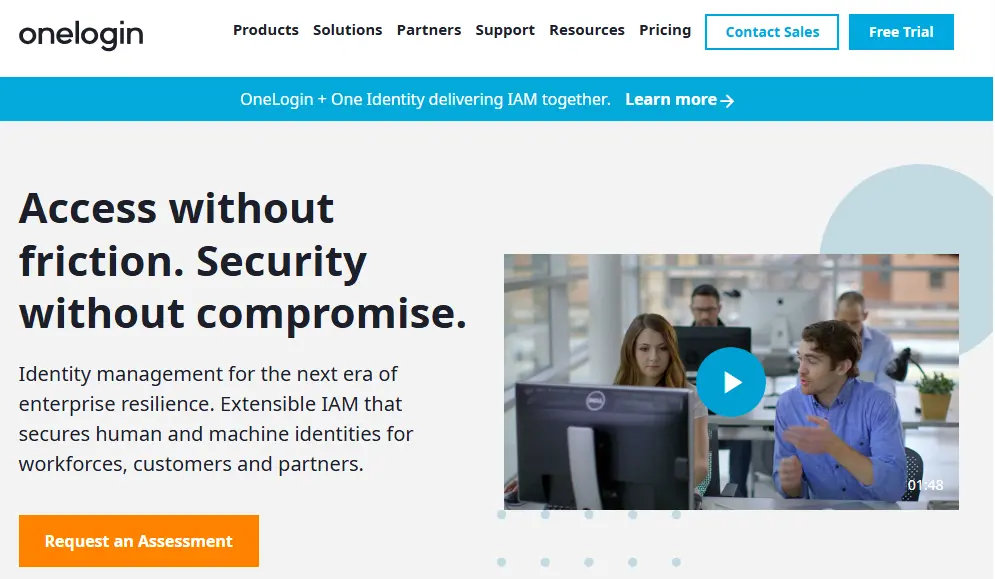
The platform has earned recognition from industry analysts, including being named a "Leader" in both Gartner's Magic Quadrant for Access Management and Forrester's Wave for Identity as a Service.
With over 6,000 pre-integrated applications and support for both cloud and on-premise resources, OneLogin serves mid-market to enterprise organizations seeking to manage their workforce, customer, and partner identities from a single platform.
OneLogin Pros & Cons
| Pros | Cons |
|---|---|
| Intuitive interface praised for ease of use | Pricing may be expensive for some smaller organizations |
| Extensive catalog of 6,000+ pre-integrated applications | Advanced configurations have a learning curve |
| SmartFactor Authentication adapts security to risk levels | Cross-company directory sharing not built-in |
| Strong support for hybrid cloud and on-premise environments | Some users report API limitations for custom integrations |
| Real-time directory synchronization with Active Directory | Contact discovery across organizations requires additional tools |
| 24/7 support availability | — |
OneLogin Review: How it Works & Key Features
Single Sign-On: OneLogin provides one-click access to all authorized applications from a customizable portal.
OneLogin's Single Sign-On capability enables users to access all their workplace applications with a single set of credentials. After authenticating once, users can click on any application in their OneLogin portal and gain immediate access without entering additional passwords.
The platform supports multiple authentication protocols including SAML 2.0, OpenID Connect, WS-Federation, and OAuth. For applications that don't support modern federation standards, OneLogin offers form-based authentication, which securely stores and automatically fills login credentials for legacy applications.
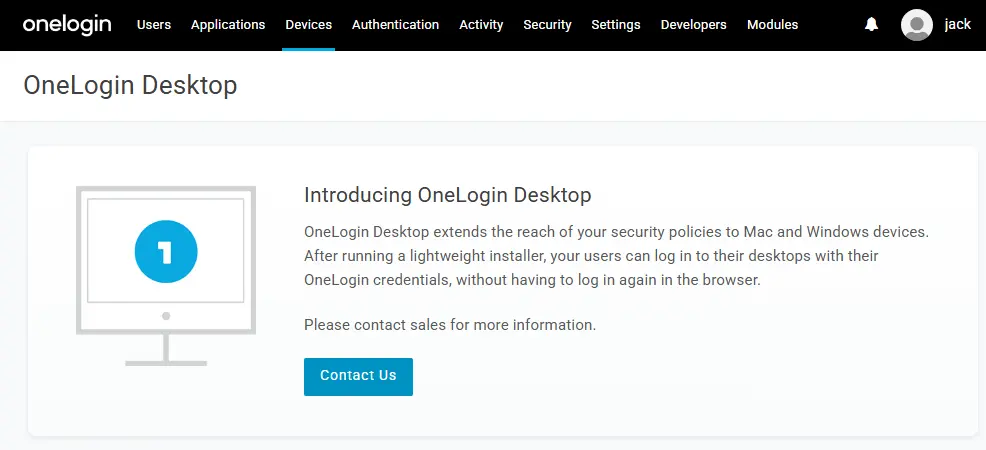
A notable feature is OneLogin Desktop, which allows users to log into their computers using their OneLogin credentials. Once authenticated at the operating system level, users gain seamless access to their applications without additional login prompts. The portal provides the same one-click access from smartphones and tablets.
The portal itself can be extensively customized with company branding, including logos, colors, and custom text. Administrators control which applications appear for different user groups based on their roles and permissions.
Multi-Factor Authentication: SmartFactor Authentication uses machine learning to adjust security requirements based on risk.
OneLogin's Multi-Factor Authentication goes beyond standard second-factor verification by incorporating adaptive, risk-based authentication through its SmartFactor Authentication feature.
This system uses a machine learning engine called Vigilance AI to analyze contextual factors for each login attempt, including user location, device characteristics, and behavioral patterns.
For low-risk scenarios (familiar device, normal location, typical behavior), SmartFactor can suppress the MFA challenge entirely, providing a frictionless experience. For high-risk situations (unfamiliar location, new device, anomalous patterns), the system automatically requires additional authentication factors.
The platform supports a wide range of authentication methods:
- OneLogin Protect: A mobile app providing push notifications and one-time passwords
- WebAuthn and FIDO2: Support for security keys and biometric authentication
- SMS and Voice: One-time codes delivered via text message or phone call
- Third-party authenticators: Integration with Google Authenticator, Duo, YubiKey, and RSA SecurID
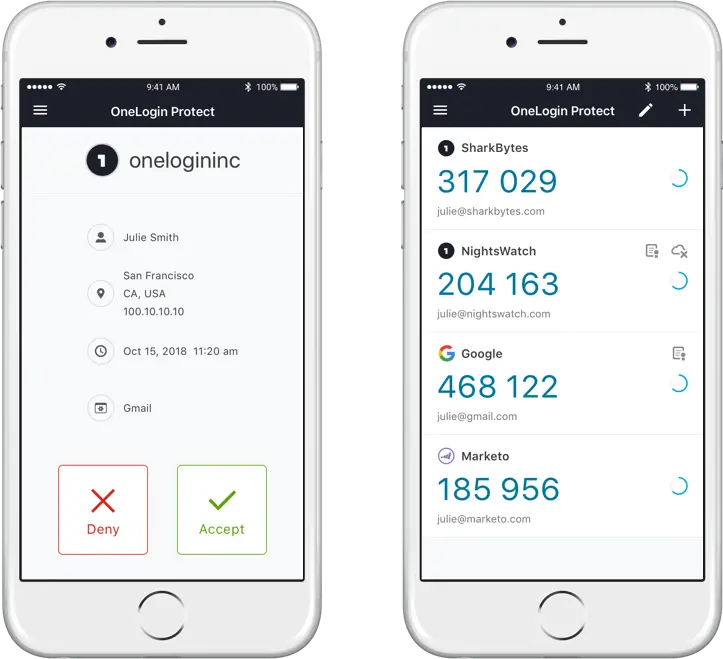
Administrators can create granular policies that specify which authentication factors are required for different user groups, applications, or scenarios. This policy-based approach allows organizations to balance security requirements with user convenience.
User Lifecycle Management: Automated provisioning ensures the right access at the right time throughout the employee journey.
OneLogin's User Lifecycle Management automates the process of creating, updating, and revoking user access across applications.
The system synchronizes with HR systems like Workday, UKG, and BambooHR, as well as traditional directories like Active Directory and LDAP, to automatically trigger provisioning workflows based on employee status changes.
When a new employee joins, OneLogin can automatically create their accounts in all necessary applications based on their role, department, and location. The platform supports SCIM (System for Cross-domain Identity Management) for standardized provisioning to SCIM-compliant applications, as well as custom provisioning rules for applications that require specific configurations.
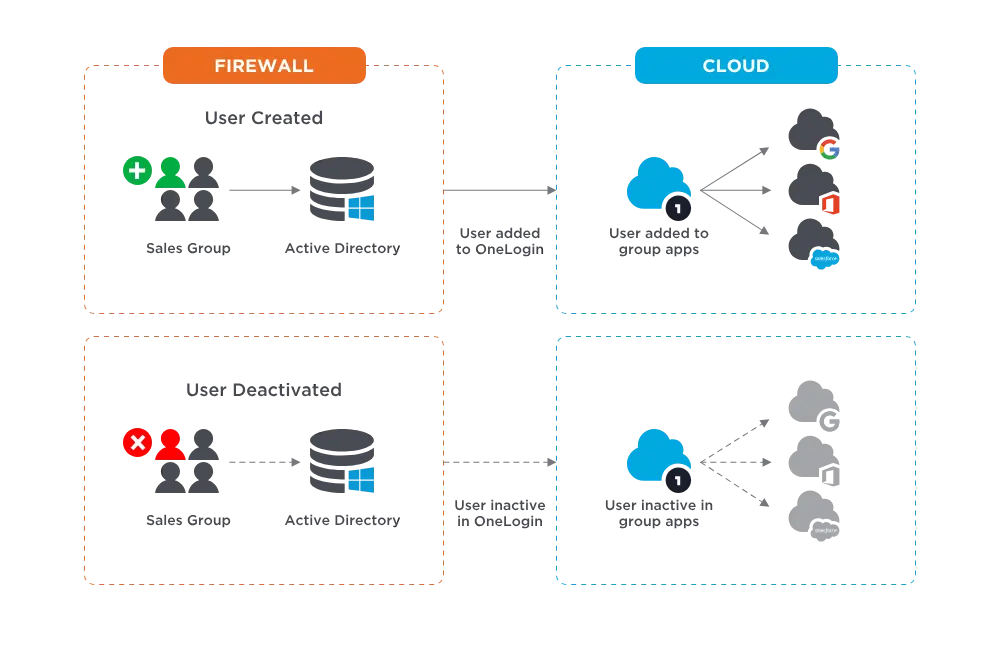
Role changes can trigger automatic access updates when properly configured. If an employee transfers to a different department, their access to previous department applications can be revoked while new access is granted, helping maintain the principle of least privilege throughout the employee lifecycle.
The offboarding process is particularly critical for security. When an employee leaves the organization and is deactivated in the source directory, OneLogin immediately suspends or deletes their accounts across all connected applications. This "kill switch" functionality helps prevent unauthorized access from former employees.
Unified Directory: A centralized meta-directory consolidates identities from multiple sources.
OneLogin's Unified Directory aggregates user identities from various sources into a single, authoritative repository.
Organizations can connect multiple directories (such as Active Directory for employees, LDAP for contractors, and HR systems for workforce data) and present them as a unified view to applications.
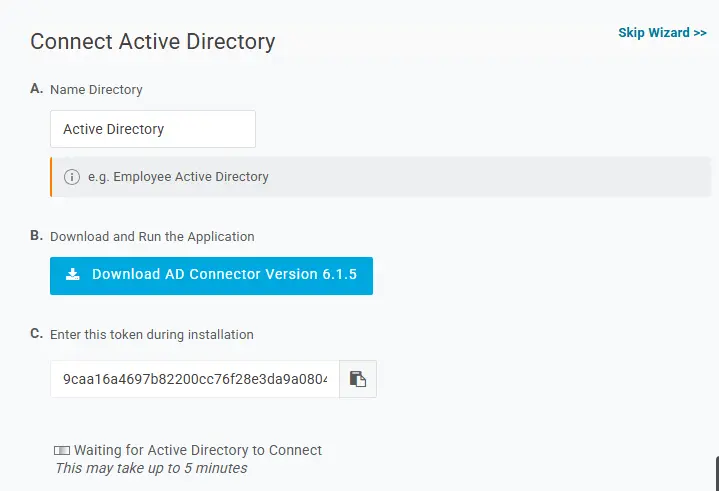
The Active Directory Connector provides real-time, bi-directional synchronization with on-premise Active Directory. Unlike some competitors that poll for changes periodically, OneLogin's connector subscribes to change notifications, allowing updates to be reflected within seconds. The connector uses outbound SSL connections, eliminating the need for inbound firewall rules.
For legacy applications that require LDAP authentication, OneLogin provides a Virtual LDAP (VLDAP) service. This allows organizations to authenticate older applications and network devices against the cloud directory without maintaining an on-premise LDAP server.
Attribute mapping provides flexibility in how user data flows between systems. Administrators can define rules that automatically assign users to groups, roles, and applications based on their directory attributes. Custom attributes can be created to store organization-specific information that isn't present in standard directory schemas.
API and Developer Tools: A comprehensive API enables custom integrations and automation.
OneLogin provides a RESTful API secured with OAuth 2.0 that allows developers to programmatically manage users and applications. The API supports operations including user creation and management, authentication, event retrieval for SIEM integration, and MFA enrollment.
Official SDKs are available for Java, Python, Ruby, and PHP, simplifying integration with existing development workflows. For languages without official SDKs (including Node.js and Go), OpenAPI specifications are available to generate client libraries.
The platform offers two types of sandbox environments for development and testing:
- Developer Sandbox: A blank environment for building and testing new integrations
- Enterprise Sandbox: A near-production clone for validating configuration changes before deployment
These sandbox environments allow organizations to test changes thoroughly without impacting their production identity infrastructure.
Where OneLogin Falls Short
While OneLogin provides comprehensive identity and access management capabilities, certain gaps become apparent for organizations with specific needs. These gaps reflect the platform's design focus rather than fundamental shortcomings.
Identity Solution, Not a Contact Directory: OneLogin excels at managing identities and access for workforce, partner, and customer scenarios.
However, identity solutions are fundamentally designed to control access to resources, not to share contact information. Creating accounts in an identity solution just to enable contact discovery introduces unnecessary security risks and administrative overhead.
Organizations that need to share directory information with partners need a purpose-built contact directory, not an extension of their IAM platform.
No Cross-Company Directory Sharing: For organizations that work closely with external partners, suppliers, or customers, the inability to share directory information creates friction.
Each company maintains its own isolated directory, leading to duplicate contact management efforts and outdated information. While OneLogin can federate identity for authentication purposes, it does not provide mutual directory browsing across organizations.
Employees looking to find the right person at a partner company must resort to manual methods like email introductions or LinkedIn searches, sometimes spending significant time just to locate the appropriate contact.
Challenging for Decentralized Organizations: Large franchise or holding companies with multiple subsidiaries often allow each business unit to choose their own technology stack.
Some subsidiaries might use Microsoft 365, others Google Workspace, and still others might use OneLogin or Okta. While OneLogin works well within a single organizational boundary, enabling seamless contact discovery across these decentralized environments requires additional tooling.
M&A Integration Gaps: When a company acquires another, full IT systems integration can take months or years.
During this transition period, employees from both organizations need to collaborate, but their directories remain separate. OneLogin doesn't provide an immediate, lightweight solution for enabling cross-company contact discovery while backend integration proceeds in parallel.
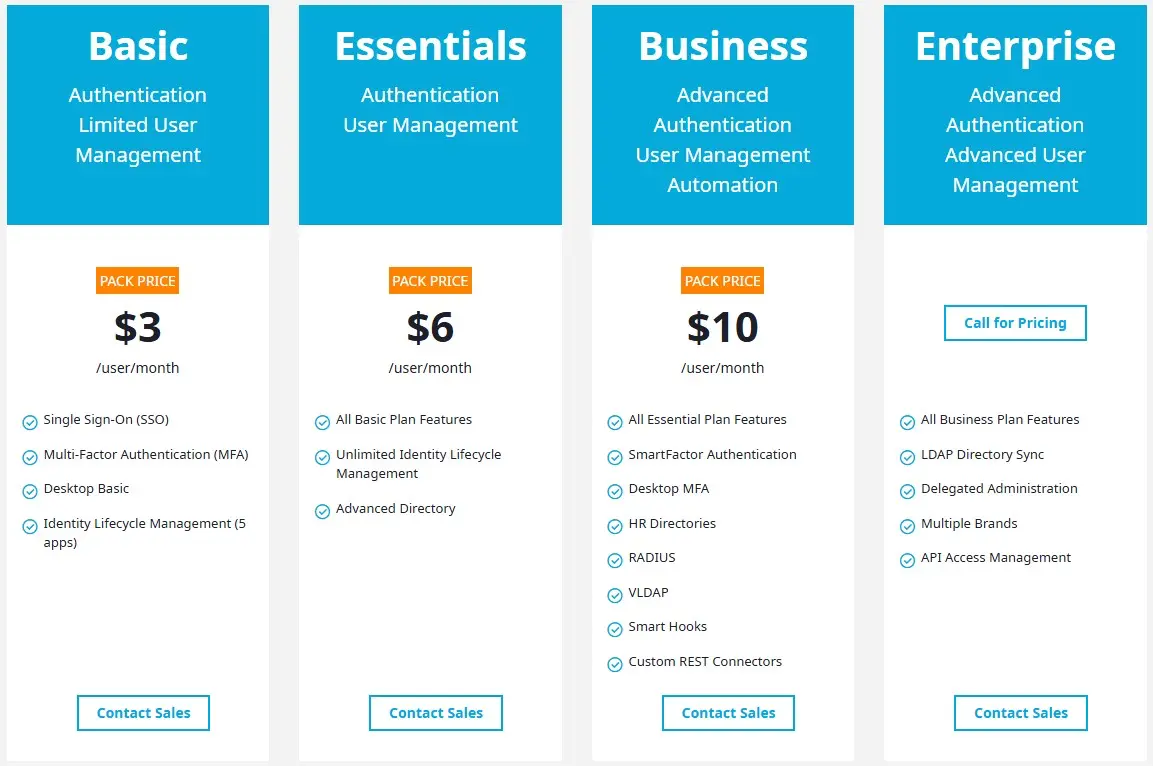
Cost Considerations:OneLogin's pricing, while competitive for mid-market and enterprise organizations, starts at $3 per user per month for the Basic bundle and can reach $10 per user or more on the Business bundle, especially if you need extra features like OneLogin Workflows. For organizations that need to share contact information with external partners, adding those external users to OneLogin solely for directory access may not be economical or appropriate.
These gaps aren't failures of design but rather natural boundaries of a platform focused on identity and access management. However, they create clear opportunities for complementary tools that can extend directory capabilities across organizational boundaries.
The Perfect Complement to OneLogin: Federated Directory
Federated Directory provides a platform specifically designed for sharing corporate address books between trusted organizations.
Developed by Fed Blokes, a company based in the Netherlands, the service enables companies to connect their directories and grant selective access to partner organizations, creating a unified view of contacts across company boundaries.
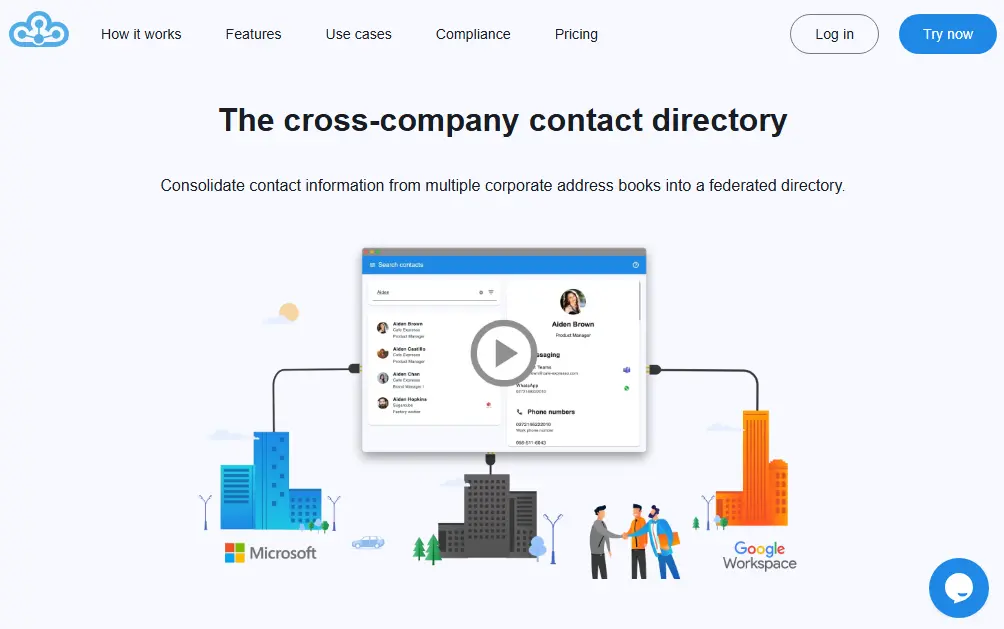
Cross-Company Contact Sharing: Federated Directory breaks down address book silos between collaborating organizations.
The core concept of Federated Directory is simple: instead of each company maintaining isolated contact information for their external partners (often in spreadsheets or personal address books), organizations connect their corporate directories and share access with trusted partners.
Each company maintains control over its own address book while granting read-only access to contacts for specific partner organizations.
When a user at Company A needs to find someone at partner Company B, they can search the federated directory directly rather than sending an email asking for an introduction. The platform supports advanced filtering to help users quickly locate the right contact based on attributes like department, location, or job function.
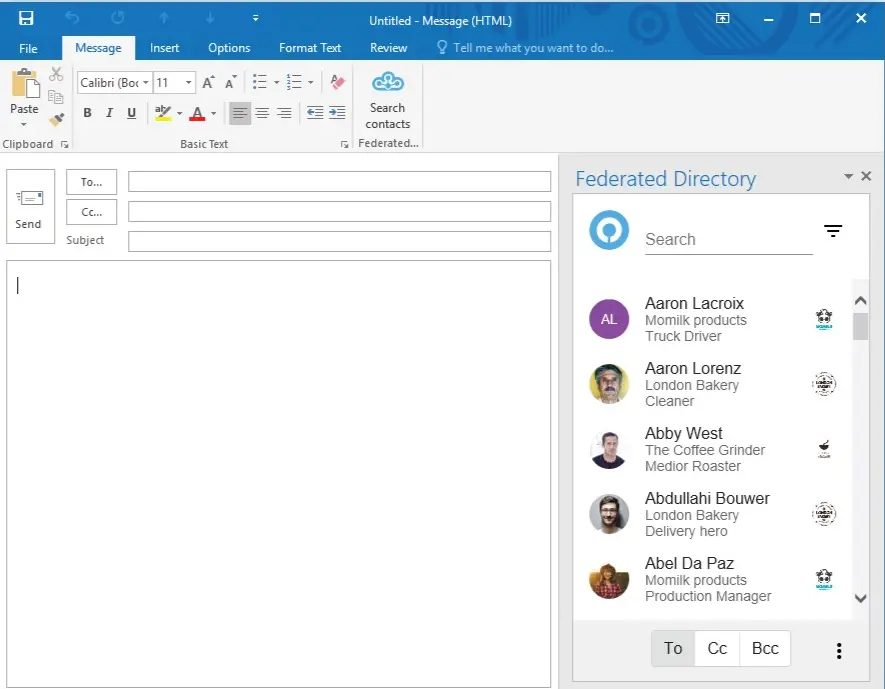
This approach addresses several common problems: outdated contact lists that require manual updates after personnel changes; duplicate data entry when managing contacts across multiple partner relationships; time spent searching for the right person at a partner organization; and security concerns from sharing contact exports in uncontrolled formats.
Ideal for decentralized organizations: Large franchise or holding companies with subsidiaries running different technology stacks (some on Microsoft, others on Google, others on OneLogin) particularly benefit from Federated Directory. It provides a unified contact directory across all subsidiaries without requiring IT standardization.
M&A transition solution: When companies merge or acquire other businesses, Federated Directory provides an immediate way to enable contact discovery across both organizations while full IT integration happens in the background. Employees can start collaborating on day one without waiting for directory consolidation.
Integration with Identity Providers: Federated Directory connects to existing corporate directory systems.
Federated Directory integrates directly with OneLogin as one of its supported identity providers.
Organizations using OneLogin can sync their user data to Federated Directory, which then manages the cross-company sharing aspects. This means companies can use OneLogin for internal IAM and Federated Directory for external contact sharing, maintaining a clear separation of concerns.
The platform also supports integration with Microsoft 365 and Entra ID, Google Workspace, Okta, and any system that implements the SCIM protocol.
This identity-provider-agnostic approach is particularly valuable for organizations that collaborate with partners using different identity providers.
A company using OneLogin can share contacts with a partner using Microsoft 365, with Federated Directory acting as the bridge between the two systems. If an organization later decides to switch identity providers, their Federated Directory integrations and cross-company relationships remain intact.
User provisioning can be automated through these integrations. When a new employee is added to the source identity provider, they can appear in the Federated Directory for sharing with partners once provisioning is configured. Similarly, when an employee leaves and is deactivated in the source system, their contact information can be removed from the federated view.
Data Normalization and Privacy Controls: Organizations maintain control over what information is shared while the platform ensures consistency.
Federated Directory acts as a translation layer between disparate identity sources.
Different organizations structure their directory data differently; one company might use the JobTitle field for internal grade codes while another uses it for public-facing titles. Federated Directory can normalize this data so applications and partner organizations receive consistent information regardless of the source format.
Cross-company groups provide the primary mechanism for controlling access. An administrator creates a group, adds their own users to it, and then invites specific users from partner organizations to join. Only members of shared groups can see each other's contact information. This model ensures that contact sharing requires explicit consent from participating organizations.
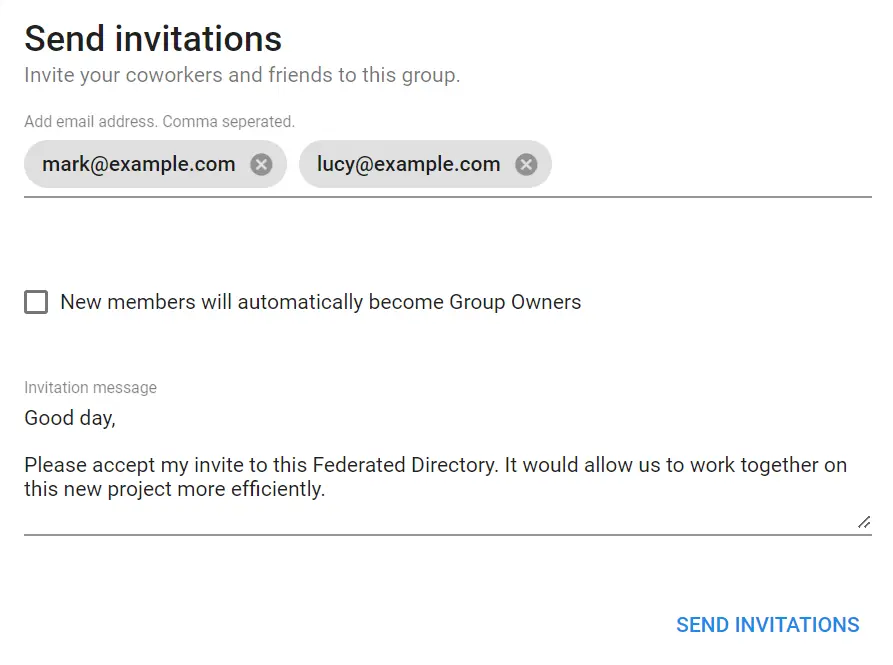
As a company based in the Netherlands, Federated Directory operates under European data protection regulations including GDPR. Organizations stay in full control of which data they share.
Unlike directly exposing your Active Directory or Entra ID to external parties, Federated Directory acts as a "clean room" where you explicitly define what contact information gets shared. Partners don't need to trust the data quality of your entire corporate directory; they only receive what you've explicitly approved for sharing.
API and Developer Integration: A SCIM-compliant API enables custom integrations and automation workflows.
For developers and technical IT teams, Federated Directory provides a fully SCIM 2.0 compliant API that enables programmatic access to contact data. This allows organizations to integrate federated contact information into custom applications, internal tools, and automated workflows.
The platform is designed for self-service deployment. IT teams can implement Federated Directory using the available documentation without requiring a sales engagement or professional services team. Working examples are provided through Postman collections, making it straightforward for developers to test and integrate.
For organizations implementing AI assistants and agentic workflows, Federated Directory also offers a Model Context Protocol (MCP) endpoint, giving AI agents a way to query contact data without granting them access to core identity infrastructure.
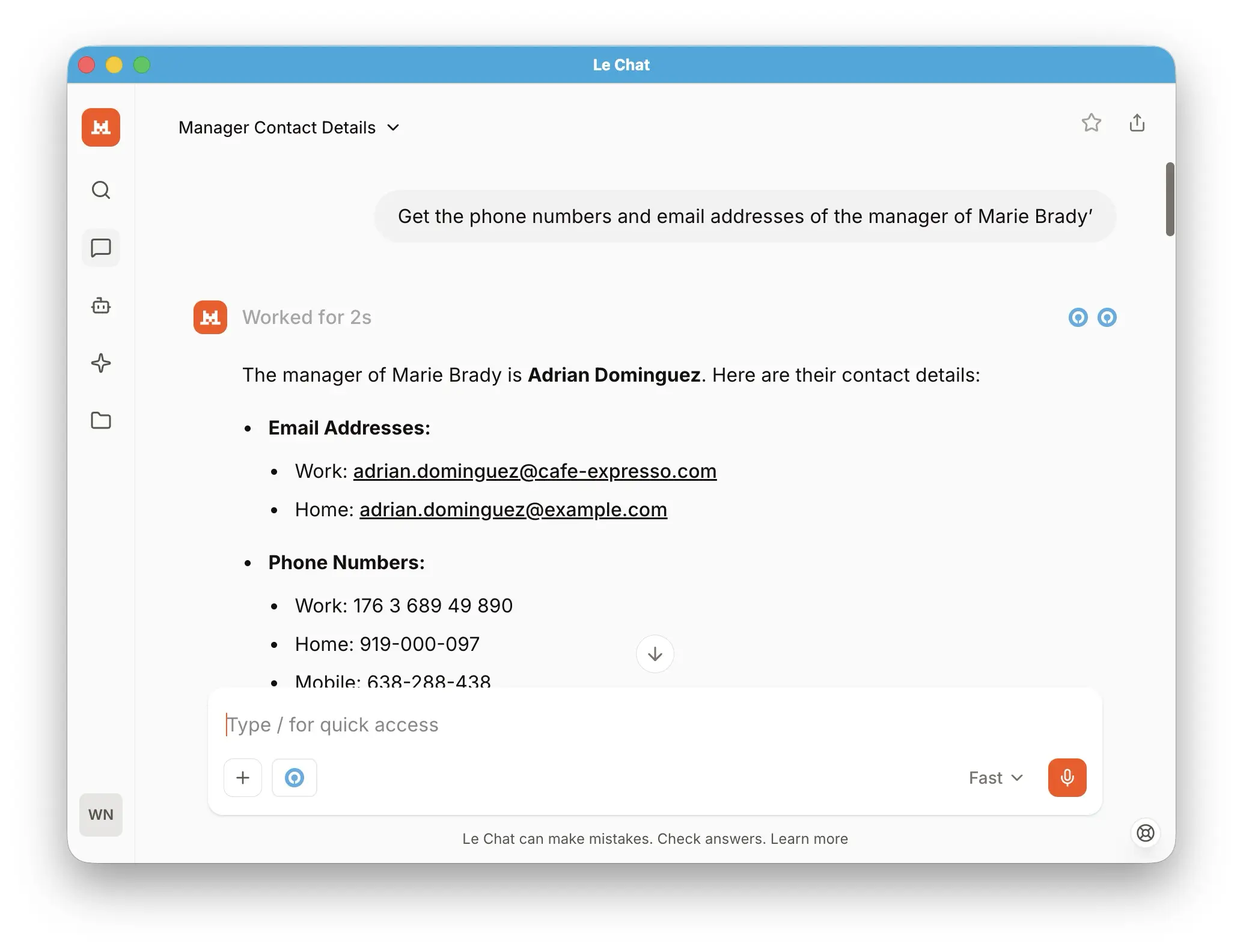
Rather than connecting an AI agent directly to Entra ID or OneLogin (which would expose sensitive permissions and access metadata), organizations can route contact queries through Federated Directory's limited, purpose-built API. This follows the principle of least privilege: AI systems get only the contact information they need, while sensitive identity data remains protected.
Multi-Platform Access: Users can access the federated directory from their preferred tools.
Contact information in Federated Directory is accessible through multiple channels: a web application for searching and browsing contacts; the Microsoft Outlook add-in integrated directly within the email client; the Microsoft Teams app for access without leaving the collaboration platform; mobile access on iOS and Android; and API access for custom integrations.
This accessibility addresses a common adoption concern: users don't need to learn a new tool or change their habits.
Once IT deploys the add-in, users simply see an additional button in Outlook or Teams to search partner contacts. For organizations with AI-integrated environments, users may not even make a conscious decision to use Federated Directory; it becomes part of how their AI assistant finds contact information.
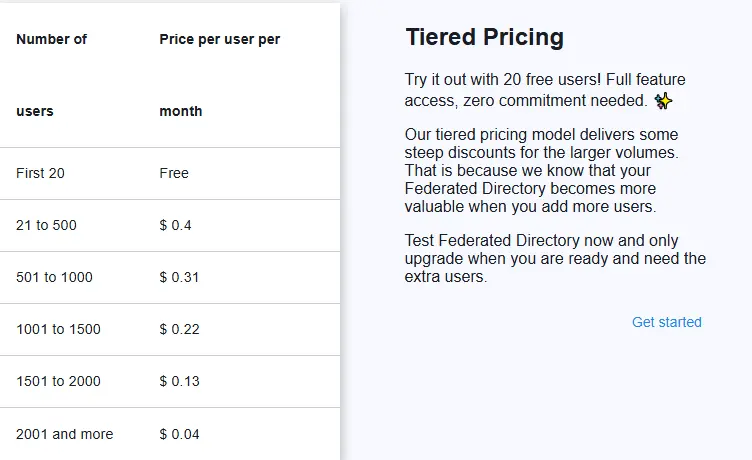
Pricing: Federated Directory offers a generous free tier with accessible paid plans.
Federated Directory provides a free tier with up to 20 users and full feature access, allowing teams to fully evaluate the platform without commitment.
This makes it accessible for developers and small teams to implement without requiring extensive budget approval. For larger organizations, contact Federated Directory directly for current pricing information on paid tiers.
OneLogin and Federated Directory: Comparison Summary
| Aspect | OneLogin | Federated Directory |
|---|---|---|
| Primary Purpose | Identity and Access Management | Cross-company contact sharing |
| Core Functionality | SSO, MFA, user provisioning, access control | Directory federation, contact discovery |
| Scope | Workforce, partners, and customers within managed boundaries | Multiple organizations sharing contacts |
| User Types Managed | Employees, contractors, partners, customers | Contact information for cross-company sharing |
| Authentication | Full authentication and SSO | Uses existing IdP authentication |
| Cross-Company Directory | Not designed for inter-company contact sharing | Purpose-built for inter-company sharing |
| Integration Approach | Acts as identity provider | Connects to existing identity providers |
| AI/Automation Integration | Full API with identity data | Contact-data-only API for safer AI access |
| Deployment Model | Enterprise implementation | Self-service, documentation-driven |
| Free Tier | 30-day trial | Permanent free tier (20 users) |
| Best For | Securing access to applications | Finding contacts at partner organizations |
Final Verdict
The choice between OneLogin and Federated Directory isn't about selecting one over the other; these platforms serve fundamentally different purposes and work best as complements.
OneLogin is an identity solution; Federated Directory is a contact directory. Organizations evaluating OneLogin should consider whether Federated Directory belongs in their tech stack as well.
Choose OneLogin if you need a comprehensive identity and access management platform to secure and streamline how your workforce accesses applications.
It excels at providing Single Sign-On across thousands of applications, enforcing strong authentication with adaptive MFA, and automating user lifecycle management. For organizations with hybrid environments spanning cloud and on-premise applications, OneLogin provides the unified control plane needed to manage access consistently.
The platform is well-suited for enterprise and growing organizations that want to consolidate their identity infrastructure and improve both security and user experience.
Get started with OneLogin here.
Add Federated Directory if your organization collaborates frequently with external partners and your employees struggle to find the right contacts at other companies.
It bridges the gap between isolated corporate directories, enabling trusted organizations to share contact information while maintaining individual control. The platform integrates directly with OneLogin (as well as Microsoft, Google, and Okta), allowing you to extend your directory beyond organizational boundaries without replacing your existing identity infrastructure.
Federated Directory is particularly valuable for large franchise or holding companies with decentralized IT environments, organizations going through mergers and acquisitions, and teams implementing AI assistants that need access to contact data without exposing core identity systems.
For businesses where cross-company collaboration is central to operations, Federated Directory transforms contact discovery from a time-consuming manual process into a self-service experience.
Together, these platforms create a robust identity and collaboration foundation: OneLogin manages who can access what within your organization, while Federated Directory helps your people connect with the right contacts at partner organizations.
Ready to extend your directory beyond OneLogin?
Get started with Federated Directory for free and connect with trusted partners in minutes.
Start Free Trial