
7 SyncGene Alternatives: Specialized Tools for Calendar Sync, Contact Management, and Cross-Company Collaboration (2026)
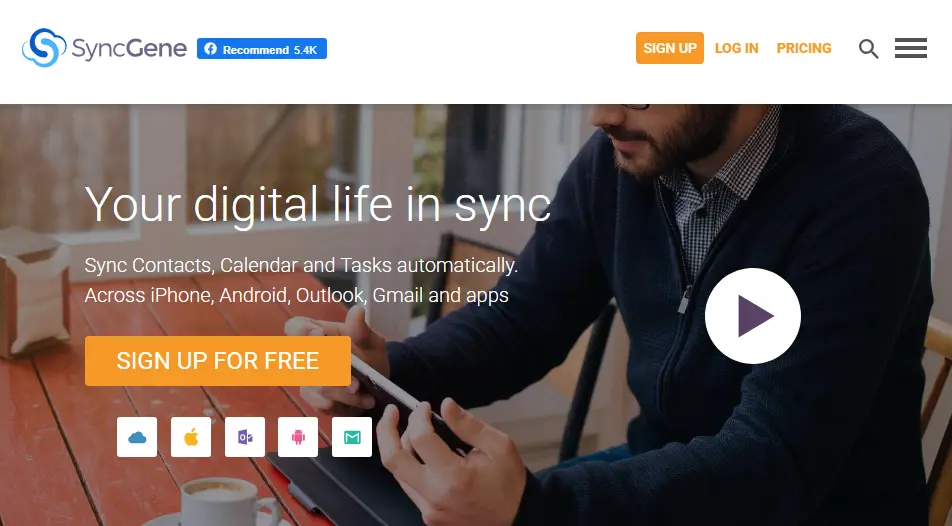
SyncGene has established itself as a popular solution for individuals and small teams who need to keep their contacts, calendars, and tasks synchronized across Google, iCloud, and Microsoft 365. Its "set it and forget it" approach to cross-platform synchronization has helped many users maintain a unified view of their personal and work information without the hassle of manual data entry.
But as your needs evolve, you might find that a general-purpose sync tool doesn't quite fit every scenario. Perhaps you need faster synchronization speeds, a more modern interface, AI-powered scheduling optimization, or the ability to share contact directories across separate companies and organizations. In some cases, you may discover that what you actually need isn't sync at all; it's an entirely different category of solution.
That's where this guide comes in. We'll explore dedicated alternatives that excel where you need them most, whether you're looking to:
- Achieve real-time calendar synchronization with granular privacy controls
- Enable cross-company contact discovery between partner organizations
- Automate meeting scheduling with AI-powered optimization
- Deploy enterprise-grade GAL synchronization for your Microsoft 365 tenant
- Find a free, open-source solution for Outlook-Google calendar sync
- Replace your calendar interface entirely with a faster, keyboard-driven experience
This isn't about finding a "better" platform; it's about finding the right fit for your specific needs. Some of these tools complement SyncGene, while others may replace it entirely depending on your use case. Let's explore the alternatives that can give you the specialized capabilities you're looking for.
Table of Contents
- SyncGene Alternatives at a Glance
- What is SyncGene?
- How We Curated Our List of SyncGene Alternatives
- Federated Directory — Best Alternative for Cross-Company Contact Discovery
- OneCal — Best Alternative for Modern, Intuitive Calendar Synchronization
- CiraSync — Best Alternative for Enterprise-Grade GAL and Contact Synchronization
- Reclaim AI — Best Alternative for AI-Powered Calendar Optimization
- Outlook Google Calendar Sync (OGCS) — Best Alternative for Free, Open-Source Calendar Synchronization
- CalendarBridge — Best Alternative for Real-Time Sync with AI Scheduling
- Vimcal — Best Alternative for Lightning-Fast Calendar Management
- The Final Verdict
SyncGene Alternatives at a Glance

Federated Directory
Best Alternative for Cross-Company Contact Discovery and B2B Directory Sharing
We chose Federated Directory because it solves a problem SyncGene doesn't address: enabling employees to discover and access contact information for people at partner organizations through a unified, vendor-agnostic directory federation service.

OneCal
Best Alternative for Modern, Intuitive Calendar Synchronization
OneCal offers a clean, modern interface for keeping multiple calendars in sync with granular privacy controls, making it the go-to choice for professionals who want powerful synchronization without complexity.

CiraSync
Best Alternative for Enterprise-Grade GAL and Contact Synchronization
CiraSync is purpose-built for Microsoft 365 environments, offering enterprise-grade Global Address List synchronization and contact management that SyncGene's standard plans can't match at scale.

Reclaim AI
Best Alternative for AI-Powered Calendar Optimization
Reclaim AI goes beyond sync — it intelligently manages your schedule by automatically protecting time for focus work, habits, and meetings, making it the right choice for anyone who wants their calendar to work smarter.

Outlook Google Calendar Sync (OGCS)
Best Alternative for Free, Open-Source Calendar Synchronization
OGCS is a free, open-source Windows application dedicated to two-way synchronization between Microsoft Outlook and Google Calendar — ideal for users who don't want to pay a monthly subscription for a single sync pair.

CalendarBridge
Best Alternative for Real-Time Sync with AI Scheduling
CalendarBridge combines near-real-time calendar synchronization with an AI scheduling assistant, offering a compelling combination of automatic sync and intelligent meeting coordination in one affordable package.

Vimcal
Best Alternative for Lightning-Fast Calendar Management
Vimcal is a keyboard-first calendar application built for speed, designed to replace your default calendar app entirely rather than just sync calendars — the right choice for power users who want a dramatically faster scheduling experience.
What is SyncGene?
SyncGene is a cloud-based synchronization service that keeps contacts, calendars, and tasks consistent across Google, iCloud, and Microsoft 365/Exchange. Launched in 2016 by 4Team Corporation and later acquired by Cira Apps Limited, it runs entirely in the cloud without requiring desktop software installation.
At its core, SyncGene operates as a background service. Once you connect your accounts, it automatically monitors for changes and propagates them across all linked platforms. The free tier allows one manual sync per month for up to two sources and 500 contacts. Paid plans unlock automatic background synchronization, unlimited contacts, and up to five sources.
SyncGene supports both one-way and two-way synchronization, giving you control over how data flows between accounts. You can also configure sync frequency — on premium plans, SyncGene checks for changes every 30 minutes and syncs them automatically. For organizations, its enterprise plan adds centralized administration, GAL sync, and Salesforce contact synchronization.
Where SyncGene excels is personal and intra-organizational use: keeping your own Google, iCloud, and Outlook accounts in lockstep, or rolling out standardized contact sync across an organization's devices. What it doesn't address is the scenario where you need employees at separate companies to discover and contact each other — that's a fundamentally different problem requiring a different class of solution.
How We Curated Our List of SyncGene Alternatives
Our selection criteria focused on identifying tools that solve specific problems where SyncGene either falls short or simply isn't the right category of product. We evaluated each alternative across several dimensions:
- Specialization: Does the tool do one thing significantly better than SyncGene, or does it serve an entirely different use case?
- Target audience fit: Is this built for individuals, small teams, or enterprise deployments?
- Pricing transparency: Can you evaluate the tool without a sales call?
- Reliability and track record: Is the product actively maintained with a clear user base?
- Integration depth: How well does it connect with the platforms users already depend on?
We deliberately excluded generic productivity suites and focused on tools with a clear primary function. The result is a list of seven products that each represent a distinct "best for" scenario — so you can quickly identify which one matches your specific situation.
Disclosure: Federated Directory is our own product. We've included it because it addresses a genuinely different use case from SyncGene (cross-company contact discovery vs. personal/organizational sync), and we believe it deserves a place on any comprehensive alternatives list for that reason. We've been transparent about what it does and doesn't do throughout this guide.
1. Federated Directory — Best Alternative for Cross-Company Contact Discovery
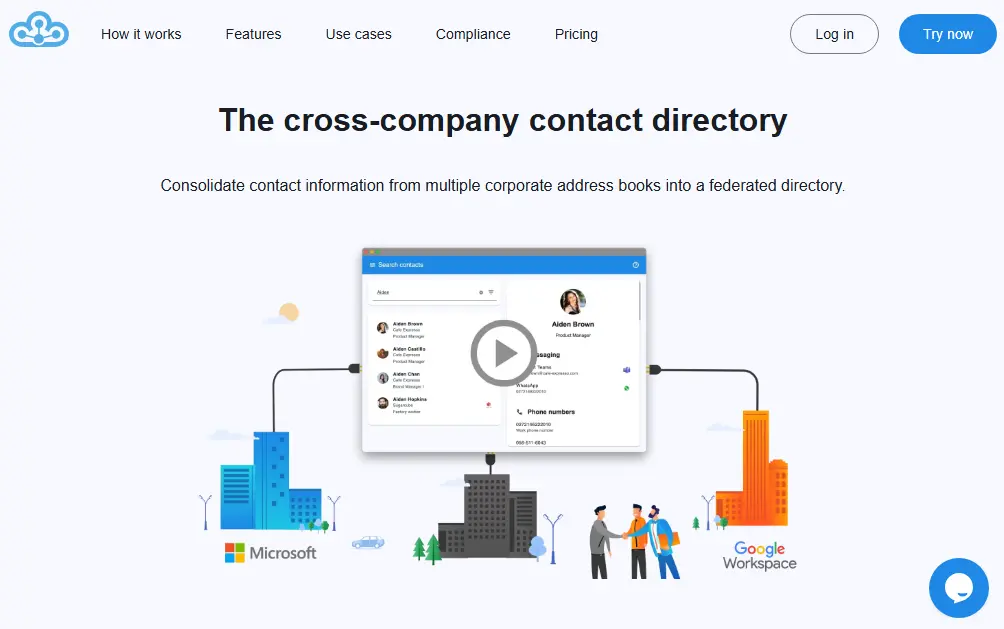
Federated Directory doesn't sync your calendars — it solves a problem that exists one layer above that: enabling employees at one company to discover and access contact information for employees at another company. If your organization works closely with external partners, subsidiaries, or clients, and people constantly have to ask "what's the email for that person at Company X?", Federated Directory is built for that exact scenario.
The service federates corporate address books across organizational boundaries. Company A and Company B each connect their identity providers (Microsoft Entra ID, Google Workspace, Okta, or any SCIM-compatible source), and once a federation is established, employees from both organizations can search across the combined directory — from Outlook, Microsoft Teams, or a web app — without needing accounts in each other's systems.
Why Choose Federated Directory Over SyncGene for Cross-Company Contact Discovery
Purpose-Built for Inter-Organizational Contact Sharing
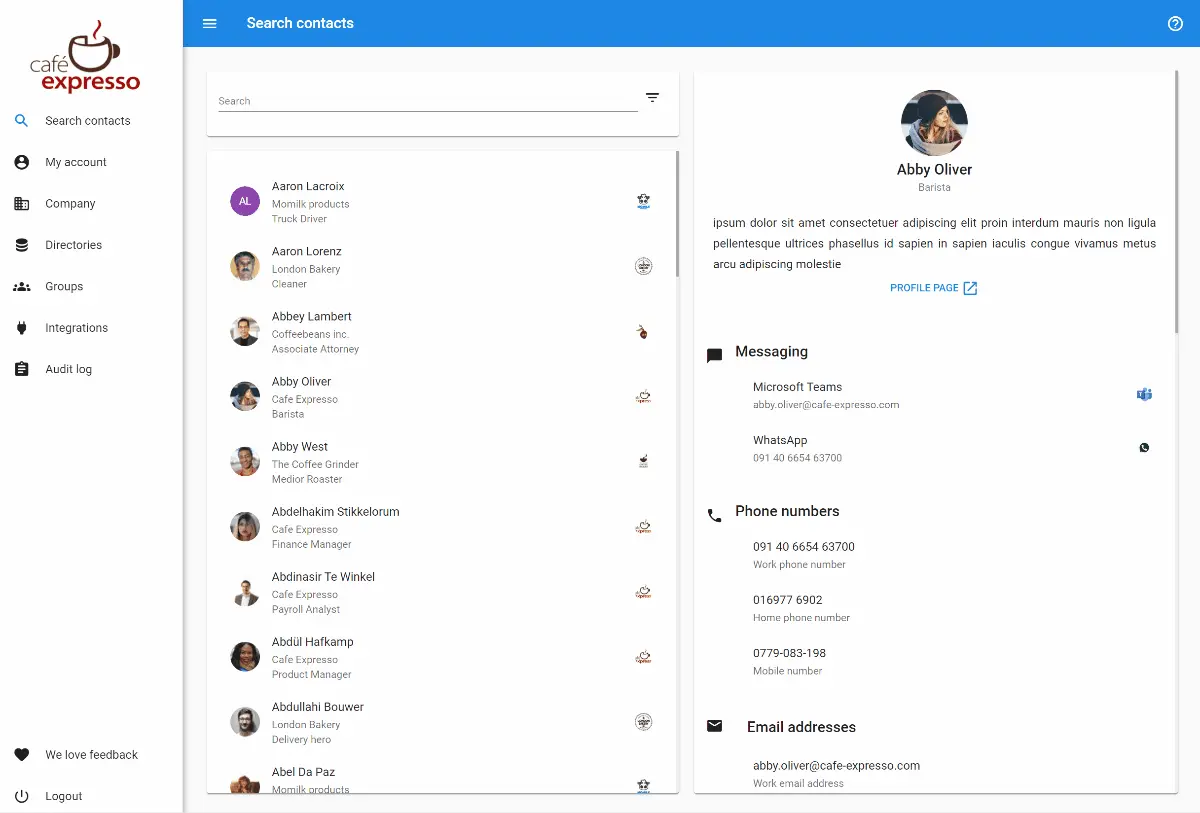
SyncGene is designed to sync data within your own accounts. Federated Directory is designed for the organizational boundary problem: when two separate companies need their people to find each other. The invitation-based federation model means both parties have explicit control over what is shared and with whom. You can configure groups to expose only specific subsets of your directory to specific partners, rather than sharing everything with everyone.
The integration surface is extensive: Microsoft Entra ID and Exchange, Google Workspace, Okta, OneLogin, and any SCIM 2.0 compatible identity provider. A certified Microsoft Teams app and Outlook add-in mean employees don't have to change how they work — the cross-company directory shows up right in the tools they already use.
Developer-First API and AI Integration
For organizations building on top of their contact data, Federated Directory offers a fully SCIM 2.0 compliant API and a Model Context Protocol (MCP) endpoint for AI integration. This means LLMs and agentic workflows can securely query contact data across your federated directory — useful for internal AI assistants that need to find the right person at a partner organization, or for automating contact-enriched workflows.
The developer API gives engineering teams direct programmatic access to the unified contact graph, enabling custom integrations without being locked into a specific UI or workflow.
Seamless Adoption Inside Existing Microsoft Workflows

The Microsoft-certified Teams app and Outlook add-in integrate directly into the tools most enterprise employees spend their day in. When a user types a contact name in Outlook or searches in Teams, federated contacts from partner organizations appear alongside internal contacts — with no separate login or workflow change required.
Getting started is fast: the setup documentation walks through connecting an identity provider and sending a federation invitation to a partner in under 30 minutes. The free tier supports up to 20 users with full feature access, making it easy to pilot with a small team before expanding.
Federated Directory Pricing
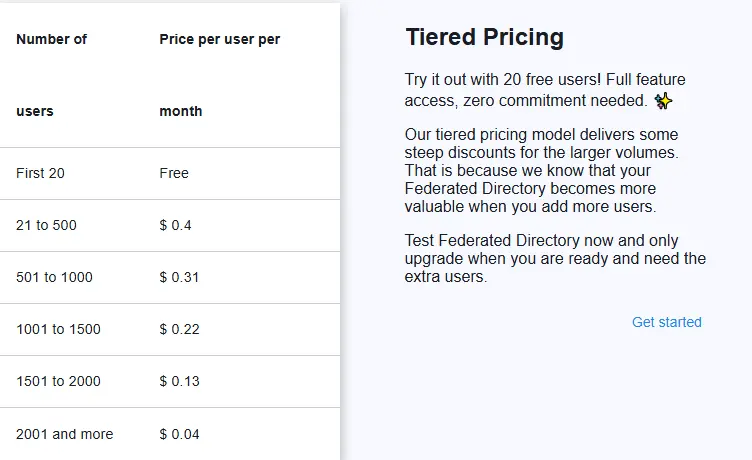
Federated Directory offers a free tier for up to 20 users with full feature access — no credit card required. Paid plans use volume-based pricing where the per-user cost decreases at higher volumes. Visit the pricing page for current rates.
🎯 NOTE: Federated Directory is not a SyncGene replacement for calendar or task sync — it's for a different job entirely. If you need to keep your own Google and Outlook calendars in sync, use SyncGene (or one of the other tools in this list). If you need employees to find contacts at partner companies, use Federated Directory. Many organizations use both.
Pros:
- Solves a problem no other tool in this list addresses: cross-company contact discovery
- Works inside Outlook and Teams — no workflow change for end users
- Supports all major identity providers (Entra ID, Google Workspace, Okta, SCIM)
- Free tier for up to 20 users with full features
- SCIM API and MCP endpoint for developer and AI integrations
- European data centers (GDPR-friendly)
Cons:
- Not a calendar or task sync tool — different use case from SyncGene
- Requires both organizations to participate in the federation
- Best value for teams collaborating with external partners; less useful for solo users
2. OneCal — Best Alternative for Modern, Intuitive Calendar Synchronization
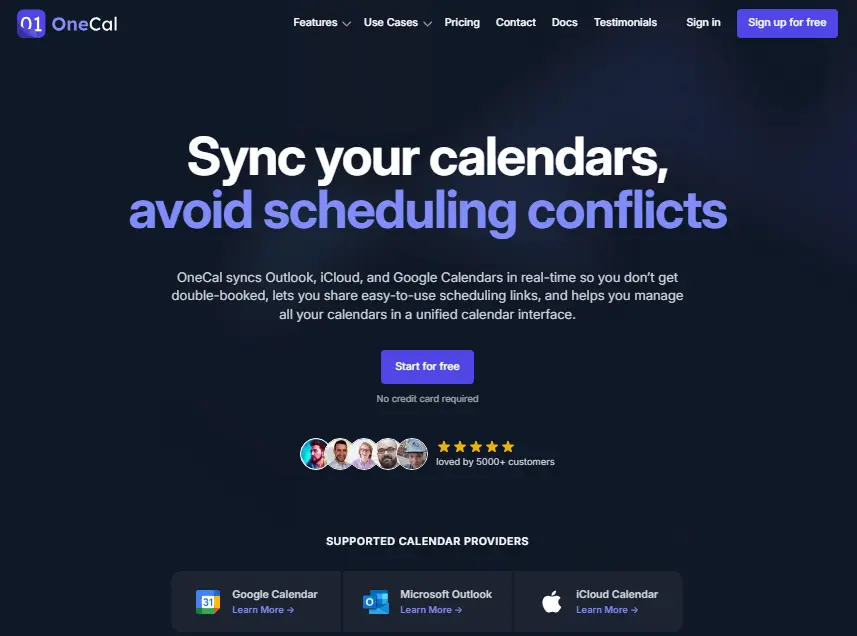
OneCal is a calendar synchronization tool focused on doing one thing extremely well: keeping events synchronized across multiple calendars with fine-grained control over what gets copied, what gets hidden, and how event details appear in each destination. If your primary frustration with SyncGene is a dated interface or lack of per-event customization, OneCal is the most direct replacement to consider.
The tool connects Google Calendar and Microsoft Outlook calendars and syncs events between them in near real-time. Calendar sync is the core feature — but OneCal goes further by giving you control over exactly how events appear in the target calendar, which events get excluded, and what information gets carried over.
Why Choose OneCal Over SyncGene for Calendar Sync
Granular Event Control
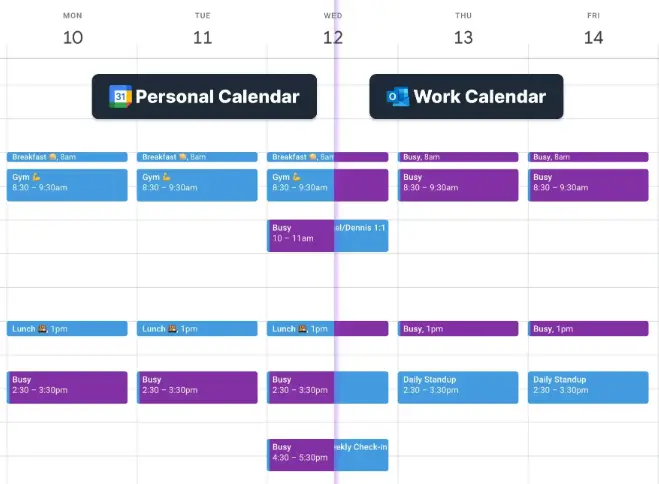
OneCal lets you exclude events by color, hide clone events from your calendar view to avoid visual clutter, and control whether event titles sync or get replaced with a privacy-friendly placeholder like "Busy." This level of control is ideal for professionals who use color-coding in one calendar and don't want every event to appear in a destination calendar.
For teams that need to coordinate availability across multiple people, OneCal also supports collective booking links — shared scheduling pages that reflect the combined availability of multiple team members. This goes beyond pure sync into active scheduling coordination.
OneCal's interface is notably cleaner and more modern than SyncGene's, with a setup process that takes minutes and a dashboard that makes it immediately clear which calendars are syncing to which, and what the current sync rules are.
OneCal Pricing
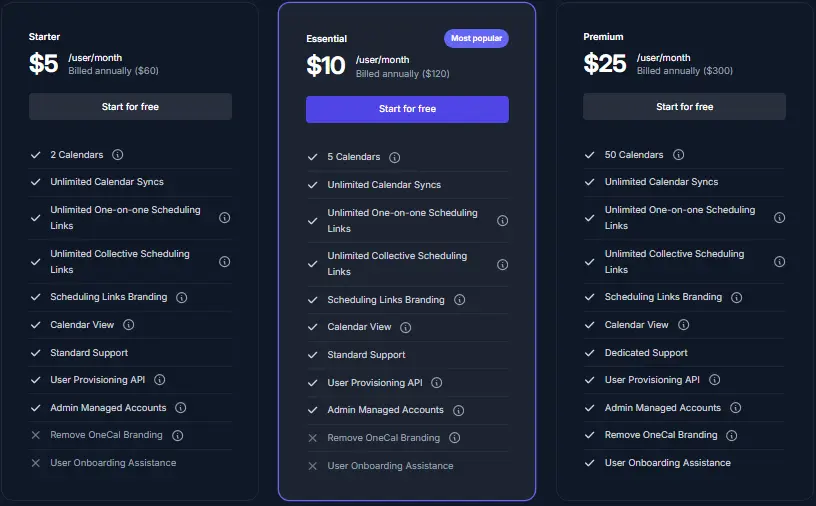
OneCal starts at $5/month (billed annually) for individuals. Team and business plans are available at higher price points. See OneCal's pricing page for current details.
Pros:
- Clean, modern interface that's easier to configure than SyncGene
- Granular event-level sync control (exclude by color, hide clones, privacy titles)
- Near real-time synchronization
- Collective booking links for team scheduling
- Strong support for Google and Microsoft calendar ecosystems
Cons:
- No free tier (paid plans only)
- Focused on calendar sync — doesn't sync contacts or tasks like SyncGene does
- No iCloud support (Google and Microsoft only)
3. CiraSync — Best Alternative for Enterprise-Grade GAL and Contact Synchronization
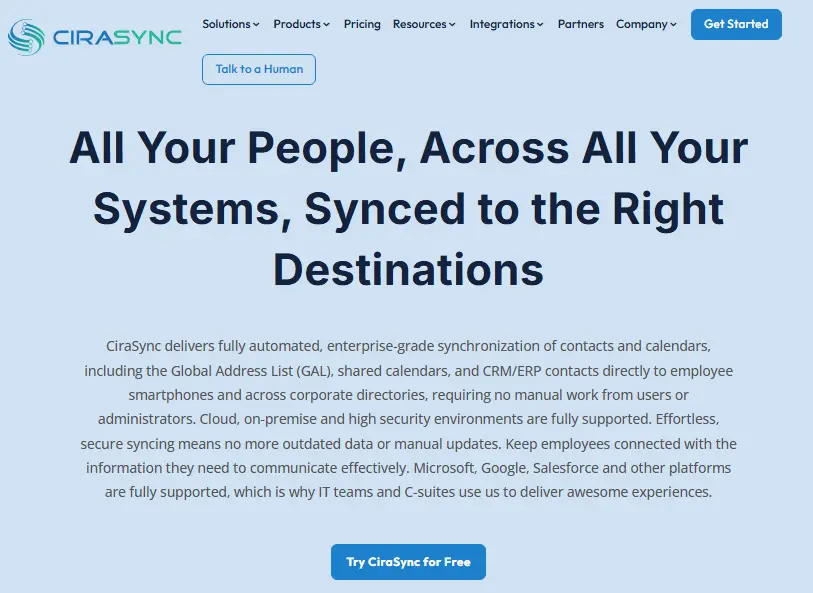
CiraSync is an enterprise-focused synchronization platform built specifically for Microsoft 365 environments. While SyncGene offers GAL sync as an enterprise add-on, CiraSync is purpose-built for this scenario — making it the stronger choice for IT administrators who need reliable, centrally managed contact synchronization across a large Microsoft 365 tenant.
Available as a Microsoft 365 Marketplace application, CiraSync is designed to be deployed and managed by IT, not configured individually by end users. This makes it fundamentally different from SyncGene's user-driven model — and the right fit when you need consistent, organization-wide contact synchronization without relying on individual employees to set things up.
Why Choose CiraSync Over SyncGene for Enterprise Contact Sync
The centerpiece of CiraSync is its GAL sync capability. It synchronizes your Microsoft 365 Global Address List to employees' native contacts apps on iOS and Android, meaning employees always have current corporate contact information on their mobile devices — without IT having to manually manage contact exports or individual employees needing to remember to sync.
Beyond GAL sync, CiraSync supports CRM contact synchronization — pushing contacts from Salesforce, HubSpot, and other CRM systems to mobile devices. This is particularly valuable for sales and account management teams who need current customer contact data available on their phones.
The comparison with SyncGene's own GAL sync offering is instructive: SyncGene provides GAL sync as an enterprise feature with custom pricing, while CiraSync offers a free tier for up to 5 users and transparent per-user pricing that scales predictably.
CiraSync Pricing
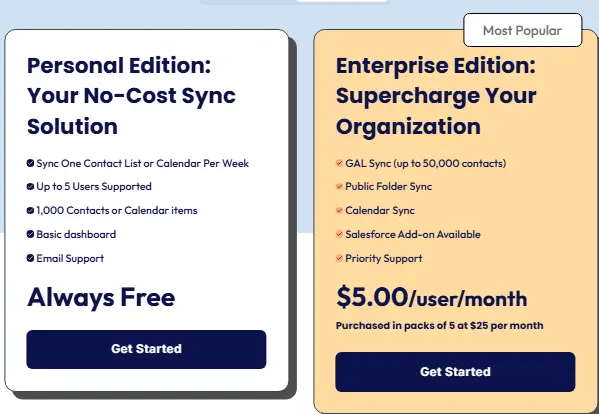
CiraSync offers a free plan for up to 5 users. Paid plans are priced per user per month, with volume discounts at larger scales. Visit CiraSync's pricing page for current rates.
Pros:
- Purpose-built for Microsoft 365 enterprise deployments
- IT-managed, centralized configuration — no per-user setup required
- Strong GAL-to-mobile sync without per-user configuration
- CRM sync (Salesforce, HubSpot) to mobile contacts
- Free tier for up to 5 users
- Available directly from the Microsoft 365 Marketplace
Cons:
- Microsoft 365-focused — limited value for Google Workspace or iCloud users
- More complex setup than SyncGene for individual users
- Primarily designed for IT administrators rather than end users
4. Reclaim AI — Best Alternative for AI-Powered Calendar Optimization

Reclaim AI is not a sync tool in the traditional sense. Rather than simply copying events between calendars, it uses AI to actively manage your schedule — protecting time for deep work, automatically scheduling recurring habits, coordinating meeting times with colleagues, and syncing calendars to prevent double bookings. It was acquired by Dropbox in 2024, giving it strong backing and integration potential.
If you find yourself using SyncGene primarily to stay on top of a complex schedule across work and personal accounts, Reclaim AI addresses that problem more intelligently — rather than just syncing what exists, it helps you create a calendar that actually reflects your priorities.
Why Choose Reclaim AI Over SyncGene for Calendar Optimization
Intelligent Scheduling That Goes Beyond Sync
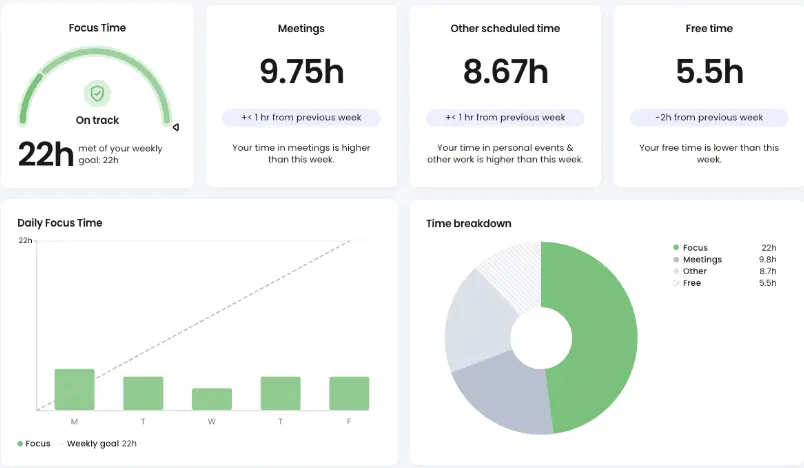
Reclaim's focus time feature automatically blocks time on your calendar for deep work, dynamically repositioning it when meetings are added. Its habits feature does the same for recurring tasks — workouts, end-of-day reviews, lunch breaks — finding the optimal slot each day rather than locking them to a fixed time.
For coordinating with others, Reclaim's smart meetings feature finds optimal meeting times across teams by analyzing everyone's priorities and commitments, not just their free/busy status. It integrates with Asana and other project management tools to automatically schedule time for tasks based on due dates and priorities.
The calendar sync capability — syncing across work and personal calendars to prevent scheduling conflicts — is included, but it's just one component of a much broader scheduling intelligence platform. Reclaim manages your schedule automatically based on your priorities, not just your existing commitments.
The range of integrations is broad: Slack (for automatic status updates), Asana, Linear, Jira, ClickUp, Zoom, and more.
Reclaim AI Pricing
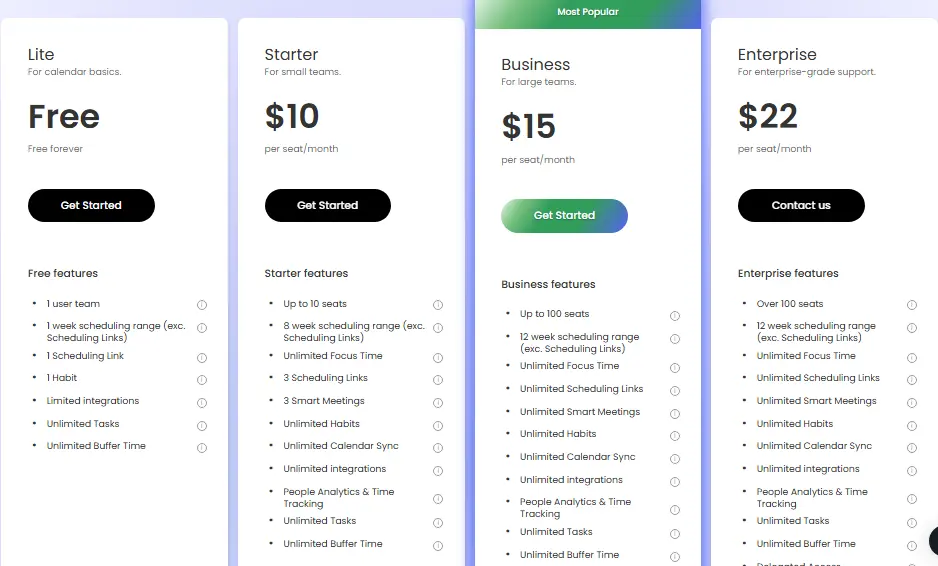
Reclaim AI offers a free plan with core features. Paid plans unlock team coordination, advanced integrations, and higher usage limits. See Reclaim's pricing page for current details.
Pros:
- AI-powered schedule optimization — goes well beyond passive sync
- Automatic focus time and habit scheduling
- Smart meeting scheduling across teams
- Broad integrations (Slack, Asana, Linear, Jira, Zoom)
- Free tier available
- Backed by Dropbox after 2024 acquisition
Cons:
- More complex than a simple sync tool — steeper learning curve
- AI scheduling may feel intrusive if you prefer manual calendar control
- Focused on Google and Microsoft calendars — no iCloud or task sync
- Full value requires team adoption for coordination features
5. Outlook Google Calendar Sync (OGCS) — Best Alternative for Free, Open-Source Calendar Synchronization
 Best.webp)
Outlook Google Calendar Sync (OGCS) is a free, open-source Windows desktop application that synchronizes Microsoft Outlook calendar with Google Calendar. If your only requirement is keeping Outlook and Google Calendar in sync — and you don't want to pay a monthly subscription to do it — OGCS is the most direct answer.
Unlike SyncGene, which is a cloud-based service, OGCS runs locally on your Windows machine. There's no account to create, no data sent to third-party servers, and it is genuinely free — the developer accepts donations but there is no paid tier. Events sync according to a configurable schedule, and the application can run minimized in the system tray.
Why Choose OGCS Over SyncGene for Free Calendar Sync
OGCS exists specifically for the Outlook ↔ Google Calendar use case. If that's your entire requirement, it delivers it at zero cost with no subscription, no account, and no data leaving your machine. The open-source nature means the code is auditable — a meaningful consideration for privacy-conscious users.
The trade-offs are clear: OGCS only syncs calendars (not contacts or tasks), only works on Windows, and requires the Outlook desktop application. It doesn't have a web interface or mobile app. But for the user who simply needs Outlook and Google Calendar synchronized, those limitations don't matter — and paying nothing is a significant advantage.
The project is actively maintained on GitHub with regular releases and an engaged community.
Pros:
- Completely free — no subscription, no paid tier
- Open-source with auditable code
- No account creation or cloud service dependency
- Data stays on your machine — no third-party server involvement
- Actively maintained
Cons:
- Windows only — no macOS, mobile, or web interface
- Requires Outlook desktop application (not just Outlook.com)
- Calendar sync only — no contacts or tasks
- Sync runs on your machine, so it only works while the computer is on
- No enterprise management or centralized deployment
6. CalendarBridge — Best Alternative for Real-Time Sync with AI Scheduling
CalendarBridge is a cloud-based calendar synchronization service that combines near-real-time sync between Google and Microsoft Outlook calendars with an AI scheduling assistant. It's a compelling choice if you want a single tool that handles both passive calendar synchronization and active meeting coordination — and want it to work automatically without ongoing configuration.
Where SyncGene emphasizes multi-platform sync across Google, iCloud, and Microsoft 365, CalendarBridge focuses on the Google ↔ Microsoft pairing and does it faster: calendars sync in near real-time rather than on a polling schedule. For professionals who switch between personal and work accounts throughout the day, this speed difference is meaningful.
Why Choose CalendarBridge Over SyncGene for Real-Time Sync
AI Scheduling Assistant Included
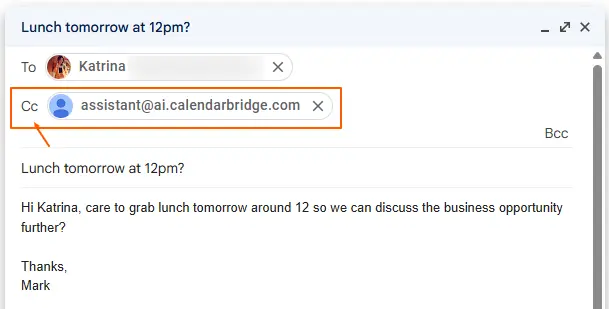
CalendarBridge's AI scheduling assistant lets you find and book meeting times using natural language. Rather than manually checking availability and sharing calendar links, you can describe what you need and have the assistant coordinate it. This is bundled with the sync service — not a separate add-on — making CalendarBridge a more feature-rich package at a competitive price point.
CalendarBridge also offers HIPAA-compliant plans for healthcare organizations, which sets it apart from most consumer calendar sync tools. HIPAA compliance is available at higher plan tiers and requires signing a Business Associate Agreement.
CalendarBridge Pricing
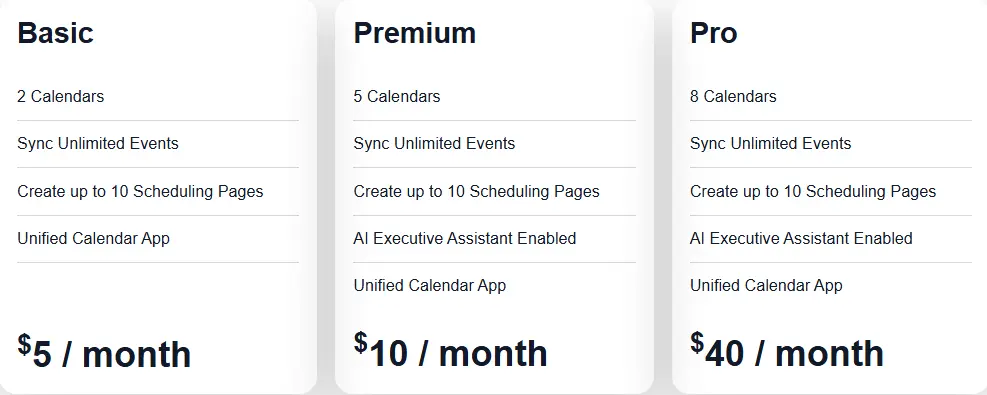
CalendarBridge starts at $4/month (billed annually). See the pricing page for current plan details.
Pros:
- Near real-time synchronization — faster than SyncGene's polling interval
- AI scheduling assistant included in the base plan
- HIPAA-compliant plans available for healthcare organizations
- Clean, straightforward setup and interface
- Affordable entry price ($4/month)
Cons:
- Focused on Google ↔ Microsoft calendar pair — no iCloud support
- Calendar-only sync — no contacts or tasks
- Smaller user base and community than some alternatives
7. Vimcal — Best Alternative for Lightning-Fast Calendar Management
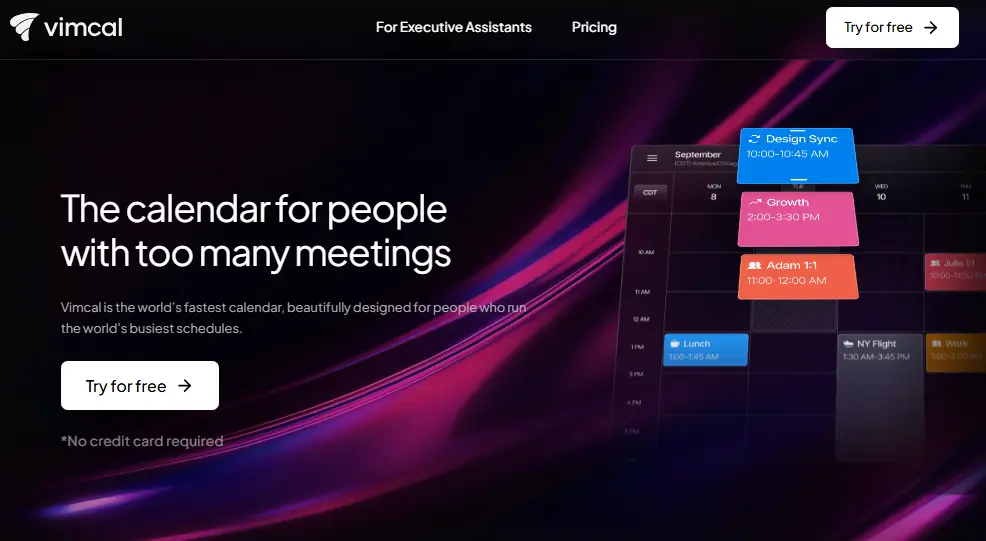
Vimcal is a different kind of alternative. Rather than syncing your existing calendar setup, it replaces your calendar application entirely — pulling in all your Google and Microsoft calendars and presenting them through an interface built for speed and keyboard-first navigation. It's the right choice if your real problem isn't sync, it's that your current calendar app is too slow and cumbersome for how you work.
Vimcal claims sub-100ms interactions throughout the app, and the interface design reflects this priority. The app is a Y Combinator-backed product built specifically for people — founders, executives, investors — who live in their calendar and need it to be fast. Founder John Li built Vimcal because he was frustrated by how slow existing calendar apps were for the volume of scheduling he needed to do.
Why Choose Vimcal Over SyncGene for Calendar Management
The value proposition is simple: if you're a power user who spends significant time in your calendar every day, Vimcal will make that time more productive. Keyboard shortcuts replace mouse clicks for nearly every action. Time zone management — a constant source of friction for globally distributed teams — is handled elegantly. Scheduling links let you share availability without the back-and-forth.
Vimcal connects to your existing Google and Microsoft calendar accounts and displays all events in a single unified interface. In this sense, it "syncs" your calendars in that it shows everything in one place — but the emphasis is entirely on the calendar UI experience, not on background synchronization between separate accounts.
The iOS app is free. The full-featured desktop application (macOS and Windows) requires a paid subscription. A team plan adds collaboration features like shared availability and team scheduling.
Vimcal Pricing
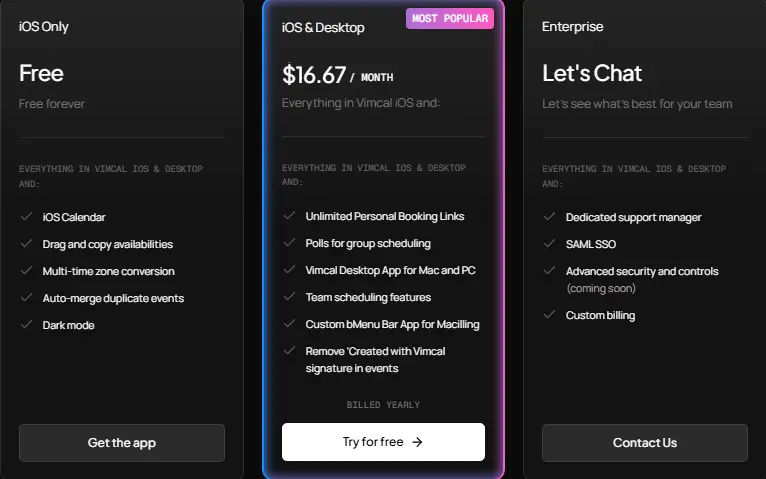
The Vimcal iOS app is free. The desktop application starts at a paid monthly subscription. Team plans are available for shared scheduling features. See Vimcal's pricing page for current details.
Pros:
- Extremely fast — sub-100ms interactions throughout the app
- Keyboard-first design dramatically reduces time spent scheduling
- Elegant time zone management for globally distributed teams
- Clean unified view of all Google and Microsoft calendars
- iOS app is free
- Built by a YC-backed team with a focus on the power user segment
Cons:
- Calendar interface replacement, not a background sync tool — different use case from SyncGene
- No contact or task synchronization
- Full-featured desktop app requires paid subscription
- Best suited to individual power users, less so for broad organizational deployment
- No iCloud support
The Final Verdict
SyncGene is a capable tool for the problem it's designed to solve: keeping your personal contacts, calendars, and tasks synchronized across Google, iCloud, and Microsoft 365. But as we've seen, several adjacent problems require entirely different categories of solution.
Here's how to choose:
- If your employees need to find contacts at partner companies — use Federated Directory. This is a fundamentally different problem from personal sync, and no other tool on this list addresses it.
- If you want modern calendar sync with granular event control — use OneCal. The interface is cleaner, the sync controls are more sophisticated, and setup takes minutes.
- If you're an IT admin deploying Microsoft 365 contact sync at scale — use CiraSync. It's purpose-built for centralized enterprise GAL and contact sync in a way SyncGene's standard plans are not.
- If you want your calendar to actively work for you, not just sync — use Reclaim AI. It goes beyond sync to intelligently schedule focus time, habits, and meetings based on your priorities.
- If you only need Outlook ↔ Google Calendar sync and don't want to pay for it — use OGCS. It's free, open-source, and does exactly this on Windows.
- If you want near-real-time sync with an AI scheduling assistant bundled in — use CalendarBridge. At $4/month, it's an affordable package that combines both capabilities.
- If speed is your primary frustration with your current calendar setup — use Vimcal. It won't sync your contacts or tasks, but it will make every minute you spend scheduling faster and less frustrating.
Most of these tools address different dimensions of the calendar and contact management problem. In many cases, the right answer isn't choosing one to replace SyncGene — it's identifying which specific capability gap you have and picking the tool that fills it. Federated Directory for cross-company contact discovery, Reclaim AI for intelligent scheduling, and SyncGene for baseline cross-platform sync can all coexist in the same workflow.
If cross-company contact discovery is on your list, the free tier of Federated Directory is the fastest way to evaluate whether it solves your problem — no credit card required, up to 20 users, full feature access from day one.
Ready to enable cross-company contact discovery for your organization? Get started with Federated Directory for free — no credit card required.
Try Federated Directory free — up to 20 users