SyncGene Pricing: Plans, Costs & Federated Directory
If you've ever navigated SyncGene's tiered pricing structure, trying to calculate whether the free plan's 500-contact limit will suffice or if you need Individual Premium at $15/month, while figuring out whether Team Premium's 4-member cap fits your organization or you need Enterprise at approximately $10/member, you know that contact synchronization pricing can feel like choosing between personal convenience and organizational scale.
SyncGene has established itself as a reliable cloud-based synchronization service, helping individuals and teams keep their contacts, calendars, and tasks consistent across platforms like Google, iCloud, and Microsoft 365.
The service promises a "set it and forget it" approach to cross-platform data harmony. But as businesses increasingly collaborate with external partners, clients, and vendors, keeping your own data in sync is only half the challenge. The other half is accessing the contact information of people outside your organization.
I've spent time analyzing SyncGene's pricing tiers, feature limitations, and use cases and here's what I found:
SyncGene is an excellent choice if:
- You need to sync contacts, calendars, or tasks across your personal devices and accounts
- Your primary challenge is keeping data consistent between Google, iCloud, and Microsoft 365
- You're an individual or small team working within a single organization
- You value automatic background synchronization without manual intervention
- Your collaboration happens mostly within your own company
However, if your needs extend beyond internal synchronization, you may also benefit from a complementary solution. Specifically, if:
- You need to access contact information from partner organizations or external companies
- Your business requires sharing corporate directories with trusted partners
- You frequently collaborate with people outside your organization and struggle to find the right contact details
- You want a unified view of both internal and external business contacts
- You're building AI integrations that need access to contact data across multiple organizations
In that case you should consider adding Federated Directory to your tech stack: a cross-company directory service that enables organizations to share their corporate address books with trusted partners, creating a unified view of contacts across organizational boundaries.
Because these tools serve complementary purposes, I've included a detailed comparison with Federated Directory in this review. With that said, if you're eager to jump into the Federated Directory breakdown, go ahead and do so with this link.
Update: SyncGene is in the process of being folded into CiraHub, a newer sync platform from the same company, Cira Apps Limited. At the time of writing, SyncGene's own pricing page is actively steering new signups toward CiraHub, while existing SyncGene plans and pricing (detailed below) remain listed and purchasable. If you're evaluating SyncGene today, confirm directly with their sales team whether you'll be onboarded onto SyncGene or CiraHub, since plan names and prices may differ between the two.
Table of Contents
- SyncGene Pricing Summary
- SyncGene Pricing: In-Depth Overview
- When You Might Need More Than Synchronization
- Federated Directory: A Complementary Approach
- SyncGene Feature Value Breakdown (vs Federated Directory)
- Final Verdict: SyncGene vs Federated Directory
- SyncGene Pricing FAQ
SyncGene Pricing Summary
| SyncGene | Federated Directory | |
|---|---|---|
| Free Plan | $0/month 500 contacts max 2 sources 1 manual sync per month | $0/month Up to 20 users Full feature access |
| Entry Level | Individual Premium: $15/mo ($12.50/mo annual) 5 sources · Unlimited contacts Auto-sync enabled | Accessible pricing for 21+ users Developer-friendly tiers Full feature access |
| Team Tier | Team Premium: Approximately $4.75/member/mo (approximately $3.73/mo annual) Up to 4 members 20 sources total · Centralized billing | Volume-based pricing for larger organizations Full feature access |
| Enterprise | Enterprise: Approximately $10/member/mo Unlimited members Salesforce integration Dedicated manager | Enterprise pricing available Full feature access |
| Best For | Individuals and teams syncing their own contacts across Google, iCloud, and Microsoft 365 | Organizations sharing corporate directories with trusted external partners and enabling AI integrations |
SyncGene Pricing: In-Depth Overview
SyncGene operates on a tiered subscription model that scales from individual users to enterprise organizations.
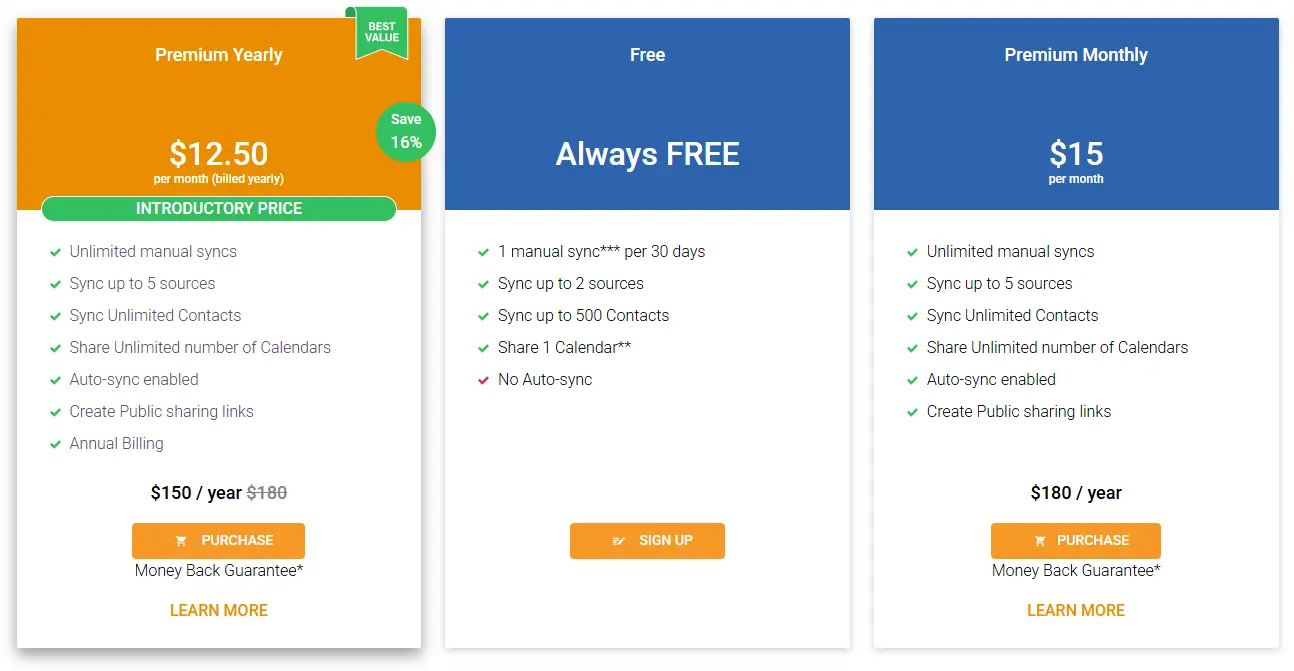
The platform offers multiple plan options: Free, Individual Premium (monthly and annual), Team Premium (monthly and annual), Enterprise Monthly, and Enterprise Custom. Pricing is structured around three main variables: the number of sources you can connect, the number of contacts you can sync, and whether synchronization happens automatically or requires manual triggers.
Let's examine each tier to understand the true cost of keeping your data synchronized.
SyncGene Free Plan: $0/month
| Feature | Details |
|---|---|
| Price | $0/month |
| Contacts | Up to 500 |
| Sources | Up to 2 |
| Sync Frequency | 1 manual sync per 30 days |
| Calendar Sharing | 1 calendar |
| Auto-Sync | Not included (7-day trial available) |
The Free plan provides a limited taste of SyncGene's capabilities, suitable for users with minimal synchronization needs.
The 500-contact limit and restriction to just 2 sources make it appropriate for testing the service or for individuals with very small contact lists. The single manual sync per month means you'll need to remember to trigger synchronization yourself, and changes won't propagate automatically between platforms.
| Free Plan Pros | Free Plan Cons |
|---|---|
| ✅ No cost to get started | ❌ Only 500 contacts allowed |
| ✅ Full 7-day auto-sync trial | ❌ Limited to 2 sources |
| ✅ Access to core sync features | ❌ Manual sync only (once per month) |
| ❌ Can only share 1 calendar |
The Bottom Line 👉 The Free plan works for testing SyncGene's interface or for users with tiny contact lists, but anyone with meaningful synchronization needs will quickly hit its limitations.
SyncGene Individual Premium: $15/month or $12.50/month annually
| Feature | Monthly | Annual | Key Benefits |
|---|---|---|---|
| Base Price | $15 | $12.50/month ($150/year) | 17% savings |
| Contacts | Unlimited | Unlimited | No caps |
| Sources | Up to 5 | Up to 5 | - |
| Auto-Sync | Yes | Yes | Background operation |
| Calendar Sharing | Unlimited | Unlimited | - |
Individual Premium represents SyncGene's core offering for serious personal users.
The jump from 500 to unlimited contacts removes the most restrictive limitation of the Free plan, while expanding from 2 to 5 sources covers most common setups (personal Google, work Microsoft 365, iCloud, etc.). Auto-sync ensures changes propagate without manual intervention.
| Individual Premium Pros | Individual Premium Cons |
|---|---|
| ✅ Unlimited contacts | ❌ Limited to one person/household |
| ✅ Auto-sync runs in background | ❌ Still capped at 5 sources |
| ✅ Create public sharing links | ❌ No team management features |
| ✅ 17% discount with annual billing | ❌ No centralized administration |
The Bottom Line 👉 Individual Premium suits professionals who manage multiple accounts and need reliable background synchronization, but teams will need higher tiers.
SyncGene Team Premium: Approximately $4.75/member/month or $3.73/member/month annually
| Feature | Monthly | Annual | Team Limits |
|---|---|---|---|
| Base Price | ~$19/month (4 members) | $15/month ($179/year) | - |
| Per Member | ~$4.75/member | ~$3.73/member | - |
| Members | Up to 4 | Up to 4 | Hard limit |
| Total Sources | 20 | 20 | Default 5 per member |
Team Premium extends SyncGene's capabilities to small groups while maintaining simplicity.
The 4-member limit and shared source pool make it suitable for families or very small teams. Centralized billing consolidates costs under one account, simplifying expense management.
| Team Premium Pros | Team Premium Cons |
|---|---|
| ✅ Cost-effective for small groups | ❌ Hard cap at 4 members |
| ✅ Centralized billing | ❌ Limited administration features |
| ✅ Savings with annual billing | ❌ Shared source pool (20 total) |
| ✅ All Individual Premium features | ❌ Not suitable for growing teams |
The Bottom Line 👉 Team Premium works well for families or small teams of 4 or fewer, but growing organizations will quickly outgrow its member cap.
SyncGene Enterprise Monthly: Approximately $10/member/month
| Feature | Details |
|---|---|
| Price | Approximately $10/member/month |
| Members | Unlimited |
| Recommended Size | 5 to 100 members |
| Administration | Centralized admin panel |
| Key Features | Salesforce integration, dedicated manager, contact list sharing |
Enterprise Monthly targets mid-sized organizations that need centralized control over synchronization across their workforce.
The Enterprise tier brings substantial additions: a centralized administration panel, Salesforce contact synchronization, shared contact list management, and a dedicated account manager. Enterprise users can also invite members from inside or outside the organization to access shared contact lists.
| Enterprise Monthly Pros | Enterprise Monthly Cons |
|---|---|
| ✅ Centralized administration panel | ❌ Higher per-member cost than Team |
| ✅ Salesforce integration included | ❌ Primarily optimized for internal sync |
| ✅ Dedicated account manager | ❌ Cross-company sharing requires manual setup |
| ✅ Flexible monthly billing | ❌ External collaboration is not the core focus |
The Bottom Line 👉 Enterprise Monthly suits organizations needing centralized management of employee synchronization. While it includes sharing features for external parties, businesses whose primary need is seamless cross-organizational directory access may find purpose-built solutions more streamlined.
SyncGene Enterprise Custom: Volume Pricing
| Feature | Details |
|---|---|
| Pricing | Custom quotes |
| Recommended Size | Over 100 members |
| Key Additions | Flexible payment options, customization solutions |
| Support | Dedicated account manager |
Enterprise Custom provides flexibility for large-scale deployments where standard pricing doesn't fit.
Negotiated pricing and tailored payment solutions accommodate complex organizational requirements.
| Enterprise Custom Pros | Enterprise Custom Cons |
|---|---|
| ✅ Negotiated pricing for scale | ❌ Requires sales negotiation |
| ✅ Customization solutions | ❌ No transparent pricing |
| ✅ Flexible payment options | ❌ Primarily designed for internal synchronization |
The Bottom Line 👉 Enterprise Custom makes sense for large organizations standardizing on SyncGene, but the custom pricing requires direct sales engagement.
SyncGene Additional Considerations
Money-Back Guarantee: SyncGene offers a 14-day money-back guarantee on paid plans, allowing users to request a full refund if unsatisfied. However, special offers are not refundable.
Billing Flexibility: Enterprise Monthly billing is flexible, charging only for the number of active members each month. This suits organizations with fluctuating headcounts.
Platform Acquisition: SyncGene was acquired by Cira Apps Limited in 2022 and is merging with CiraHub, a more advanced syncing service. Users should consider how this transition might affect their experience.
When You Might Need More Than Synchronization
SyncGene excels at synchronizing data across platforms for individuals and teams.
However, organizations with extensive external collaboration may encounter scenarios where synchronization alone doesn't solve the underlying challenge.
The Core Difference: Syncing Your Data vs. Discovering Partner Contacts
SyncGene's strength is keeping your existing data consistent across platforms (Google, iCloud, Microsoft 365).
The platform's architecture centers on synchronization, ensuring that when you add a contact in one place, it appears everywhere else you need it.
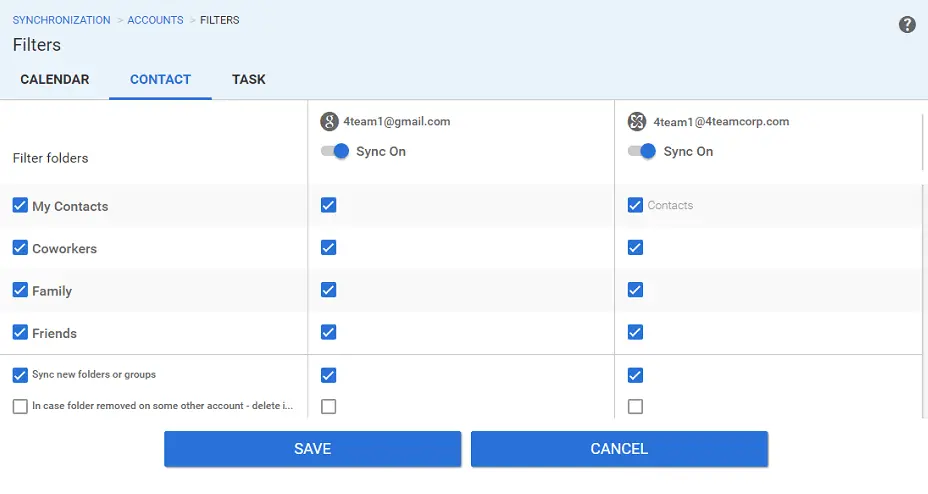
But for organizations that regularly collaborate with external partners, the challenge isn't syncing their own contacts. It's finding contacts they don't yet have: the right person at a partner company, a vendor's project manager, or a client's technical lead.
Without a shared directory, employees spend significant time calling, messaging through LinkedIn, or asking colleagues just to find someone's phone number or email address.
Mesh Topology Complexity
When organizations try to solve cross-company contact visibility through synchronization, they often end up creating a mesh architecture where multiple directories sync with each other. This approach has significant disadvantages as the number of partners grows.
Adding a tenth organization to a mesh topology requires nine new sync configurations, whereas a centralized model requires exactly one connection. Mesh architectures also introduce conflict resolution challenges, increased security exposure (more entry points for potential breaches), and higher maintenance costs.
AI and Agentic Workflow Considerations
As companies implement AI assistants and agentic workflows, they increasingly need contact data accessible to LLMs.
Building AI integrations across a group of companies with different identity tenants, for example, five companies with five different Entra ID or Google Workspace instances, becomes complex. Developers would need to connect to multiple APIs, handle multiple authentication methods, and merge multiple data formats.
Additionally, connecting AI directly to identity management systems like Entra ID or Google Workspace can expose sensitive permissions and access data. A dedicated contact directory that provides only the information AI agents need; names, titles, phone numbers, emails, creates a security boundary that follows the principle of least privilege.
These considerations have led many businesses with extensive external collaboration to explore purpose-built solutions for cross-organizational directory sharing.
Federated Directory: A Complementary Approach
Federated Directory addresses a different challenge than synchronization tools: enabling organizations to share their corporate directories with trusted external partners while maintaining full control over their own data.
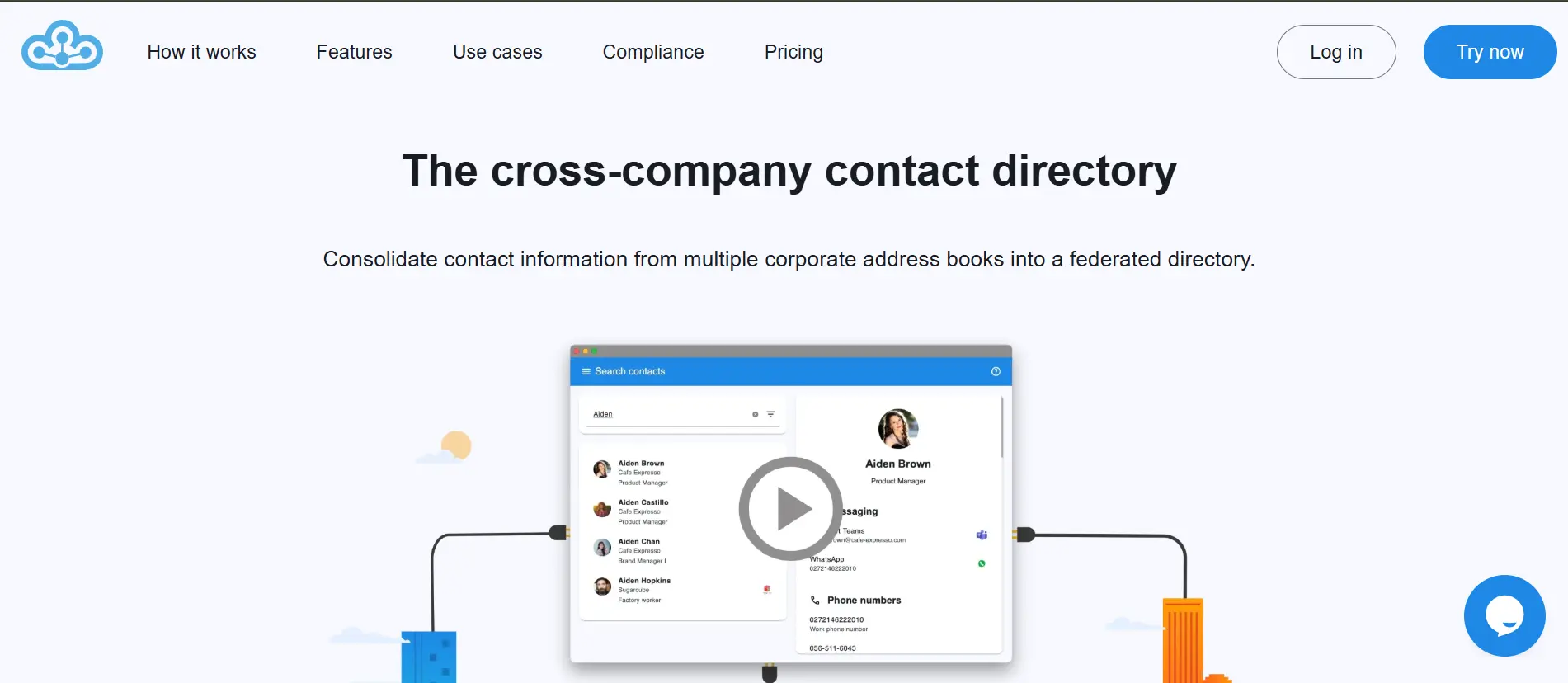
For businesses that find that synchronization tools don't address cross-company contact visibility, and struggle with manually maintained partner contact lists or time-consuming searches to find the right person at another organization, Federated Directory offers a solution built specifically for inter-company collaboration.
Founded by Fed Blokes, a European company, Federated Directory connects corporate address books across organizational boundaries.
It integrates with platforms like Google Workspace, Microsoft 365, Okta, and OneLogin, but serves a different purpose than synchronization: instead of syncing your own data across platforms, it shares your organization's directory with trusted partners and gives you access to theirs.
The platform takes a privacy-first approach where organizations stay in full control of which data they share. It acts as a buffer between organizations, as companies don't have to trust or ingest an external organization's entire Active Directory. They only access what the partner explicitly shares, and each company maintains complete control over their shared attributes.
Federated Directory Free Tier: $0/month for up to 20 users
| Feature | Details |
|---|---|
| Price | $0/month |
| Users | Up to 20 |
| Features | Full feature access |
| Integrations | Google Workspace, Microsoft 365, Okta, OneLogin, plus SCIM 2.0 API |
| Requirements | No commitment |
Unlike SyncGene's Free plan with its 500-contact and single-sync limitations, Federated Directory's free tier provides full feature access for small teams.
Twenty users is enough to pilot the service with a department or small business unit before expanding, particularly useful since the platform is designed for self-service deployment by IT teams without requiring sales engagement.
| Free Tier Pros | Free Tier Cons |
|---|---|
| ✅ Full feature access from day one | ❌ Limited to 20 users |
| ✅ No commitment to start | ❌ Value depends on partner adoption |
| ✅ Integrates with major identity providers | ❌ Requires partners to also use Federated Directory |
The Bottom Line 👉 The Free tier lets organizations test cross-company directory sharing without commitment before expanding.
Federated Directory Paid Tiers
| Users | Pricing |
|---|---|
| 1-20 | Free |
| 21+ | Contact Federated Directory for pricing |
Federated Directory offers tiered pricing for organizations exceeding 20 users.
Pricing is intentionally accessible, designed so that technical decision-makers can adopt it without requiring extensive budget justification, similar to how developers might add a subscription for a useful SaaS tool. All users receive full feature access regardless of tier.
| Paid Tiers Pros | Paid Tiers Cons |
|---|---|
| ✅ All features at every tier | ❌ Value requires partner adoption |
| ✅ Developer-friendly pricing model | ❌ Specific pricing requires inquiry |
| ✅ No feature differentiation by tier | ❌ Newer platform with growing market presence |
The Bottom Line 👉 Organizations interested in Federated Directory should take advantage of the free tier to evaluate the service, then contact the company for pricing on larger deployments.
Federated Directory Key Capabilities
Cross-Company Groups: Create trusted sharing relationships with partner organizations where each company maintains control over their own directory while granting specific access to partners.
Multi-Platform Integration: Connect Google Workspace, Microsoft 365, Okta, and OneLogin directories into a single searchable view. The platform also offers a fully SCIM 2.0 compliant API for custom integrations with other systems.
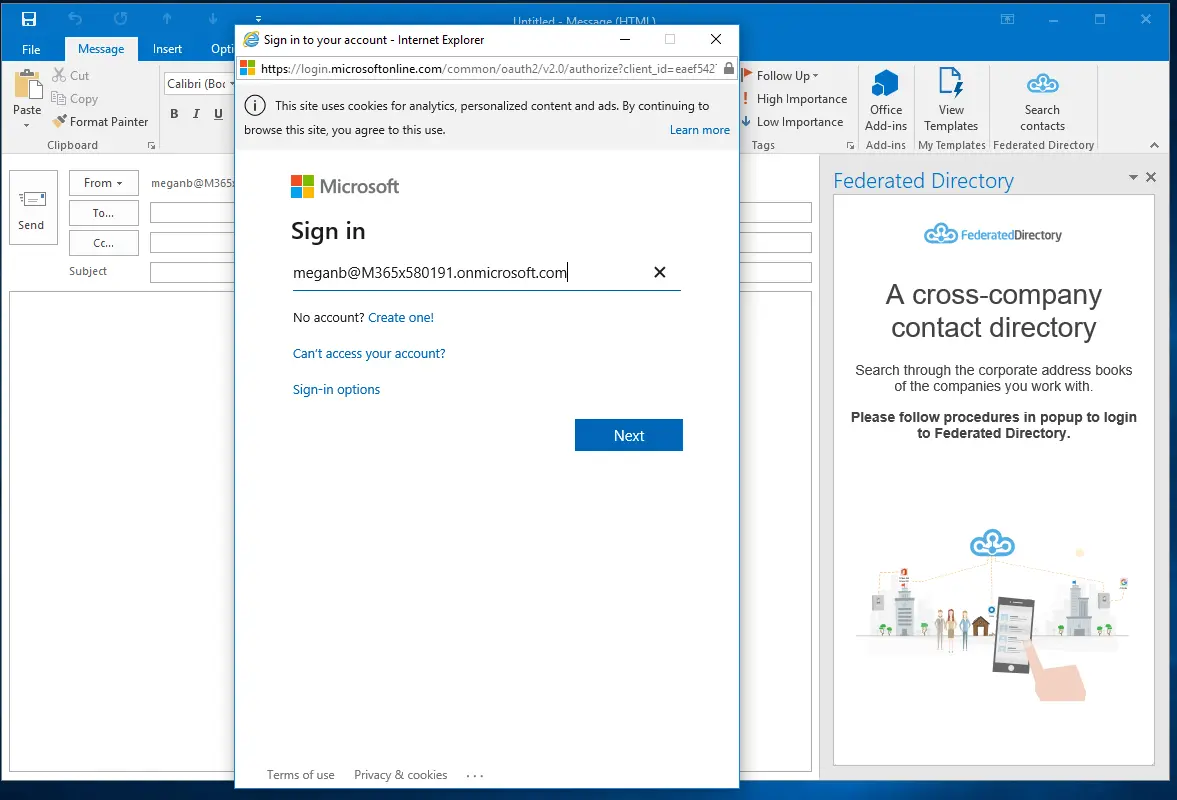
Access from Existing Workflows: Users access the shared directory through add-ins for Microsoft Outlook and Microsoft Teams; they don't need to learn a new tool or change their habits. The add-ins appear as a simple button in their existing applications, enabling users to search partner directories and initiate chats, calls, or emails directly.
Data Normalization: Federated Directory acts as a translation layer between disparate identity sources, mapping different source attributes into a unified schema. This means applications receive consistent information regardless of how each partner organization structures their directory data.
AI-Ready Architecture: For organizations building AI assistants or agentic workflows, Federated Directory provides a single, clean endpoint for querying contact data across all connected organizations.
This avoids the complexity of connecting to multiple identity provider APIs and creates a security boundary. AI agents query only contact data through a limited, purpose-built API rather than gaining broad access to identity management systems.
European Data Handling: As a European company, Federated Directory addresses compliance considerations that matter to European enterprises and government organizations increasingly concerned about data sovereignty.
Use Cases
The platform excels for franchises coordinating between franchisor and franchisees with decentralized IT.
It holds companies with multiple subsidiaries running different tech stacks (some on Microsoft, others on Google), companies undergoing mergers and acquisitions who need immediate collaboration while full IT integration happens in the background, and any business that frequently collaborates with external partners and needs to find the right contact quickly.
SyncGene Feature Value Breakdown (vs Federated Directory)
Use Case Alignment
SyncGene's Approach: SyncGene solves the "my data is scattered across platforms" problem. If you have contacts in Google, calendars in iCloud, and tasks in Microsoft 365, SyncGene keeps them synchronized. This is valuable for individuals managing multiple accounts and teams standardizing on a unified view of their own data.
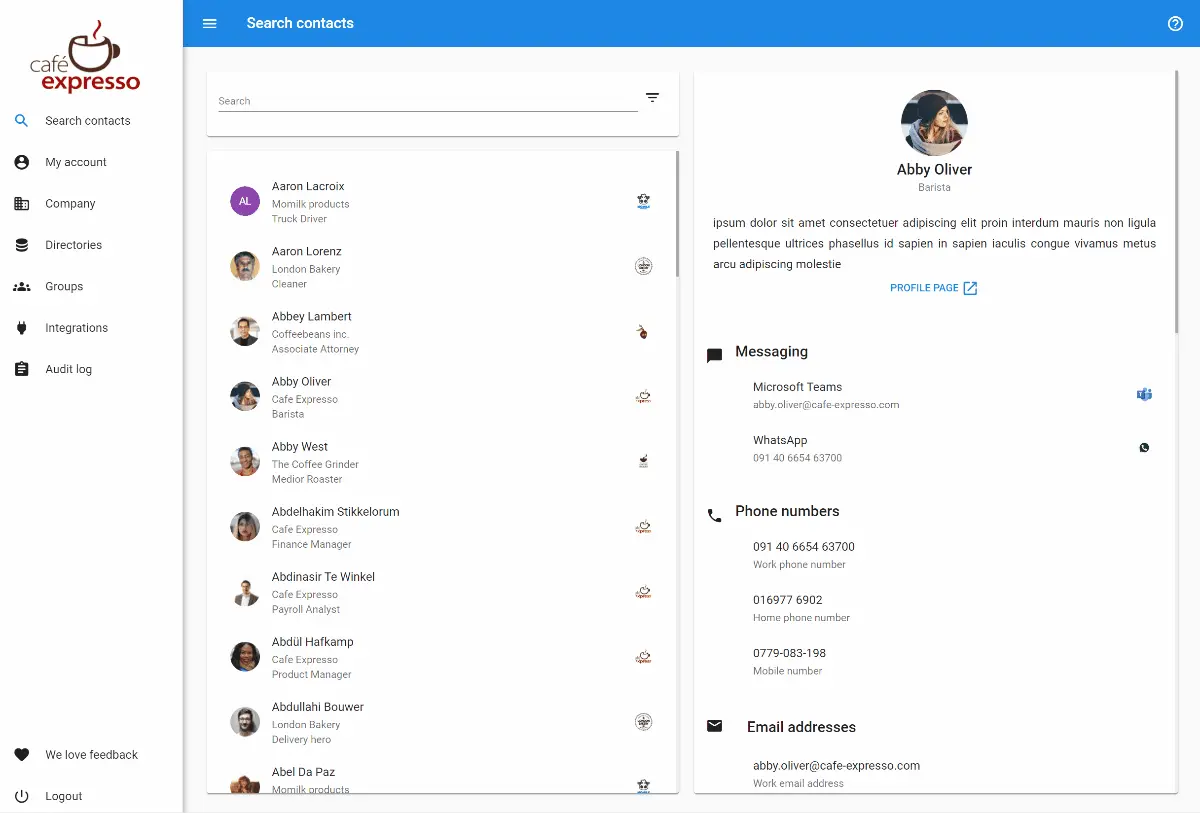
Federated Directory's Approach: Federated Directory solves the "I can't find contacts at partner companies" problem. If you frequently collaborate with external organizations and struggle to find the right person, Federated Directory creates a searchable directory spanning trusted partner companies. Each organization maintains control while sharing access.
🪙 Value Assessment: These are complementary use cases, not competing ones. Many organizations might benefit from SyncGene for internal data synchronization AND Federated Directory for cross-company contact discovery. The choice depends on which problem is more pressing for your organization.
Pricing Model Philosophy
SyncGene's Approach: SyncGene prices primarily by user tier with feature differentiation. Free users get limited contacts and manual sync; Premium users get unlimited contacts and auto-sync; Enterprise users get administration tools. The platform offers multiple price points from free to approximately $20/member for enterprise.
Federated Directory's Approach: Federated Directory offers a generous free tier (20 users with full features) and accessible pricing for larger organizations designed to be adoptable without extensive budget approval processes. Contact Federated Directory for specific pricing details beyond the free tier.
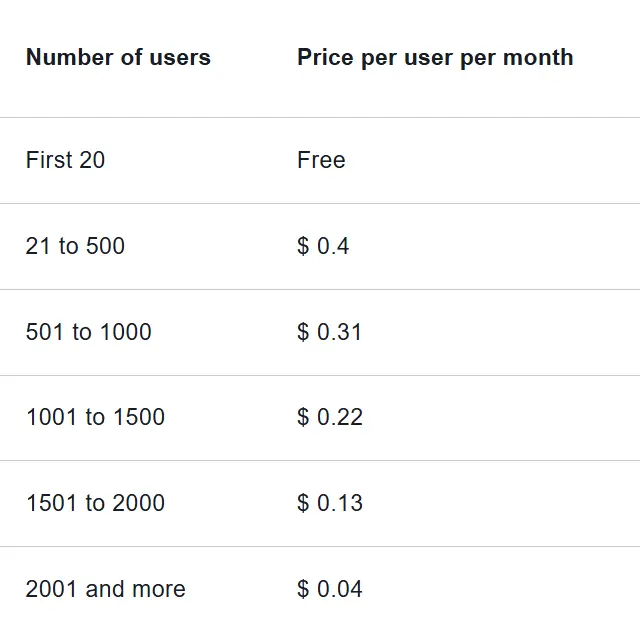
🪙 Value Assessment: SyncGene offers more gradual entry points for individuals, while Federated Directory's free tier is more generous for small organizations testing cross-company collaboration.
Collaboration Scope
SyncGene's Approach: Collaboration in SyncGene focuses on sharing calendars and contact lists with specific individuals through invitations or public links. Enterprise users can share with external parties through Contact List Sharing. This works well for coordinating schedules with family members, colleagues, or specific external contacts.
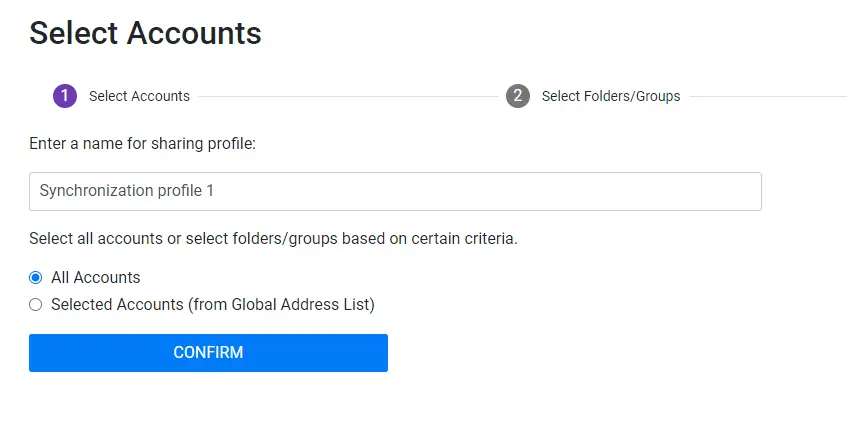
Federated Directory's Approach: Cross-organizational collaboration is the core purpose. Organizations establish trusted relationships, designate group owners from partner companies, and provide searchable access to their directories. Changes propagate automatically as employees join or leave organizations.
The focus is on discovery; helping employees find the right person at a partner company, rather than sharing specific contact lists.
🪙 Value Assessment: Organizations primarily needing internal sync and occasional external sharing may find SyncGene sufficient. Organizations with extensive external collaboration across multiple partners will find Federated Directory's approach more aligned with their workflow.
Platform Integration and AI Readiness
SyncGene's Approach: SyncGene integrates with Google, iCloud, Microsoft 365/Exchange, and Salesforce (Enterprise only). The integration focuses on pulling contact, calendar, and task data for synchronization. The service runs on Microsoft Azure and acts as an intermediary without storing user data.
Federated Directory's Approach: Federated Directory integrates with Google Workspace, Microsoft 365, Okta, and OneLogin through native connections, plus a SCIM 2.0 compliant API for other systems.
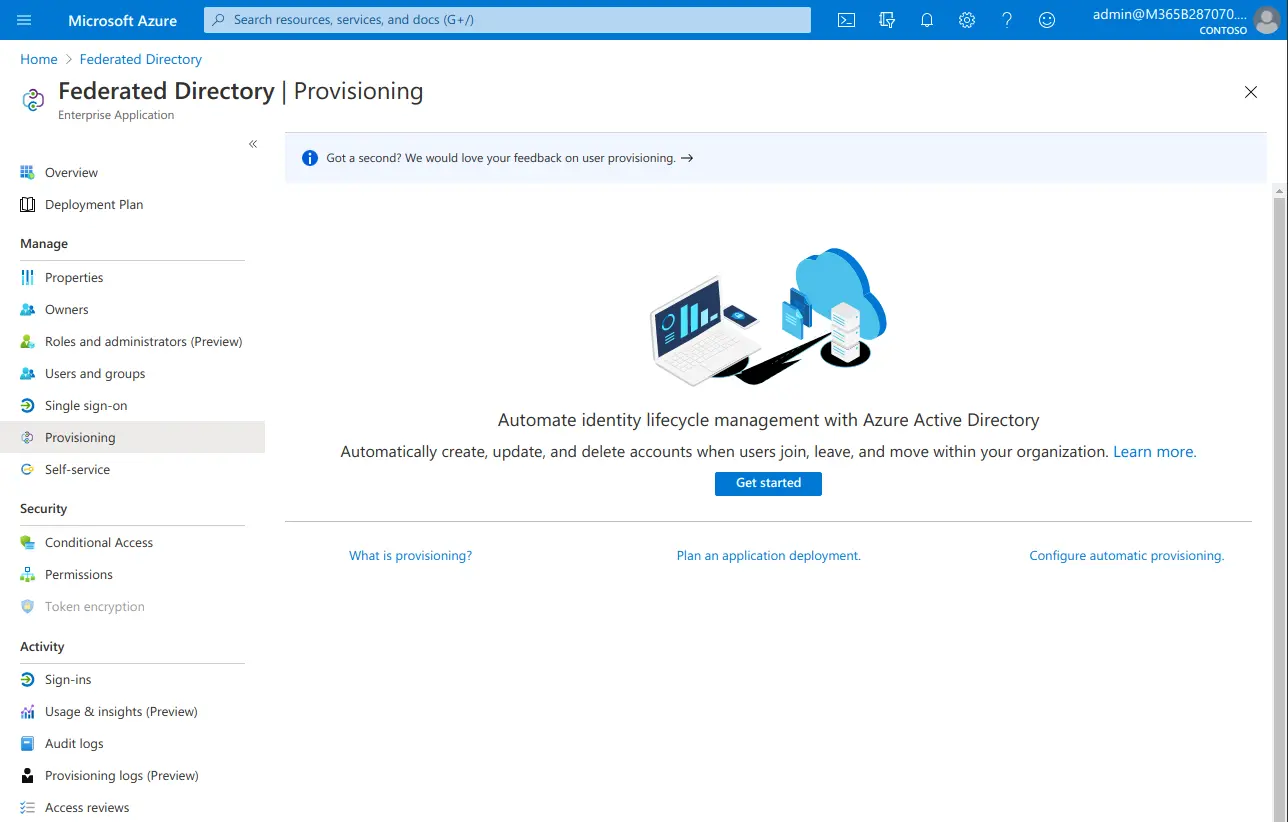
For organizations building AI integrations, the platform provides a single endpoint to query contact data across all connected organizations, avoiding the complexity of integrating with multiple identity providers while maintaining a security boundary that limits AI access to contact information only.
🪙 Value Assessment: Both platforms cover major ecosystems. SyncGene has Salesforce integration; Federated Directory has Okta and OneLogin for identity management plus purpose-built architecture for AI integrations. Choose based on which integrations and use cases matter for your specific needs.
Final Verdict: SyncGene vs Federated Directory
Rather than competing solutions, SyncGene and Federated Directory address different problems that often coexist in the same organization.
👍 SyncGene is a cross-platform synchronization service for individuals and teams who need their contacts, calendars, and tasks consistent across Google, iCloud, and Microsoft 365. With pricing from free to approximately $10/member/month for enterprise, it delivers automatic background synchronization that keeps your personal and professional data unified regardless of which device or platform you're using.
This synchronization-first approach fits professionals managing multiple accounts, teams standardizing on unified data access, and organizations that need Salesforce contact synchronization.
Get started with SyncGene here.
👉 Federated Directory is a cross-company directory service for organizations that collaborate extensively with external partners and need visibility into their contacts. With a free tier for up to 20 users and accessible pricing for larger organizations, it enables trusted directory sharing between organizations while each company maintains control over their own data.
This collaboration-first approach is essential for franchises coordinating across franchisees, holding companies with subsidiaries on different tech stacks, companies navigating mergers and acquisitions, and organizations building AI workflows that need access to contact data across multiple companies.
Ready to add cross-company contact sharing alongside your SyncGene setup?
Get started with Federated Directory — free for up to 20 usersThe difference is scope and purpose. SyncGene asks "How can I keep my data consistent across platforms?" while Federated Directory asks "How can I find and access contacts at partner organizations?"
For organizations with both challenges, these tools work alongside each other. SyncGene doesn't replace the need for cross-company directory sharing, and Federated Directory doesn't replace the need for personal data synchronization.
SyncGene Pricing FAQ
Is SyncGene free to use?
SyncGene offers a permanently free plan with significant limitations: 500 contacts maximum, 2 sources, and only 1 manual sync per 30 days. New accounts receive a 7-day trial of auto-sync. For meaningful synchronization needs, most users will require the Individual Premium plan at $15/month or $12.50/month with annual billing.
What's the difference between SyncGene Team and Enterprise?
Team Premium costs approximately $4.75/member/month (or approximately $3.73 annually) but is limited to 4 members maximum. Enterprise Monthly costs approximately $10/member/month with no member limit and adds centralized administration, Salesforce integration, shared contact list management, and a dedicated account manager.
The price increase reflects substantial feature additions for organizational deployment.
Does SyncGene offer a free trial?
SyncGene's free plan serves as an unlimited-time trial with restricted features. New free accounts also receive a 7-day trial of auto-sync functionality. Additionally, all paid plans include a 14-day money-back guarantee (excluding special offers).
How does SyncGene compare to Federated Directory for business use?
These tools serve complementary purposes. SyncGene helps businesses sync employee data across platforms (Google, iCloud, Microsoft 365); it's about keeping your own data consistent. Federated Directory helps businesses share directory access with external partner organizations; it's about discovering and accessing contacts at other companies.
If your challenge is internal data consistency, SyncGene fits. If your challenge is finding contacts at partner companies or providing AI agents with cross-organizational contact data, Federated Directory addresses that need. Many organizations benefit from both.
What happens to SyncGene after the CiraHub merger?
SyncGene was acquired by Cira Apps Limited in 2022 and is merging with CiraHub, which is described as a "new and enhanced syncing service" with advanced multi-way sync and better enterprise customization. Existing users should monitor communications about the transition timeline and feature changes.
Can I use both SyncGene and Federated Directory?
Yes. Since they solve different problems, organizations with both internal synchronization needs and external collaboration requirements might benefit from using SyncGene for keeping individual user data consistent across platforms while using Federated Directory for cross-company contact discovery.
Federated Directory is explicitly positioned as complementary to existing identity and synchronization solutions. It sits alongside platforms like SyncGene, Okta, or Entra ID rather than replacing them.
Is Federated Directory suitable for AI integrations?
Federated Directory offers a SCIM 2.0 compliant API that provides a single endpoint for querying contact data across all connected organizations.
For organizations building AI assistants or agentic workflows, this architecture offers advantages: developers don't need to integrate with multiple identity provider APIs, and the platform creates a security boundary where AI agents access only contact information rather than gaining broad permissions to identity management systems.
