SyncGene Review 2026: Is This Synchronization Service Right for You?
SyncGene has established itself as a popular solution for keeping contacts, calendars, and tasks consistent across multiple devices and platforms. For professionals juggling an iPhone, a work laptop with Outlook, and a personal Android tablet, it promises to eliminate the chaos of fragmented information by automatically syncing everything in the background. But as businesses grow and collaboration extends beyond internal teams to external partners, a question emerges: what happens when you need to share contact information with other companies?
To create this SyncGene review, I've analyzed the platform extensively. I believe it's the ideal choice if:
- You need to sync contacts, calendars, and tasks across multiple personal devices
- You use a mix of Google, iCloud, and Microsoft 365 accounts
- You want automatic background synchronization without manual exports
- You value a cloud-based solution that requires no software installation
- You need a simple way to keep personal and work calendars unified
SyncGene excels at personal and internal organizational synchronization, including GAL sync between tenants.
But for organizations that also need to connect employee directories across separate companies — such as holding companies with subsidiaries or businesses with external partners — Federated Directory serves as a complementary solution that addresses this adjacent need. Rather than replacing your sync infrastructure, it adds cross-company directory federation on top of whatever identity systems you already use.
If cross-company contact discovery is also on your requirements list, you can explore Federated Directory's free plan here.
Table of Contents
- What is SyncGene?
- SyncGene Pros & Cons
- SyncGene Review: How it Works & Key Features
- Beyond Internal Sync: Cross-Company Collaboration
- A Complementary Solution: Federated Directory
- SyncGene and Federated Directory: Different Tools for Different Needs
- Final Verdict
What is SyncGene?
SyncGene is a cloud-based synchronization service designed to unify a user's contacts, calendars, and tasks across multiple devices, platforms, and accounts.
Launched in 2016 by 4Team Corporation, a Microsoft Gold Certified Partner with experience developing synchronization tools since 1999, SyncGene helps address the problem of fragmented personal and professional data scattered across different cloud services.
In June 2022, Cira Apps Limited, a SaaS company focused on Office 365 productivity solutions, acquired the SyncGene platform. Following the acquisition, SyncGene continues to operate under its own name while benefiting from Cira Apps' resources and expertise in enterprise synchronization.
The platform acts as a bridge between various ecosystems like Google, iCloud, and Microsoft 365/Exchange, ensuring that information stays consistent and up-to-date everywhere. Users can access SyncGene through a web application and mobile apps for iOS and Android, eliminating the need for software installation on computers.
SyncGene serves both individual users who need to keep personal devices in sync and businesses looking for centralized management of employee synchronization. The ideal customer is anyone who uses multiple devices and platforms for personal or professional purposes and wants a unified view of their contacts, calendars, and tasks without manual data entry.
SyncGene Pros & Cons
| Pros | Cons |
|---|---|
| ✅ Cross-platform support for Google, iCloud, Microsoft 365/Exchange | ❌ Some users find the interface less modern than competitors |
| ✅ Automatic background synchronization (Premium plans) | ❌ Sync settings may not offer the granularity some power users prefer |
| ✅ No desktop software installation required (web-based with optional mobile apps) | ❌ Free plan restricted to 500 contacts and 1 manual sync/month |
| ✅ Duplicate entry prevention when merging data | ❌ Synchronization runs on a scheduled basis rather than in real-time |
| ✅ Data not stored on SyncGene servers (privacy-focused) | ❌ Premium pricing may feel high for users with basic personal needs |
| ✅ Enterprise plan with centralized administration |
SyncGene Review: How it Works & Key Features
Synchronization Engine: The core of SyncGene's value proposition.
SyncGene's synchronization functionality is designed around a straightforward workflow.
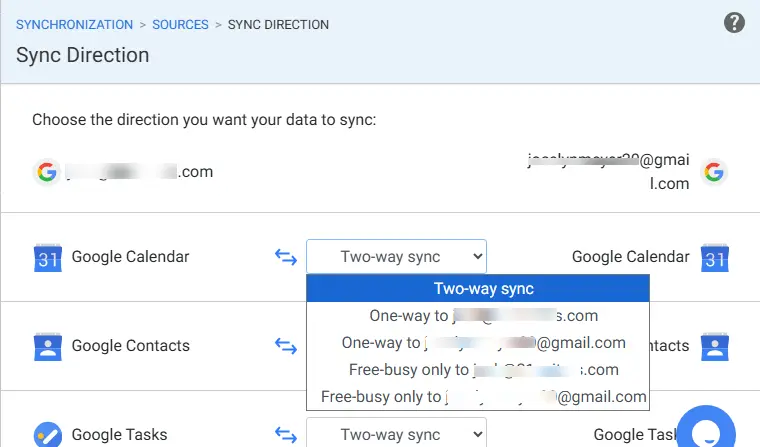
Users add their accounts (called "sources") from platforms like Google, iCloud, Office 365, or Microsoft Exchange. The service then allows them to select which data types to synchronize (contacts, calendars, or tasks) and configure the direction of data flow.
The platform supports both one-way and two-way synchronization. Two-way sync ensures that changes made in one connected source are automatically reflected in all other linked sources. One-way sync allows data to flow from a designated source to a destination without changes in the destination affecting the source.
For calendars, there's also a "Free-Busy" option that shares only availability information without revealing appointment details.
Once configured, SyncGene runs scheduled synchronization for Premium users, checking connected sources every 30 minutes and updating all linked accounts automatically. The initial synchronization can take anywhere from a few minutes to over an hour depending on data volume, but subsequent updates happen without user intervention.
The free plan limits users to 2 sources, 500 contacts, and one manual sync per 30 days. Premium plans unlock unlimited contacts, up to 5 sources, and automatic synchronization.
Calendar Sharing: Enabling schedule visibility across platforms.
SyncGene allows users to share their calendars with others, regardless of which platform the recipient uses. A Google Calendar user can share their schedule with an iCloud user, and both parties can view (and potentially edit) the calendar from their native applications.
The sharing process works through two mechanisms. Users can generate a public link that grants "View only" access to anyone with the link. For more comprehensive permissions, including edit rights, SyncGene uses an email-based invitation system. The owner enters the recipient's email address, sets the permission level (Owner, Edit, View only, or Free/Busy), and sends an invitation.
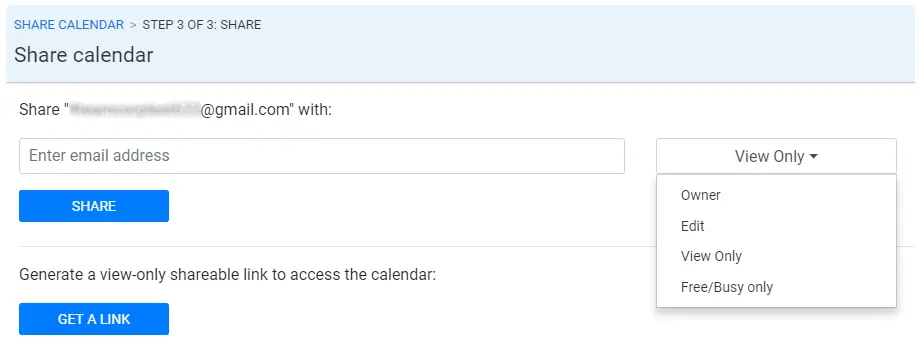
Permission levels provide granular control over shared calendar access. "Owner" grants full control, "Edit" allows modifications, "View only" permits viewing without changes, and "Free/Busy" shows availability without revealing appointment details.
This flexibility makes SyncGene useful for coordinating schedules among family members, small teams, or collaborators on different platforms.
Data Transfer: Migrating information between platforms.
Beyond ongoing synchronization, SyncGene serves as a data transfer tool for migrating contacts, calendars, and tasks between platforms. This is particularly valuable when switching devices, moving from one ecosystem to another (such as from Google to Microsoft), or consolidating information from multiple accounts.
The transfer process eliminates the traditional workflow of exporting data to files (CSV, vCard) and importing them elsewhere. Users simply add both the source and destination accounts to SyncGene, configure the synchronization direction, and initiate the transfer. The platform handles the rest, including duplicate prevention when merging information from multiple sources.
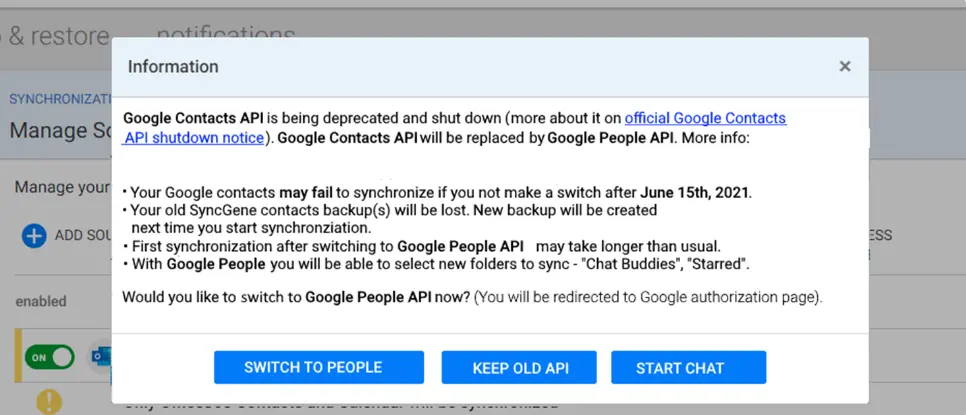
For businesses, the Enterprise plan enables large-scale migrations across multiple user accounts. IT administrators can transfer data for entire organizations during platform transitions (such as moving from Google Workspace to Microsoft 365) through a centralized administration panel.
Pricing Structure: Tiered plans for individuals, teams, and enterprises.
SyncGene offers multiple subscription tiers designed to accommodate different user needs, from individuals to large enterprises:
Free Plan:
- 1 manual sync per 30 days
- Up to 2 sources
- 500 contacts maximum
- Share 1 calendar
- No automatic synchronization
Premium (Individual):
- Available in monthly or yearly billing options
- Unlimited manual syncs
- Up to 5 sources
- Unlimited contacts
- Automatic background synchronization
- Public sharing links
Team Premium:
- All Individual Premium features
- Up to 4 team members
- Up to 20 sources total for the team
- Single consolidated billing
Enterprise:
- Recommended for 5 to 100+ members
- Centralized administration and billing
- Contact list sharing within the organization
- Salesforce contact synchronization
- Dedicated account manager
- Custom pricing available for larger deployments
GAL Sync (via Cira Apps):
- Global Address List synchronization for Office 365 and Google Workspace
- Multi-tenant support
- Two-way GAL sync available as an add-on
All paid plans include a 14-day money-back guarantee.
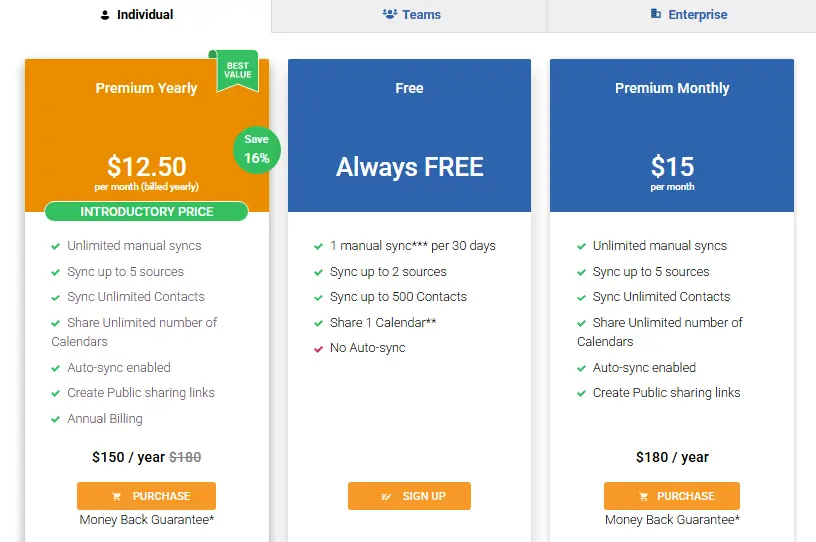
Note: SyncGene is currently transitioning to CiraHub, an enhanced syncing service. Visit SyncGene's pricing page for the most current rates and plan details.
Beyond Internal Sync: Cross-Company Collaboration
SyncGene does what it's designed to do well: keeping your data synchronized across your own accounts and devices. It can even sync GALs between tenants and platforms within your organization. However, some organizations face a related but distinct challenge that falls outside the scope of personal synchronization tools.
The cross-company contact discovery problem: When employees need to find and contact people at partner organizations, clients, or suppliers, they often lack a systematic way to do so. The result is inefficient workflows — calling colleagues, searching LinkedIn, or sending "who handles X at Company Y?" emails — just to find basic contact information.
This isn't a shortcoming of SyncGene; it's simply a different problem. SyncGene synchronizes your data across your platforms. Cross-company directory federation connects separate organizations' address books so employees can discover contacts in partner companies through a unified search.
Organizations commonly face this challenge in scenarios like:
- Holding companies managing multiple subsidiaries with decentralized IT (some on Microsoft, others on Google)
- Franchise networks where franchisees and corporate need to communicate
- Mergers and acquisitions where full IT integration takes months or years
- Project-based collaborations with long-term external partners
- Enterprises implementing AI workflows that need to query contact data across organizational boundaries
For organizations that need both internal device synchronization and cross-company contact access, these represent two different layers of the contact management stack, and they require different tools.
A Complementary Solution: Federated Directory
Federated Directory addresses the cross-company discovery problem specifically.
Developed by Fed Blokes, a European company based in the Netherlands, it's a cloud-based service that connects corporate address books between trusted organizations, creating a unified, searchable contact directory that spans company boundaries.
Rather than replacing identity solutions or synchronization tools, Federated Directory sits alongside your existing infrastructure. Organizations already using SyncGene for internal sync, Okta for identity management, or Microsoft Entra ID for authentication can add Federated Directory to enable cross-company contact discovery without changing their existing setup.
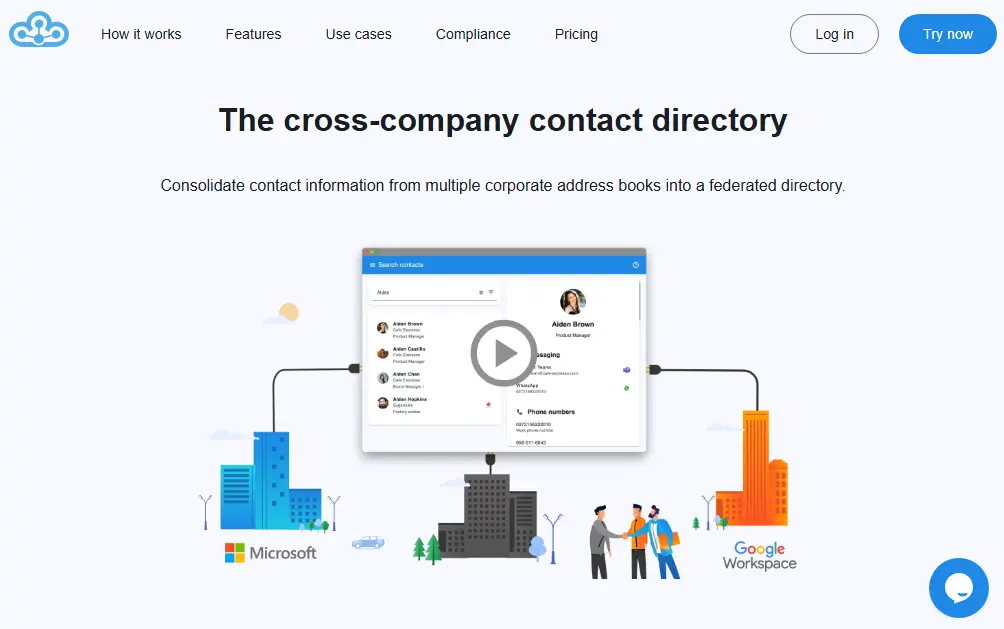
Directory Federation: Connecting separate organizations into a unified directory.
The core concept of Federated Directory is straightforward: each company maintains control over its own address book while granting specific access to trusted partners. Instead of exchanging and updating contact lists manually, the system automatically keeps information current across all connected organizations.
When an employee at Company A needs to find someone at Company B, they simply search the federated directory rather than requesting contact information or hunting through outdated spreadsheets. The search results include contacts from all trusted partner organizations, with advanced filtering to narrow down results.
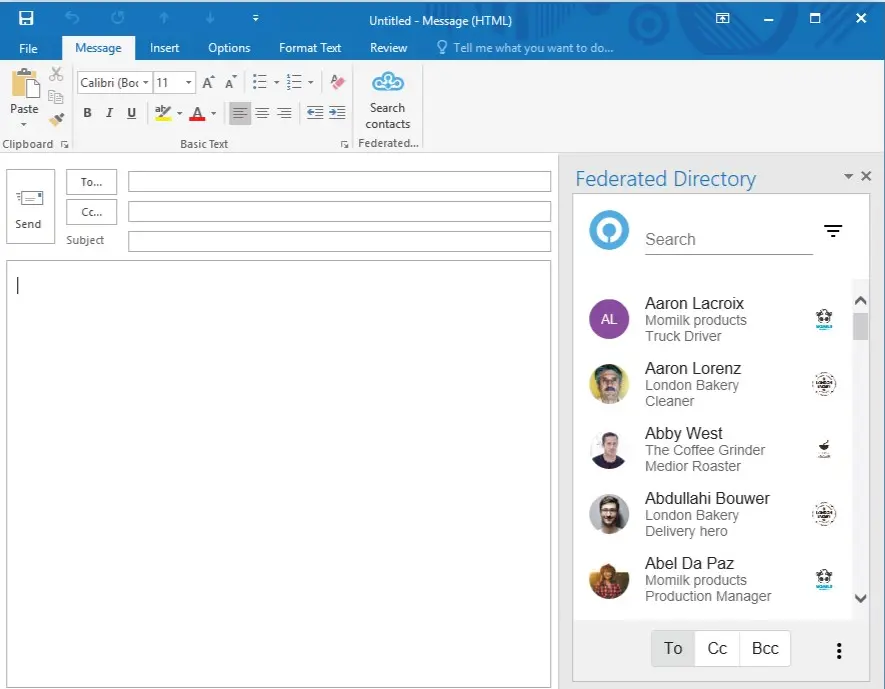
This federation model works bidirectionally: Company A's employees can find Company B contacts, and Company B's employees can find Company A contacts. The shared directory stays current because it pulls directly from each organization's authoritative source system.
Trust-Based Sharing: Controlled access through invitation and permissions.
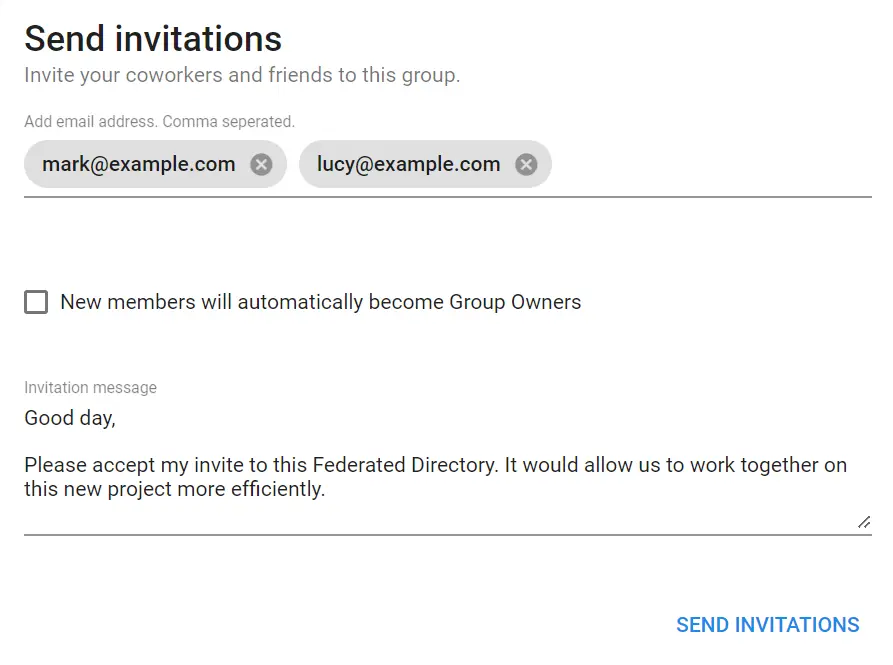
Federated Directory uses a group-based model for establishing trust between organizations. An administrator creates a cross-company group, adds their own users to it, and then invites users from partner companies to join.
This invitation-based approach ensures sharing arrangements are intentional. Administrators can designate "group owners" from partner organizations, allowing them to add additional users from their own company without requiring intervention from the original administrator. This delegation streamlines expanding the federated network while maintaining control.
Each organization retains full control over its own data; companies decide which users and what contact information to share with each partner. This "clean room" approach means you don't have to trust the data quality of an external organization's entire Active Directory — you only ingest what the partner explicitly shares.
Platform Integration: Working with existing directory systems.
Federated Directory integrates with major corporate directory and identity management platforms via its native connectors: Microsoft Entra ID (formerly Azure AD), Google Workspace, Okta, and OneLogin. This allows organizations to synchronize their existing user data into Federated Directory without manual uploads or duplicate data entry.
Integration supports Single Sign-On (SSO), so users access the federated directory with existing corporate credentials. When an employee is added or updated in the source directory, changes are automatically reflected in Federated Directory.
For end users, the key adoption advantage is that Federated Directory integrates into existing workflows. Rather than learning a new application, users access the federated directory through add-ins for Microsoft Outlook and Microsoft Teams (including mobile clients). IT deploys it, and users see an extra button in their existing tools to search across all connected partner companies' address books.
Developer Capabilities: SCIM API and AI Integration.
For technical teams, Federated Directory provides a fully SCIM 2.0 compliant API for custom integrations. This open standard enables automated user provisioning and programmatic access to the federated directory.
The platform also offers a Model Context Protocol (MCP) endpoint for AI integration, allowing LLMs and agentic workflows to query contact data. This positions Federated Directory as a safe data layer for AI implementations — it provides only contact information to AI systems while keeping sensitive identity data protected in your core identity provider.
Organizations can query "Who is the manager of this person?" or "Give me the phone number of X at Company Y" without giving AI agents broad access to Entra ID or other identity systems.
For organizations with multiple companies using different identity tenants, this single endpoint approach simplifies AI integration considerably. Instead of connecting to multiple APIs with multiple authentication methods, AI agents can query contact data across all connected organizations through one clean interface.
European Data Residency and Compliance.
As a European company, Federated Directorystores all data in European data centers. For organizations subject to European data protection requirements or those moving toward sovereign cloud solutions, this provides a compliant option for cross-company contact sharing that doesn't require US-based infrastructure.
Pricing: Volume-based model with a free tier.
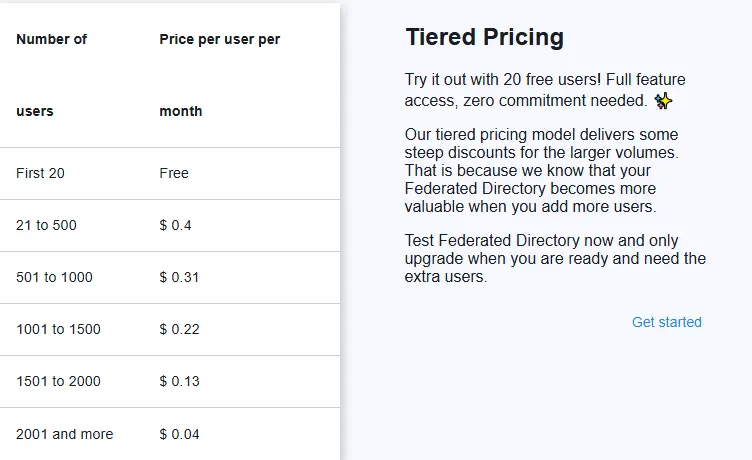
Federated Directory uses a volume-based pricing model:
Free Tier:
Paid Tiers:
- Pricing is tiered based on user count, with per-user costs decreasing as organization size increases
- Contact Federated Directory directly for current pricing details
The pricing is positioned to be accessible enough that developers or technical decision-makers can adopt it without extensive budget approval processes.
SyncGene and Federated Directory: Different Tools for Different Needs
| Aspect | SyncGene | Federated Directory |
|---|---|---|
| Primary Function | Sync personal data across your own devices/accounts | Connect corporate directories across organizations |
| Scope | Individual and internal organizational sync | Cross-company directory sharing |
| Target Problem | Fragmented contacts/calendars across platforms | Finding contacts in partner companies |
| Data Direction | Between your own accounts (one user, many platforms) | Between separate organizations (many users, trusted partners) |
| Integration Level | Individual account connections | Organization-wide directory federation |
| User Experience | Unified view of your own data | Searchable directory of partner organization contacts |
| Platform Support | Google, iCloud, Microsoft 365/Exchange | Microsoft Entra ID, Google Workspace, Okta, OneLogin |
| Access Method | Web app, iOS/Android apps | Web app, Outlook/Teams add-ins (including mobile) |
| API/Developer Features | Sync configuration | SCIM 2.0 API, MCP endpoint for AI |
| Free Tier | 500 contacts, 2 sources, 1 sync/month | 20 users, full features |
| Best For | Keeping your devices in sync | Collaborating with external partners |
| Relationship | Core sync infrastructure | Complementary layer for cross-company needs |
Final Verdict
SyncGene and Federated Directory address different layers of the contact management challenge — they complement rather than compete with each other.
Use SyncGene to keep your personal contacts, calendars, and tasks consistent across multiple devices and platforms.
It handles the complexity of multi-platform synchronization, working in the background to keep everything up-to-date. For individuals managing multiple accounts and businesses wanting to standardize employee device sync, SyncGene provides automatic synchronization on premium plans. Its GAL sync capabilities also make it useful for keeping contact data consistent across tenants within your organization.
Get started with SyncGene here.
Add Federated Directory if your organization also needs cross-company contact discovery.
It's designed for scenarios where employees regularly need to find and contact people at partner organizations, subsidiaries, or external collaborators. By federating corporate directories, it provides searchable access to current partner contact information without the administrative burden of maintaining separate lists or giving partners accounts in your identity system.
For organizations implementing AI workflows, the SCIM API and MCP endpoint provide a secure way to make contact data available to AI agents without exposing sensitive identity infrastructure.
For many organizations, the answer isn't choosing one over the other. SyncGene keeps individual employees' devices in sync with their company accounts, while Federated Directory provides the layer that enables discovering and accessing contacts in trusted partner organizations. Together, they address both internal synchronization and external collaboration needs.
Get started with Federated Directory here.
Ready to add cross-company contact discovery on top of your existing sync setup?
Get started with Federated Directory — free up to 20 users